web
You’re offline. This is a read only version of the page.
close
Skip to main content

Notifications

Announcements

No record found.

Community site session details

Community site session details

Session Id :
Supply chain | Supply Chain Management, Commerce
Unanswered

Hazardous Materials: Shipper's Declaration

(0) ShareShare
ReportReport
Posted on by 53

We implemented D365 earlier this year without enabling the Hazardous Materials features. 

I've started working on enabling this feature and I am running into an issue with the Shipper's Declaration not updating according to the Regulation that was set for the shipment. 

Per the Warehouse Management Report Setup (screenshot below), the Regulation Code to be used is TDG

pastedimage1655411475931v1.png

The setup of the Regulation is as below

pastedimage1655411644218v3.png

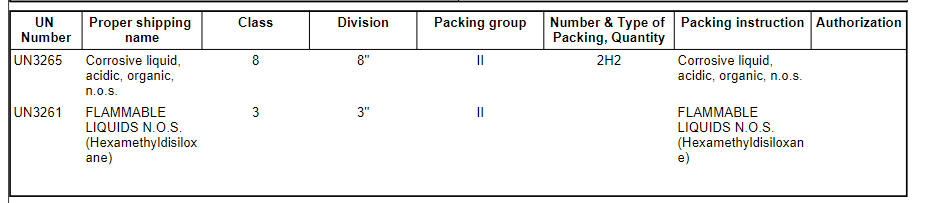
And the actual output on the Shipper's Declaration is this:
pastedimage1655411581376v2.png

I have a few questions; 

  1. The fields showing in this print setup are not correctly reflecting the Regulation setup. Have I missed a step in the setup?
  2. "Quantity" is listed in Header of the Shipper's Declaration table, but the quantity is not listed. Any idea why? 

  3. When I try to view the Hazardous Material Documents from the Load->Ship and Receive menu I get the following error:
    pastedimage1655412101726v5.png
    pastedimage1655412041902v4.png
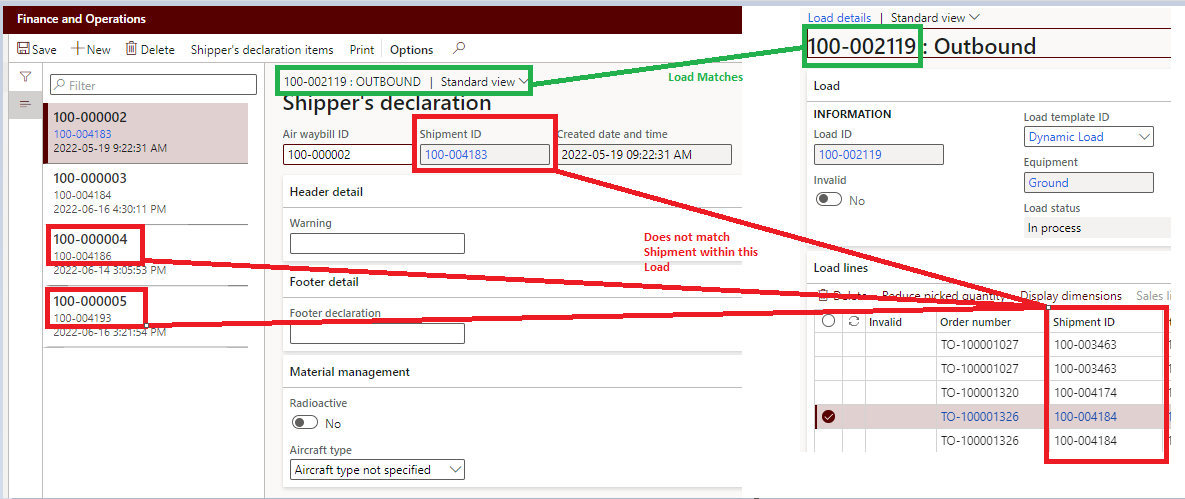
    and when I try to access it from the Load->Transportation menu it directs me to a form with a filter not working.
    pastedimage1655412587064v7.png
    Is this a known issue? I couldn't find any posts regarding this topic. 
  4. In the below screenshot two lines show for UN3265; both of these lines were generated by the different TO lines for the same item number. Presumably, if "Quantity" were working, the quantities would be separated per line. Is there a setting to aggregate them?  
    pastedimage1655413013485v8.png

Hope you can help me out.  

Thanks! 

-Clem

I have the same question (0)
  • nunomaia Profile Picture
    25 Moderator on at

    Setup will only be applicable to documents posted after setup.

    For example quantity in report is only calculated if hazardous setup was already enabled ( enable feature in feature management ) .

    After hazardous is enabled in fearture management, you get in quantity field, 3 numeric values ( load quantity, etc).

    Values are not grouped by code.  

  • The.Clem Profile Picture
    53 on at

    Thanks for the reply Nuno.

    I should have mentioned, this is testing in a sandbox environment where the "Hazardous materials product information and shipping documentation" was turned on already.

    The "Hazardous materials enhancements" is not turned on, but what I'm looking for is not covered by the additional feature.

    pastedimage1655472599487v1.png

    Do you have any other suggestions? 

    -Clem

  • nunomaia Profile Picture
    25 Moderator on at

    It i'm not in mistake you need to enable both features to get quantity in report 

  • The.Clem Profile Picture
    53 on at

    Hi Nuno! 

    Thanks again for replying. 

    The Enhancements feature is still in the Preview status. I will check with my seniors to see if we are willing to enable it in this our environment. 

    pastedimage1656011538958v1.png

    -Clem

Under review

Thank you for your reply! To ensure a great experience for everyone, your content is awaiting approval by our Community Managers. Please check back later.

Helpful resources

Quick Links

Responsible AI policies

As AI tools become more common, we’re introducing a Responsible AI Use…

Neeraj Kumar – Community Spotlight

We are honored to recognize Neeraj Kumar as our Community Spotlight honoree for…

Leaderboard > Supply chain | Supply Chain Management, Commerce

#1
Siv Sagar Profile Picture

Siv Sagar 283 Super User 2025 Season 2

#2
Laurens vd Tang Profile Picture

Laurens vd Tang 213 Super User 2025 Season 2

#3
André Arnaud de Calavon Profile Picture

André Arnaud de Cal... 152 Super User 2025 Season 2

Last 30 days Overall leaderboard

Featured topics

Product updates

Dynamics 365 release plans

