web
You’re offline. This is a read only version of the page.
close
Skip to main content

Notifications

Announcements

No record found.

Community site session details

Community site session details

Session Id :
Small and medium business | Business Central, N...
Suggested Answer

Working on Time Sheets

(0) ShareShare
ReportReport
Posted on by

Hey guys,

first of all I created a new job.

To this job I assigned a few lines and these lines got again so called job planning lines.

In the job planning lines, I assigned some employees as resources.

In that line I could only specify one day for the planning date, but no a period...

If I only enter a day there, I can only get that day in the time sheet.
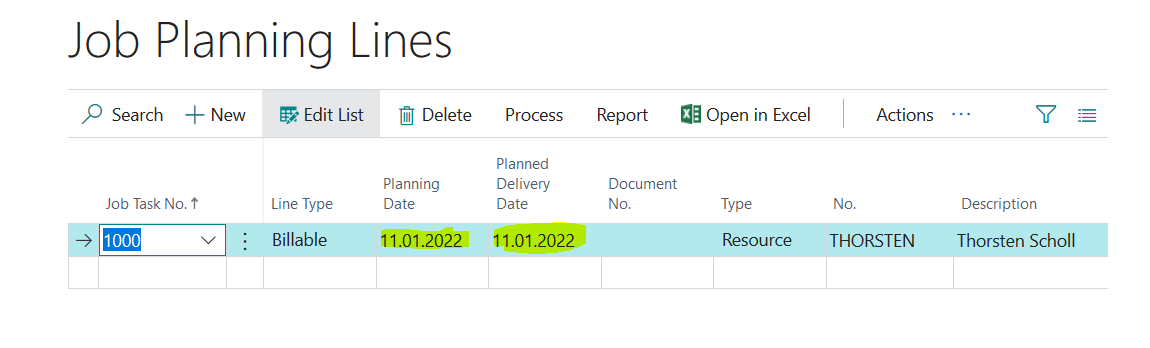
5557.Job.PNG

However, if I want to create a time sheet for every week and always want to post something on this one job planning line, this is not possible because the date from the job planning line does not match the current date /date period in the time sheet.

How do I handle this? Can I somehow set the planning lines a period for the entire project or should I do this on the project card?

Thank you ;)

I have the same question (0)
  • Suggested answer
    TWBlaisdell Profile Picture
    on at

    Hello,

    Thank you for posting on the Microsoft Dynamics Business Central Forum Page.

    I would possibly begin with the following documentation for guidance:

    https://docs.microsoft.com/en-us/dynamics-nav-app/projects-how-use-resources

    https://docs.microsoft.com/en-us/dynamics-nav-app/projects-how-use-time-sheets

    https://docs.microsoft.com/en-us/dynamics-nav-app/projects-how-manage-budgets

    To properly manage the Resource time availability, you would want to enter Planning Dates for multiple dates if the Resource is working on the Job Site for a longer period of time.  This will make sure that the Resource Card will properly reflect the correct Resource Availability, as well.

    These are just some thoughts on best practices.

    Best Regards,
    Tom

  • Community Member Profile Picture
    on at

    All right, so suppose I have a resource and a project. The project has a duration of one year. The project is then divided into several job task lines. Now I want to assign my resource to one of these job task lines. So I create the job planning line for the first day of that year. Do I have to manually enter every single working day of the year for the resource here in the Job Planning Lines, so that I can later get the resource in the time sheets? The resource should create such a time sheet every week during the project. So that I can better control the effort.

  • TWBlaisdell Profile Picture
    on at

    Hi Malue 1991,

    I understand and get it! :-)  However, I highly recommend an Idea submission and invite your colleagues and friends to vote for it!

    https://experience.dynamics.com/ideas/categories/?forum=e288ef32-82ed-e611-8101-5065f38b21f1&forumName=Dynamics%20365%20Business%20Central

    Unfortunately, I don't have a "magic bullet fix" or process for you on this one.

    Best Regards,

    Tom

  • Anita75 Profile Picture
    1,165 on at

    I've been having the same issue as you are and I think the design here is not the best as we cannot enter a duration for planning lines, which is a basic principle in project planning such as MS Project.  Curious to know why this wasn't considered

  • Community Member Profile Picture
    on at

    Ok, so an Idea submission could be a solution ;)

  • Community Member Profile Picture
    on at

    @Anita75 And how do you deal with it? Do you have a strategy on how to allocate resources?

Under review

Thank you for your reply! To ensure a great experience for everyone, your content is awaiting approval by our Community Managers. Please check back later.

Helpful resources

Quick Links

Responsible AI policies

As AI tools become more common, we’re introducing a Responsible AI Use…

Neeraj Kumar – Community Spotlight

We are honored to recognize Neeraj Kumar as our Community Spotlight honoree for…

Leaderboard > Small and medium business | Business Central, NAV, RMS

#1
OussamaSabbouh Profile Picture

OussamaSabbouh 2,066

#2
YUN ZHU Profile Picture

YUN ZHU 658 Super User 2025 Season 2

#3
Sumit Singh Profile Picture

Sumit Singh 595

Last 30 days Overall leaderboard

Featured topics

Product updates

Dynamics 365 release plans
