web
You’re offline. This is a read only version of the page.
close
Skip to main content

Notifications

Announcements

No record found.

Community site session details

Community site session details

Session Id :
Customer experience | Sales, Customer Insights,...
Answered

Email Router installation for Microsoft Dynamics 365(2016) is failing because of Windows Live ID Sign In Assistant

(0) ShareShare
ReportReport
Posted on by 139

Hello all, 

I am struggling to get the email router installed on VM for my work. I am using the CRM2016-Router exe. Not sure why the tool isnt able to install from online, but I have found where others have put these msi files locally to where the email router installation pick it up to run it. It keeps looking online in the logs.

On one server where the ER doesnt exist, I get stuck here: 
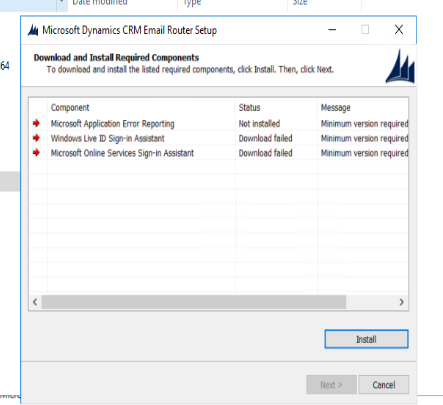
pastedimage1605144977175v1.png

 On another server where MS Dynamics 2015 ER exists, I tried running the 2016 exe in hopes that that server would have the necessary components. It looks like I am still missing the Windows Live ID Sign In Assistant: pastedimage1605145232749v2.png
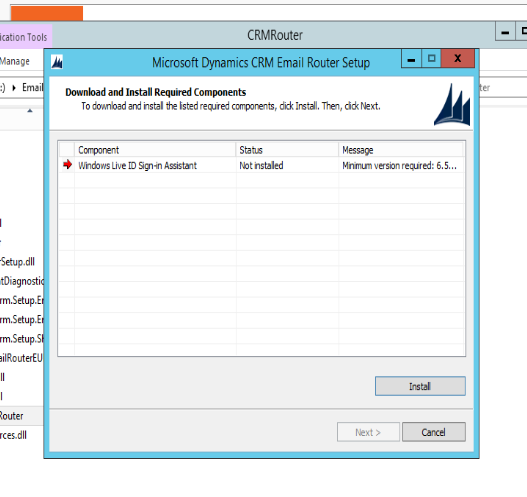
Every Microsoft link ive followed to try and find the Windows Live ID Assistant doesnt exist....

I eventually found where someone had it publicly, so i put wllogin_64.msi on my server to run it manually. It shows a quick prompt and nothing happens. 

Can I point this CRM2016-Router exe to use the local msi files? Is there a way to install this without this Windows Live ID assistant? I keep going down dead ends to solve this. 

I have the same question (0)
  • Suggested answer
    SS-01100907-0 Profile Picture
    on at

    Hello,

    Well this needs a little manual effort.

    1. There are two manual setup file that you need to download

    2. Then you need to go to installation media folder and create a folder called idcrl

    3. Then you need to keep the downloaded files into this folder and start the installation of email router

    pastedimage1605170318283v1.jpeg

    Now the problem is I can t not share the files here, please log a case with Microsoft support to get the files

  • damccracken Profile Picture
    139 on at

    Did you receive the files from Microsoft? Ive read where a "Redist" folder needs to be in spot where your "idcrl" folder is. And inside the "Redist" folder has the "idcrl" folder in it.

    Ive tried the method with the "redist" folder where the setup.exe is and still cant install. 

  • damccracken Profile Picture
    139 on at

    Just wanted come back and update that this saved me!

    I was able to pull the IDCLR folder and files from this post I followed, put only the IDCRL folder in the path you specified and that did the trick!

    Mine was on a server with no internet, but i was able to manually turn it on with my work proxy.

    Post im referring to for IDCLR:

    Please follow the folder structure

    community.dynamics.com/.../how-to-install-microsoft-dynamics-crm-2013-without-an-internet-connection

    For Downloading setup:

    ehoo-my.sharepoint.com/.../ES4fAwZz5bVJoZubUZPk_RkBdIzmGWdsko2igeHALE9BDA

  • richardpanek Profile Picture
    20 on at

    Where do you get these files from?

  • richardpanek Profile Picture
    20 on at

    The links are broken, is there a place to get these files?

  • Aubrey Robertson Profile Picture
    10 on at

    What are the names of the "two files"???

  • damccracken Profile Picture
    139 on at

    The Links are valid in this post. Not sure why they broke on mine.

    community.dynamics.com/.../windows-live-id-sign-in-assistant-download-failed---dynamics-365-v9-email-router-installation

  • Aubrey Robertson Profile Picture
    10 on at

    I found the original download links for wllogin_32.msi and wllogin_64.msi, which are the installers for Windows Live ID Sign-In Assistant.  Those official links are now dead, but if you plug them into The Way Back Machine (search for it), it will give you the files.

Under review

Thank you for your reply! To ensure a great experience for everyone, your content is awaiting approval by our Community Managers. Please check back later.

Helpful resources

Quick Links

Responsible AI policies

As AI tools become more common, we’re introducing a Responsible AI Use…

Neeraj Kumar – Community Spotlight

We are honored to recognize Neeraj Kumar as our Community Spotlight honoree for…

Leaderboard > Customer experience | Sales, Customer Insights, CRM

#1
Tom_Gioielli Profile Picture

Tom_Gioielli 170 Super User 2025 Season 2

#2
#ManoVerse Profile Picture

#ManoVerse 61

#3
Gerardo Rentería García Profile Picture

Gerardo Rentería Ga... 52 Most Valuable Professional

Last 30 days Overall leaderboard

Product updates

Dynamics 365 release plans
