web
You’re offline. This is a read only version of the page.
close
Skip to main content

Announcements

News and Announcements icon
Community site session details

Community site session details

Session Id :
Small and medium business | Business Central, N...
Answered

Bank No. must have a value in ACH RB Detail: It cannot be zero or empty

(1) ShareShare
ReportReport
Posted on by 43
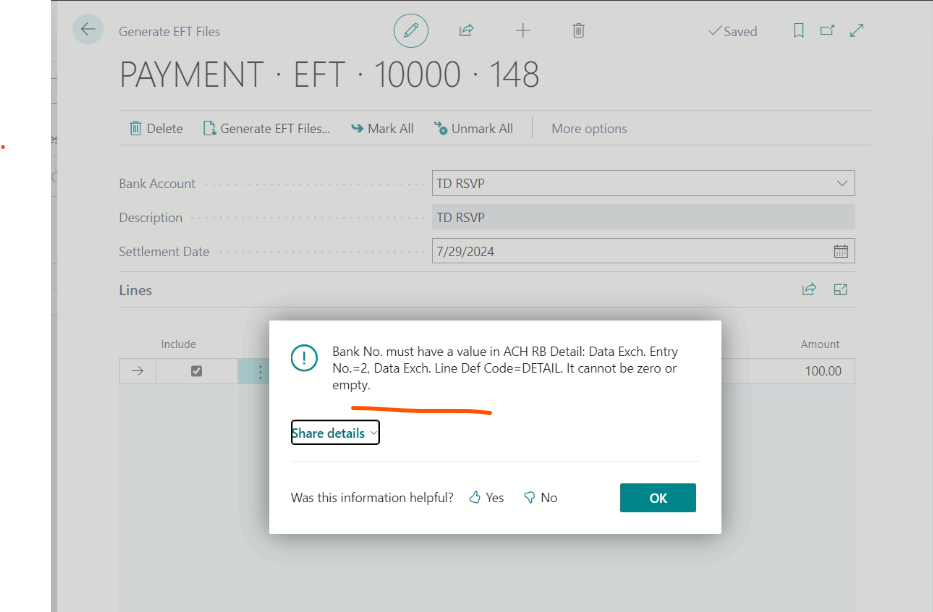
This issue is impacting all companies (two productions and 3 test companies). It started from Jul 24th before there was no issue with generating EFT files.
Error message:
Bank No. must have a value in ACH RB Detail: Data Exch. Entry No.=2, Data Exch. Line Def Code=DETAIL. It cannot be zero or empty.


AL call stack:
"EFT Export Mgt"(CodeUnit 10331).CheckOptional line 13 - Base Application by Microsoft
"EFT Export Mgt"(CodeUnit 10331).ProcessColumnMapping line 31 - Base Application by Microsoft
"EFT Export Mgt"(CodeUnit 10331).InsertDataExchLineForFlatFile line 10 - Base Application by Microsoft
"Exp. Mapping Det EFT RB"(CodeUnit 10334).OnRun(Trigger) line 18 - Base Application by Microsoft
"Exp. Launcher EFT"(CodeUnit 10320).ProcessDetails line 50 - Base Application by Microsoft
"Exp. Launcher EFT"(CodeUnit 10320).EFTPaymentProcess line 48 - Base Application by Microsoft
"Generate EFT"(CodeUnit 10098).CheckAndStartExport line 12 - Base Application by Microsoft
"Generate EFT"(CodeUnit 10098).StartEFTProcess line 58 - Base Application by Microsoft
"Generate EFT"(CodeUnit 10098).ProcessAndGenerateEFTFile line 17 - Base Application by Microsoft
"Generate EFT Files"(Page 10810)."GenerateEFTFile - OnAction"(Trigger) line 7 - Base Application by Microsoft
---------------------------------------------
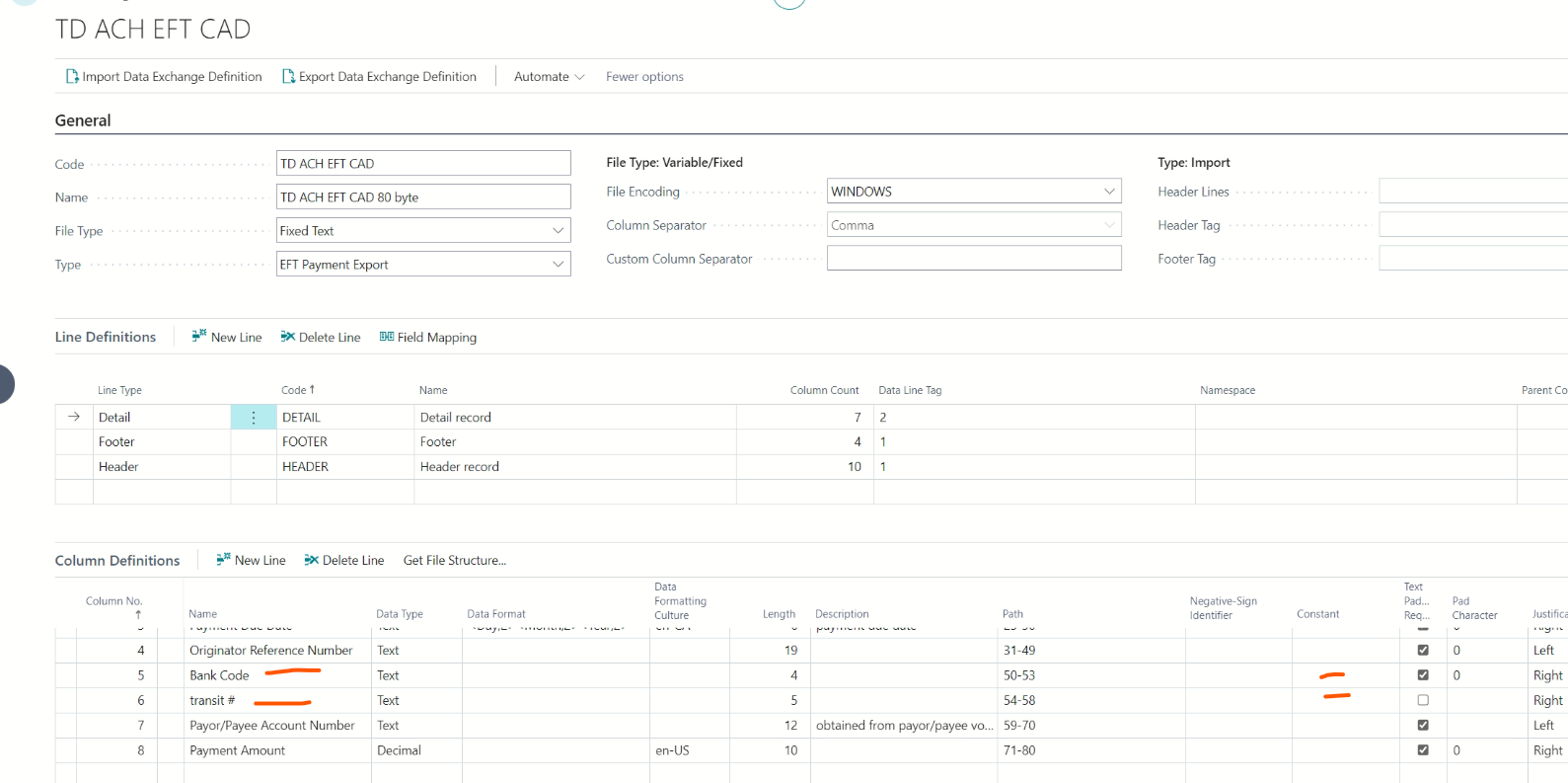
The issue is been caused by below two fields. In our PD we identified that if put a constant value for #5 “Bank Code” in the Data exchange definiation  as in below screen shot. Then this error message is gone but then we receive same error but pointing to #6 “transit #”. If we have constant values for both fields then the EFT file getting generated. For some reasons these two fields have stopped receiving data during the generate EFT file process.
I have the same question (0)
  • Verified answer
    Valentin Castravet Profile Picture
    32,800 Super User 2026 Season 1 on at
    This is caused by the newest Business Central update. If your vendor bank account card has the Country/Region Code field populated , then ensure that in the Country/Region Page that value has an ISO Code entered. If the ISO Code is empty, you will get this error. 
     
  • TR-29071229-0 Profile Picture
    43 on at
     
    Thanks for your help Valentin Castravet
    Your solution worked.
  • Valentin Castravet Profile Picture
    32,800 Super User 2026 Season 1 on at
    Great!

Under review

Thank you for your reply! To ensure a great experience for everyone, your content is awaiting approval by our Community Managers. Please check back later.

Helpful resources

Quick Links

Season of Sharing Community Challenge Winners!

Congratulations to our community stars!

Women in Power Builds Momentum

Expanding mentorship, skilling, and AI innovation

Congratulations to the June Top 10 Community Leaders

These are the community rock stars!

Leaderboard > Small and medium business | Business Central, NAV, RMS

#1
OussamaSabbouh Profile Picture

OussamaSabbouh 653 Super User 2026 Season 1

#2
Gerardo Rentería García Profile Picture

Gerardo Rentería Ga... 414 Most Valuable Professional

#3
YUN ZHU Profile Picture

YUN ZHU 394 Super User 2026 Season 1

Last 30 days Overall leaderboard

Featured topics

Microsoft Training Manuals

Product updates

Dynamics 365 release plans
