web
You’re offline. This is a read only version of the page.
close
Skip to main content

Notifications

Announcements

No record found.

Community site session details

Community site session details

Session Id :
Microsoft Dynamics CRM (Archived)

SSRS Report is only viewable to Administrator not to another user (Report type -Link to Web Page)

(0) ShareShare
ReportReport
Posted on by 3,710

 Link-Report.png

Link-report1.png

Hi all!!

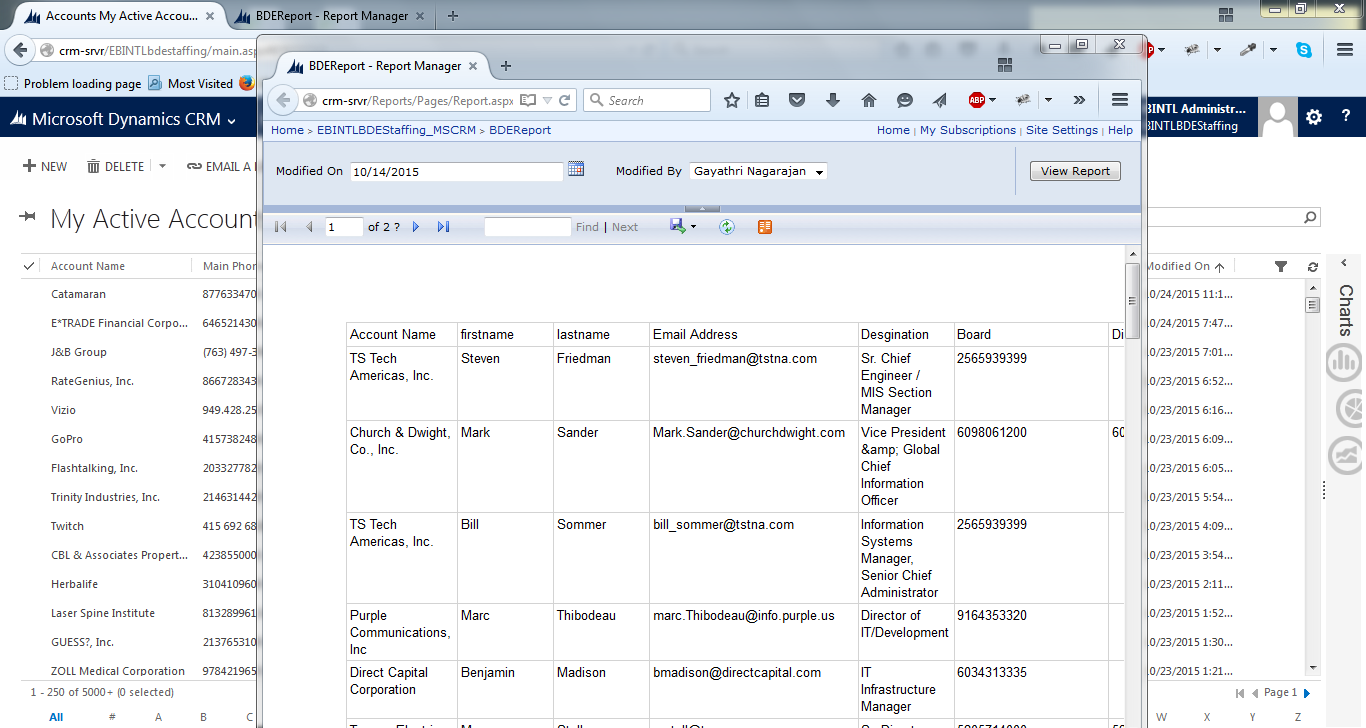
I have created an SSRS report  but when am loading the  .rdl with existing file options , the respective reports were not loaded, so I had chosen the Link to webpage options and used the URL as below,

crm-srvr/.../Report.aspx

The respective reports were loaded when logged with Administrator role only, but when am logged with different user respective reports are not loaded.

Any suggestions, what are the things needed to be changed with respective to the security roles?? Or any other things need to be changed?? Needs Help...

Thanks in Advance!!! 

*This post is locked for comments

I have the same question (0)
  • Suggested answer
    Alex Fun Wei Jie Profile Picture
    33,628 on at

    make sure you change the setting like this and the user has read privilege in entities.

    6102.1.png

  • Kishor Kumar Profile Picture
    3,710 on at

    Hi Wei Jie Fun,

    thanks for your response,

    I had given the rights as organization only and the another user has  read  privilege in entities.

    But still its loads for Admin not for the another users!!

    Any Suggestions Wei Jie Fun??

    Thanks in advance

  • Alex Fun Wei Jie Profile Picture
    33,628 on at

    is it possible to print screen the image for us to take a look ?

  • Kishor Kumar Profile Picture
    3,710 on at

    Hi Wei Jie Fun,

    I had updated the images as below, When Am logged as Administrator then Click the Run Report, its loading as shown below,

    6675.Link-report1.png 

    But am logging with different user, the respective report is not loading as shown below,

    6675.Link-report1.png

    What are things that I have to change to show this reports for all the users in the organization.

    Kindly Suggest some solution!! Am Still facing the issues

  • Suggested answer
    Alex Fun Wei Jie Profile Picture
    33,628 on at

    double check your report data source credential, have you set it to using window credential or ?

    1805.1.png

  • Alex Fun Wei Jie Profile Picture
    33,628 on at

    only this report having this issue? how about the other reports

  • Kishor Kumar Profile Picture
    3,710 on at

    Yeah,I have checked it is in windows Authentication Only!!!

  • Kishor Kumar Profile Picture
    3,710 on at

    yeah only this report is only having this issue, and other reports am using the .rdl file to generate reports.

  • Alex Fun Wei Jie Profile Picture
    33,628 on at

    is your report involved multiples entities? which methods are you using, fetch xml or sql query?

    if you are using sql query, filtered view or normal view?

  • Kishor Kumar Profile Picture
    3,710 on at

    yeah, am using Multiple Entities Like Account, Contact and opportunity to fetch the data using SQL query for the Filtered Views

Under review

Thank you for your reply! To ensure a great experience for everyone, your content is awaiting approval by our Community Managers. Please check back later.

Helpful resources

Quick Links

Responsible AI policies

As AI tools become more common, we’re introducing a Responsible AI Use…

Neeraj Kumar – Community Spotlight

We are honored to recognize Neeraj Kumar as our Community Spotlight honoree for…

Leaderboard > 🔒一 Microsoft Dynamics CRM (Archived)

#1
SA-08121319-0 Profile Picture

SA-08121319-0 4

#1
Calum MacFarlane Profile Picture

Calum MacFarlane 4

#3
Alex Fun Wei Jie Profile Picture

Alex Fun Wei Jie 2

Last 30 days Overall leaderboard

Featured topics

Product updates

Dynamics 365 release plans



