web
You’re offline. This is a read only version of the page.
close
Skip to main content

Announcements

No record found.

News and Announcements icon
Community site session details

Community site session details

Session Id :
Microsoft Dynamics AX (Archived)

Purchase Agreement Link while Creating Purchase Order from Purchase Requisition

(0) ShareShare
ReportReport
Posted on by 76

I am trying to create a purchase order from a purchase request, which has a purchase agreement associated with it, but when I confirm the purchase order and receive the merchandise it is not discounted from the agreement, the agreement is by Product category value commitment
I am testing this in AX 2012 R2 CU7
AR_2D00_006629_5F00_1.jpg

Thanks

Regards

*This post is locked for comments

I have the same question (0)
  • Mark Boy2 Profile Picture
    506 on at

    Hi, Maxi Martinez

    Could you show the purchase agreement?

  • Maxi Martinez Profile Picture
    76 on at

    Hello Mark,
                  I attached the agreement, I hope it serves you, anything is at your disposal

    Regards,

    Agreement_5F00_1.jpgAgreement_5F00_2.jpgAgreement_5F00_3.jpg


  • Suggested answer
    SouravDam Profile Picture
    11,730 on at

    Hi Maxi Martinez,

    This is as per default design in system.

    If you are using 'Product category value commitment' in purchase agreement, system will not allow you to select any item in agreement line. Rather; you have to select the procurement category. Even if you select some discount percentage for the procurement category in agreement line and then release the purchase order after confirming the agreement; system will not show you the same discount percentage in purchase order line created from the agreement.

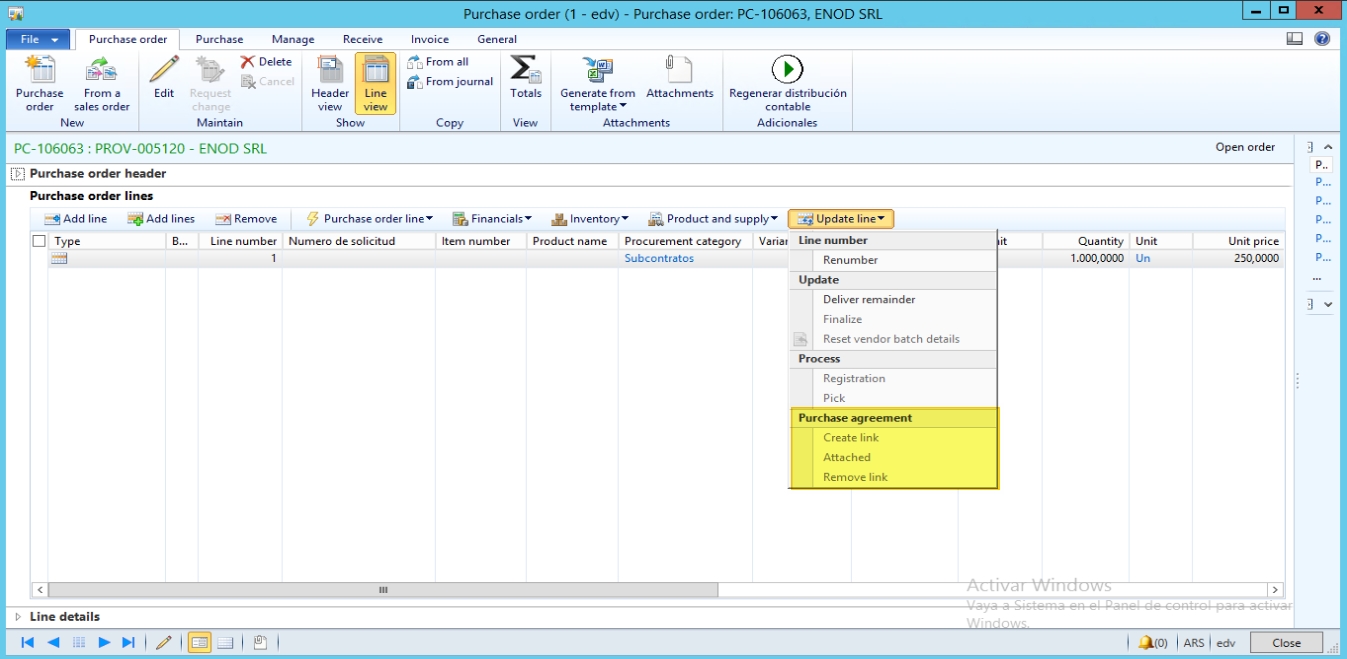
    If you are using Product quantity commitment in agreement, then you will be able to select the item. You can mention the discount percentage which will be displayed in the purchase order once it is released from the agreement. For example; below PO is released from the agreement where 10% discount percentage was selected.

    0257.JPG

    You can further check in the Update line > Attached in the purchase order which will give you the detail of the above item line.

    8322.JPG

    Best regards,
    Sourav Dam

    Please take time to click 'Yes' against the answers that help you guide in right direction to help other community members.

  • Suggested answer
    Mark Boy2 Profile Picture
    506 on at

    Did you check your Puchase Order Line the storage dimension?

Under review

Thank you for your reply! To ensure a great experience for everyone, your content is awaiting approval by our Community Managers. Please check back later.

Helpful resources

Quick Links

Introducing the 2026 Season 1 community Super Users

Congratulations to our 2026 Super Stars!

Meet the Microsoft Dynamics 365 Contact Center Champions

We are thrilled to have these Champions in our Community!

Congratulations to the March Top 10 Community Leaders

These are the community rock stars!

Leaderboard > 🔒一 Microsoft Dynamics AX (Archived)

#1
Joris dG Profile Picture

Joris dG 5

#2
Andrew Jones a1x Profile Picture

Andrew Jones a1x 2

#3
GL-01081504-0 Profile Picture

GL-01081504-0 1

Last 30 days Overall leaderboard

Featured topics

Product updates

Dynamics 365 release plans
