web
You’re offline. This is a read only version of the page.
close
Skip to main content

Notifications

Announcements

No record found.

Community site session details

Community site session details

Session Id :
Microsoft Dynamics CRM (Archived)

Activity dates changing when owner is update

(0) ShareShare
ReportReport
Posted on by

Hi Guys,

Ive noticed today that when I changed the owner of an account or an opportunity the activity dates changed to todays date. See below screenshots.

Before owner changed the activity showed dates of 16/07/2018 etc
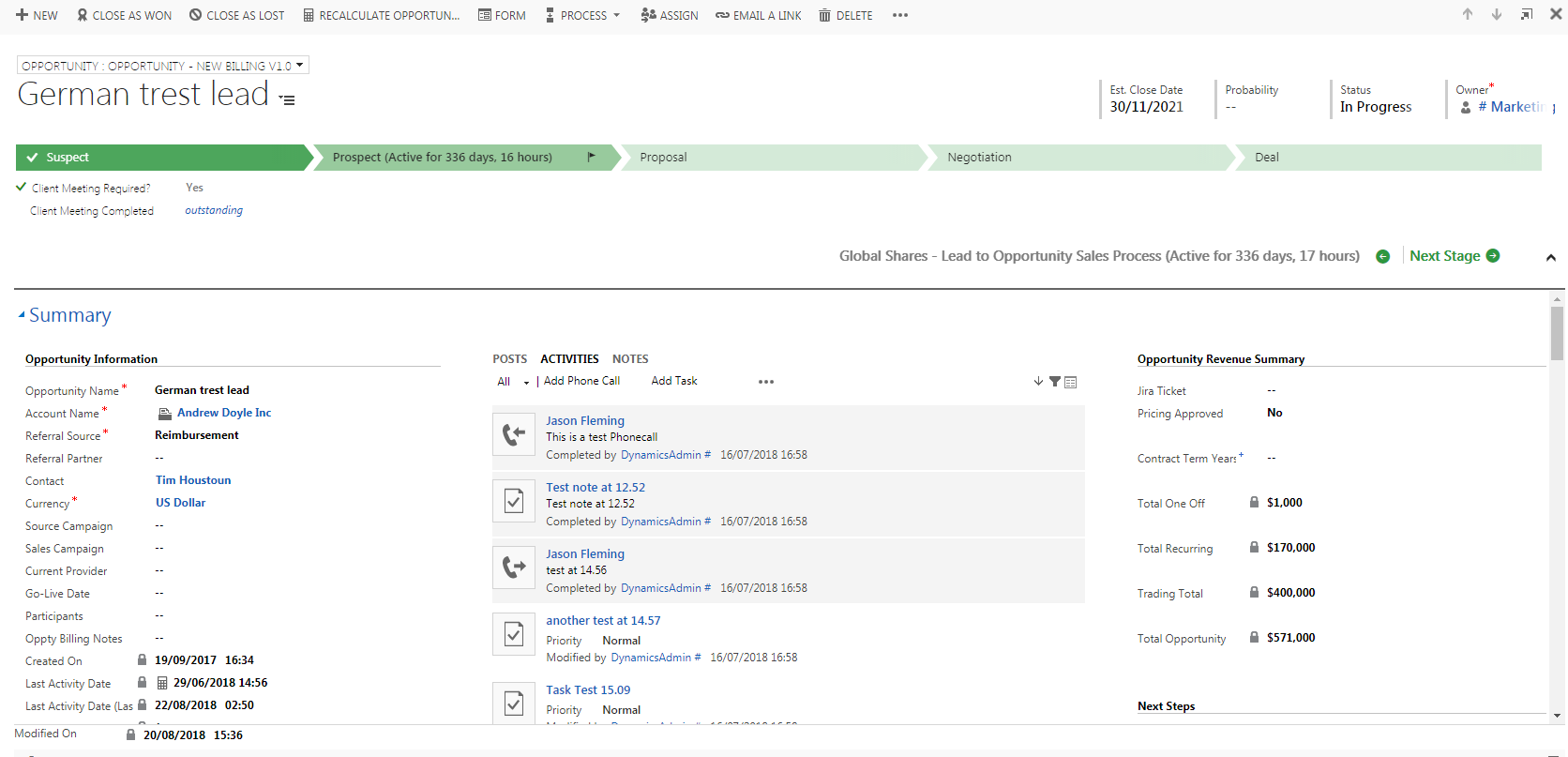
Before-owner-changed.png

After owner changed the dates all reverted to todays date.
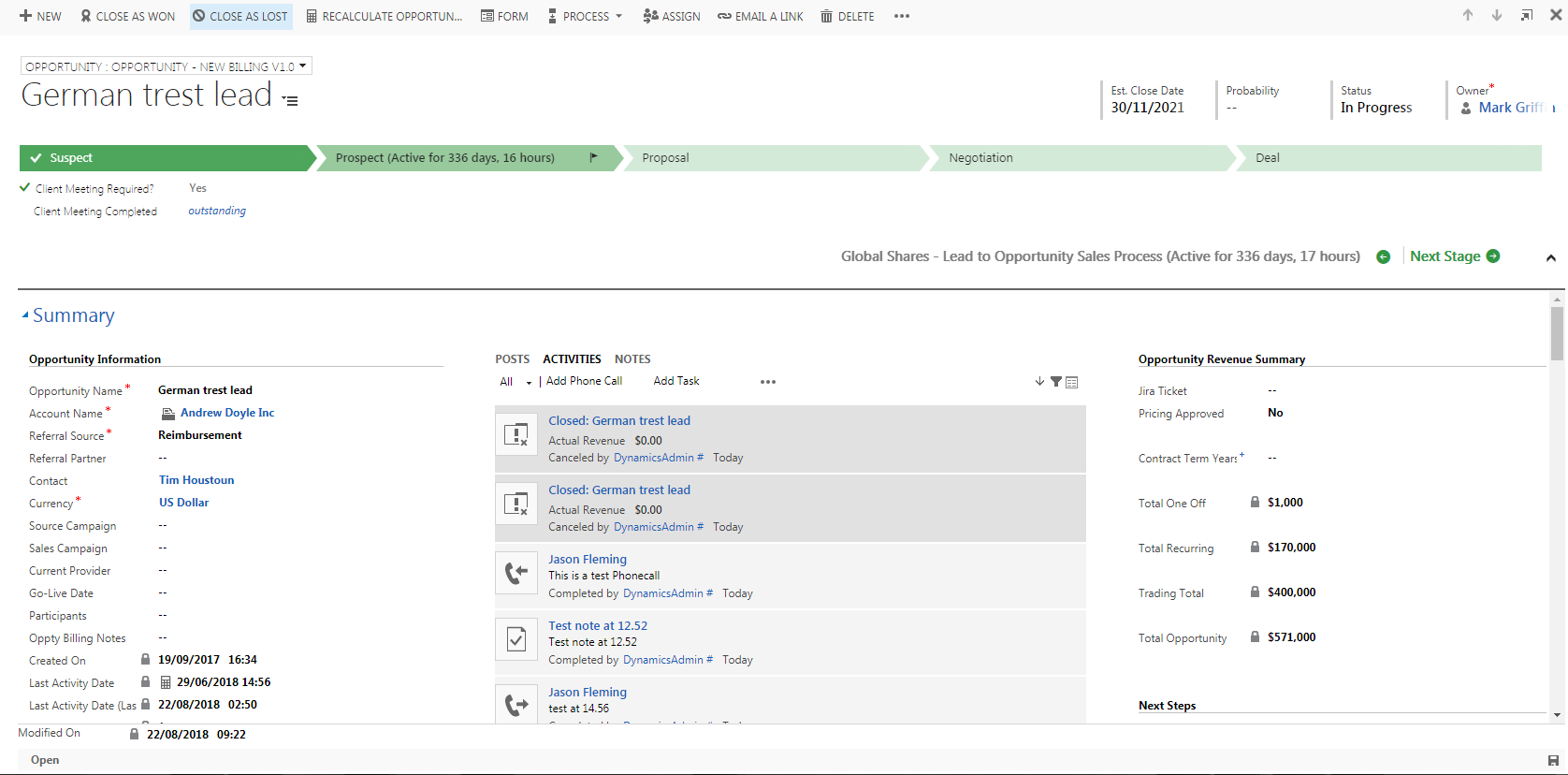
After-Owner-changed.png

What setting do I need to changed to make sure this doesnt happen as we changed owners alot depending on the location of leads, accounts etc?

Thanks for the help.

*This post is locked for comments

I have the same question (0)
  • Shidin Haridas Profile Picture
    3,499 on at

    Hi Jason,

    I am trying to replicate this. Just to clarify, only the modifiedon date changes, right?

    The actual dates of the activity remains as is.

  • Suggested answer
    RaviKashyap Profile Picture
    55,410 Moderator on at

    Hi,

    Please check if you have any workflow/ plugin running on update of opportunity. This doesn't seem to be crm behavior.

    Hope this helps.

  • Suggested answer
    Mahendar Pal Profile Picture
    45,095 on at

    Hi,

    What you see is modified date changes it's not the create date, please check this thread to know more about this behaviour community.dynamics.com/.../137978

  • Community Member Profile Picture
    on at

    It seems that the over view date changes, the actual date when you click into each activity holds to the actual date. I will post a screenshot there now to show what dates changed. I know my sales team will question why these dates have changed.

    Error-on-activity.png

  • Verified answer
    Shidin Haridas Profile Picture
    3,499 on at

    Jason,

    As mentioned before, that is the modifiedon date, which the view picks up.

    I understand, from a user-experience perspective, it is confusing.

    Solution 1:

    What is happening is that, when the Account Owner changes, all the child records such as phone calls, tasks etc are also assigned to the new Owner.

    This causes an update of the record and thus, the modified on date changes. These are called the cascading rules in CRM.

    If you do not want the phone calls to be re-assigned to the new Owner, then you can set up 'Configurable Cascading' rules. This will prevent an update to the child activities and the modified on date will not change.

    Solution 2:

    If you do want the child activities to be assigned to the new Owner, then AFAIK, there is no supported way of changing what is shown on the UI with regards to that date.

    Maybe you could not use the OOB 'activities' form control and just have plain boring grids.
    Or, just train your sales team that the date what they see is just the last date when the record was modified and NOT the date of the activity.

    If my answer helps you, please mark it as verified.

  • Verified answer
    Suresh Sorde Profile Picture
    1,077 on at

    Hi Jason,

    Please check this 

    Thanks

  • Conleth Overton Profile Picture
    32 on at

    I see that this is still the case in the current version.

    Does anyone know if this can be worked around ?

    As when an opportunity is given to a new member of staff. All of the dates change and they are not able to refer to any history.

  • DavidG1234 Profile Picture
    35 on at
    [quote user="Jason Fleming"]

    Hi Guys,

    Ive noticed today that when I changed the owner of an account or an opportunity the activity dates changed to todays date. See below screenshots.

    Before owner changed the activity showed dates of 16/07/2018 etc

    After-Owner-changed.png

    After owner changed the dates all reverted to todays date.

    What setting do I need to changed to make sure this doesnt happen as we changed owners alot depending on the location of leads, accounts etc?

    Thanks for the help.

    [/quote]

    I believe what is happening is that the Opp/Lead/Account owner changes, that ownership change is automatically cascading to the related activites.  When the activity owner changes, the modified on date of the activity changes.

    There are two options - you can adjust the cascading behavior on the relationships, or you can change the Timeline settings so that the 'Created On' date is displayed instead of the 'Modified On' date. 

    To adjust the cascade of assignment from, you'd need to modify the 1:N relationship between the Entities/Tables (i.e. Opportunity, Account, Lead) and each type of Activity.   You can't adjust this on the '1'Opportunity:'N'Activitiies relationship, but for each type of activity you can configure the cascading of changes from the 'Regarding' object to the 'Activity' objects.

    To adjust the Timeline display/sort order settings, you'd need to open the Form editor for each Entity that contains a Timeline.

Under review

Thank you for your reply! To ensure a great experience for everyone, your content is awaiting approval by our Community Managers. Please check back later.

Helpful resources

Quick Links

Responsible AI policies

As AI tools become more common, we’re introducing a Responsible AI Use…

Neeraj Kumar – Community Spotlight

We are honored to recognize Neeraj Kumar as our Community Spotlight honoree for…

Leaderboard > 🔒一 Microsoft Dynamics CRM (Archived)

#1
SA-08121319-0 Profile Picture

SA-08121319-0 4

#1
Calum MacFarlane Profile Picture

Calum MacFarlane 4

#3
Alex Fun Wei Jie Profile Picture

Alex Fun Wei Jie 2

Last 30 days Overall leaderboard

Featured topics

Product updates

Dynamics 365 release plans
