web
You’re offline. This is a read only version of the page.
close
Skip to main content

Notifications

Announcements

No record found.

Community site session details

Community site session details

Session Id :
Microsoft Dynamics AX (Archived)

Ledger balance summary and range of dimensions

(0) ShareShare
ReportReport
Posted on by 2,050

here original report Ledger balance summary appear with range of dimensions
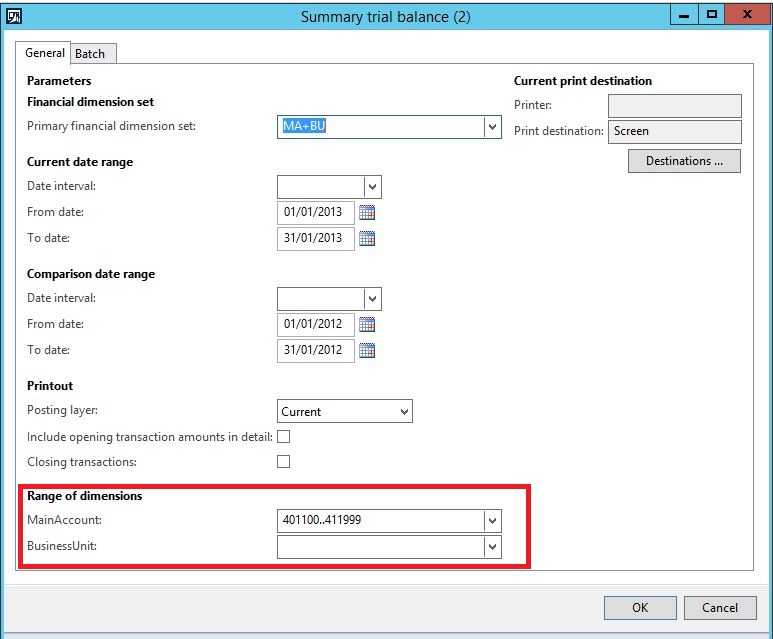
8154.1.JPG

so i do customization on this report and create new design on the same ssrs (Ledger balance summary) i created chart for this report on my new design  but when i try to call my new design range of dimensions not shown on my customization like summary
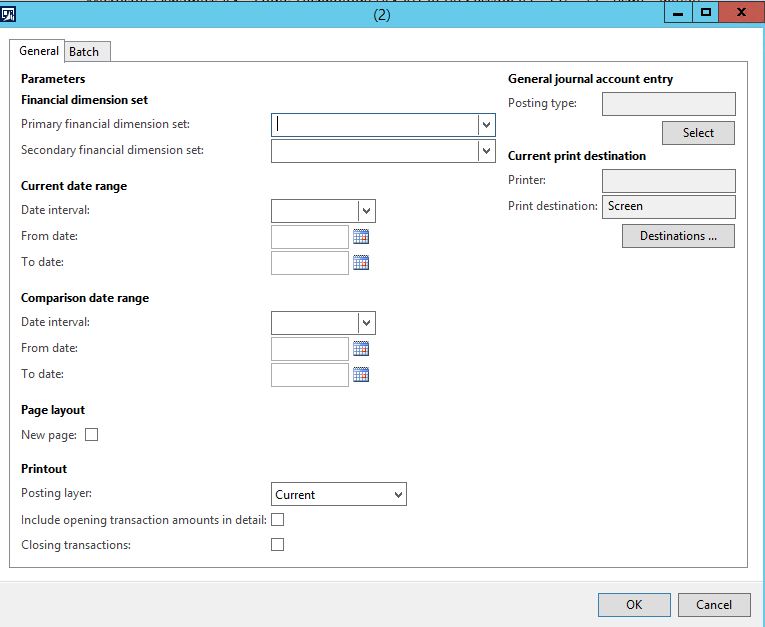
2134.2.JPG

*This post is locked for comments

I have the same question (0)
  • mohammed.mqi Profile Picture
    2,050 on at

    thanks for replay

    i change visibility set to true but stil not appear

    so then i add new case also not appear

    3718.3.JPG

  • mohammed.mqi Profile Picture
    2,050 on at

    amy idea

  • Suggested answer
    Ludwig Reinhard Profile Picture
    Microsoft Employee on at

    Hi,

    Why do you make an adjustment to the summary trial balance report?

    There is the ledger trial balance list page where you can get those data calculated and where you can filter in the way required either on ledger accounts or financial dimensions.

    What is the reason for making this modification and what is the value added?

    Best regards,

    Ludwig

  • mohammed.mqi Profile Picture
    2,050 on at

    thanks for reply

    because i need to create design chart into LedgerTrialbalance for sales product so i need range of dimensions for that

    thanks

  • Ludwig Reinhard Profile Picture
    Microsoft Employee on at

    Hi,

    Why don't you use the standard cubes/Power BI for that purpose?

    Best regards,

    Ludwig

  • Verified answer
    mohammed.mqi Profile Picture
    2,050 on at

    thanks for reply 

    when i create my custom design then i create menuitem (output)

    0044.4.JPG

    0044.4.JPG

    and about what you said Power BI because i i just need create this and show it as report from ax2012 direct 

Under review

Thank you for your reply! To ensure a great experience for everyone, your content is awaiting approval by our Community Managers. Please check back later.

Helpful resources

Quick Links

Responsible AI policies

As AI tools become more common, we’re introducing a Responsible AI Use…

Neeraj Kumar – Community Spotlight

We are honored to recognize Neeraj Kumar as our Community Spotlight honoree for…

Leaderboard > 🔒一 Microsoft Dynamics AX (Archived)

#1
Martin Dráb Profile Picture

Martin Dráb 4 Most Valuable Professional

#1
Priya_K Profile Picture

Priya_K 4

#3
MyDynamicsNAV Profile Picture

MyDynamicsNAV 2

Last 30 days Overall leaderboard

Featured topics

Product updates

Dynamics 365 release plans
