web
You’re offline. This is a read only version of the page.
close
Skip to main content

Notifications

Announcements

No record found.

Community site session details

Community site session details

Session Id :
Microsoft Dynamics CRM (Archived)

we are trying to update the "Is Searchable" flag on a field. Via a .Net application but unable to find any documentation

(0) ShareShare
ReportReport
Posted on by

Hi All,

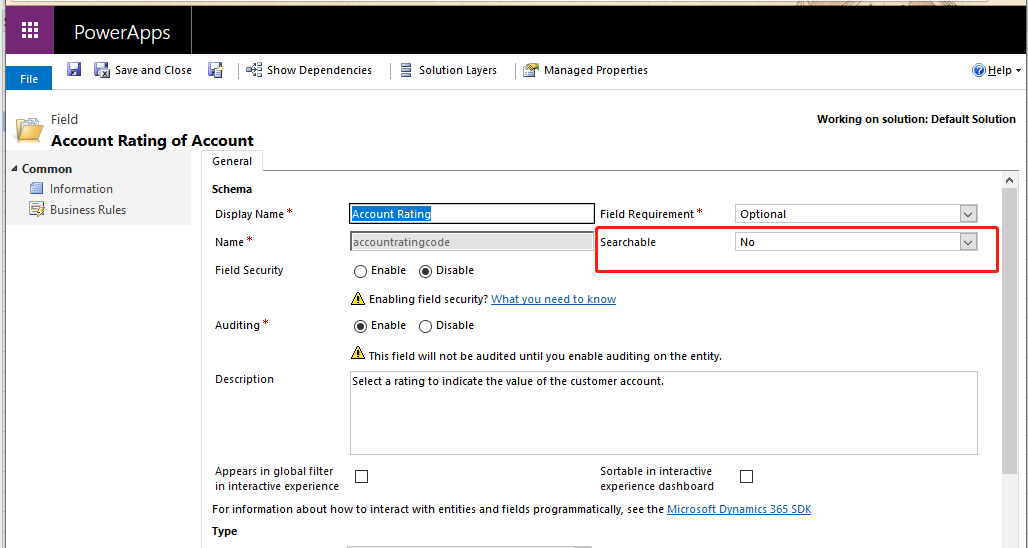
i am trying to update "Is Searchable" flag programmatically.  
WeChat-Screenshot_5F00_20190408091519.png

Through the UI, i can set it :

27516.2.png

but i cannot change it via SDK.

RetrieveAttributeRequest attributeRequest = new RetrieveAttributeRequest
            {
                EntityLogicalName = Account.EntityLogicalName,
                LogicalName = "	accountratingcode",
                RetrieveAsIfPublished = true
            };

            RetrieveAttributeResponse attributeResponse =
                        (RetrieveAttributeResponse)_serviceProxy.Execute(attributeRequest);

            Console.WriteLine("Retrieved the attribute {0}.",
                        attributeResponse.AttributeMetadata.SchemaName);

            AttributeMetadata retrievedAttributeMetadata =
                        attributeResponse.AttributeMetadata;
            retrievedAttributeMetadata.IsSearchable = true;

            // Update an attribute retrieved via RetrieveAttributeRequest
            UpdateAttributeRequest updateRequest = new UpdateAttributeRequest
            {
                Attribute = retrievedAttributeMetadata,
                EntityName = Account.EntityLogicalName,
                MergeLabels = false
            };

            // Execute the request
            _serviceProxy.Execute(updateRequest);


but it says:  

Error CS0200 Property or indexer 'AttributeMetadata.IsSearchable' cannot be assigned to -- it is read only

Can someone help me? i did not find any related doc!

*This post is locked for comments

I have the same question (0)
  • Suggested answer
    Abby Kong Profile Picture
    6 on at

    Hi 10120,

    Please try to set IsValidForAdvancedFind

    Also XrmToolBox has a plugin Attribute Bulk Updater https://www.xrmtoolbox.com/plugins/MscrmTools.AttributeBulkUpdater/

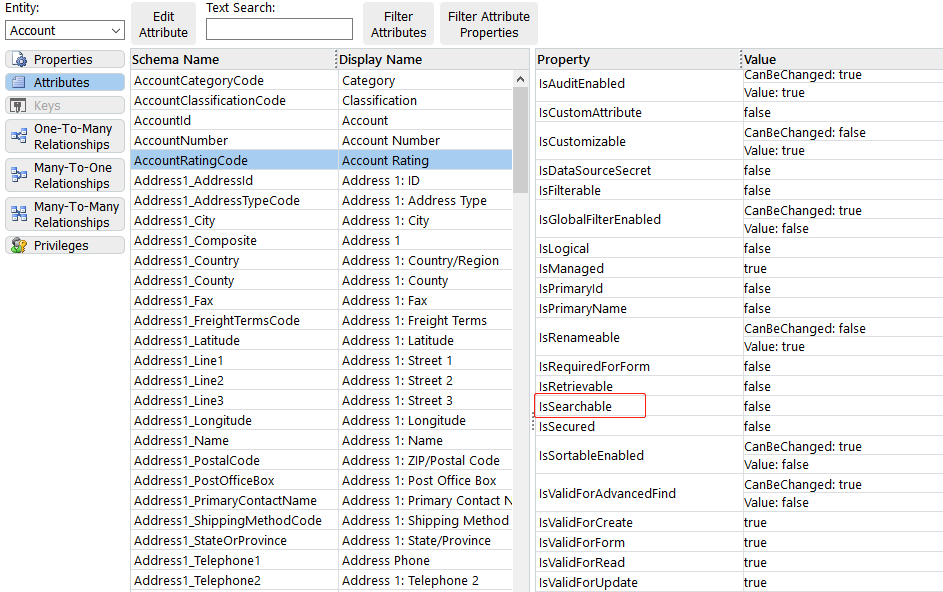
    You can use it to bulk update 'Valid for Adv. Find' which will set Searchable in your picture. That project is also open source on GitHub if you are interested in checking out the source code.

    searchable.png

    Regards,

    Abby

  • Verified answer
    Kokulan Profile Picture
    18,054 on at

    Hi

    The Is Searchable is only for internal use, please see below

    AttributeMetadata.IsSearchable Property : This API supports the product infrastructure and is not intended to be used directly from your code.

    https://docs.microsoft.com/en-us/previous-versions/dynamicscrm-2016/developers-guide/mt621852(v%3dcrm.8)

    AttributeMetadata.IsValidForAdvancedFind Property : Gets or sets the property that determines whether the attribute appears in Advanced Find.

    https://docs.microsoft.com/en-us/previous-versions/dynamicscrm-2016/developers-guide/gg307509(v%3dcrm.8)


    As suggested above, you have to set IsValidForAdvancedFind  not Is Searchable

  • Community Member Profile Picture
    on at

    OK.  i see.  i had thought the UI settings are corresponded to "is searchable".  I made a mistake.   So  the conclusion is that    This property is not able to change, right? 

  • Verified answer
    Abby Kong Profile Picture
    6 on at

    Hi 10120,

    You are right. And I just noticed it's also showing in the picture you posted originally. Anything without CanBeChanged is not intended for developers to set.

    from10120.png

    Regards,

    Abby

Under review

Thank you for your reply! To ensure a great experience for everyone, your content is awaiting approval by our Community Managers. Please check back later.

Helpful resources

Quick Links

Responsible AI policies

As AI tools become more common, we’re introducing a Responsible AI Use…

Neeraj Kumar – Community Spotlight

We are honored to recognize Neeraj Kumar as our Community Spotlight honoree for…

Leaderboard > 🔒一 Microsoft Dynamics CRM (Archived)

#1
SA-08121319-0 Profile Picture

SA-08121319-0 4

#1
Calum MacFarlane Profile Picture

Calum MacFarlane 4

#3
Alex Fun Wei Jie Profile Picture

Alex Fun Wei Jie 2

Last 30 days Overall leaderboard

Featured topics

Product updates

Dynamics 365 release plans