web
You’re offline. This is a read only version of the page.
close
Skip to main content

Announcements

No record found.

News and Announcements icon
Community site session details

Community site session details

Session Id :
Microsoft Dynamics AX (Archived)

How to edit Purchase order report in AX 2012 R3?

(0) ShareShare
ReportReport
Posted on by

Hi all,

When i'm trying open the Purchase order report in SSRS it's showing "The 'AX_CompanyName' parameter is missing a value".

after when i'm clicking on edit it's asking for connect to report server.
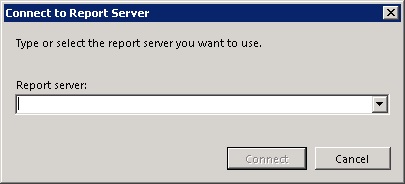
3465.1234.jpg

how can i solved it?

  • The 'AX_CompanyName' parameter is missing a value

*This post is locked for comments

I have the same question (0)
  • Community Member Profile Picture
    on at

    Try to clear caches and data usage user, if it'll not work try to set parameter as nullable

  • Community Member Profile Picture
    on at

    thanks for the reply and do you know about report server URL?

  • Community Member Profile Picture
    on at

    can u please guide how can it nullable?  

  • Community Member Profile Picture
    on at

    System Administration > config > businessintelligenece > Reporting Service > Report server

  • Community Member Profile Picture
    on at

    On visual studio go to node design, search the parameter and on the property panel set as nullable

  • Community Member Profile Picture
    on at

    it's already configured as below :

    Server : MBSSERVER

    Server Instance Name : MSSQLSERVER

    Report Manager URL : http://mbsserver/Reports

    Web Services URL : http://mbsserver/ReportServer

  • Verified answer
    Community Member Profile Picture
    on at

    it's done. i make the same version of the SQL and SSRS.

    Now i can update and edit the report.

Under review

Thank you for your reply! To ensure a great experience for everyone, your content is awaiting approval by our Community Managers. Please check back later.

Helpful resources

Quick Links

Introducing the 2026 Season 1 community Super Users

Congratulations to our 2026 Super Stars!

Meet the Microsoft Dynamics 365 Contact Center Champions

We are thrilled to have these Champions in our Community!

Congratulations to the March Top 10 Community Leaders

These are the community rock stars!

Leaderboard > 🔒一 Microsoft Dynamics AX (Archived)

#1
CP04-islander Profile Picture

CP04-islander 39

#2
Michel ROY Profile Picture

Michel ROY 14

#3
imran ul haq Profile Picture

imran ul haq 8

Last 30 days Overall leaderboard

Featured topics

Product updates

Dynamics 365 release plans
