web
You’re offline. This is a read only version of the page.
close
Skip to main content

Announcements

No record found.

News and Announcements icon
Community site session details

Community site session details

Session Id :
Customer experience | Sales, Customer Insights,...
Suggested Answer

Updating old records in CRM after creating Business Rules and Scripts

(0) ShareShare
ReportReport
Posted on by 62

Hi,

In our organization's CRM we have an entity called as "Funnel", it contains 6 fields namely Business Unit, Business Category, Brand, Name of the Product, LOB and LOB Manager. 

I have modified an existing script using JScript where if you select the options in Business area then automatically the options in Business line will pop up and so on for the fields.

For LOB and LOB Manager I created Business rules in CRM.

My script is working fine but I want to update the old records which were created using old script. I have some 500 to 1000 records so how to automate the records so that all the old records should get modified according to new script and new business rules.

I tried to do manually but its taking long time so is there any shortcut method to achieve this?

FYI
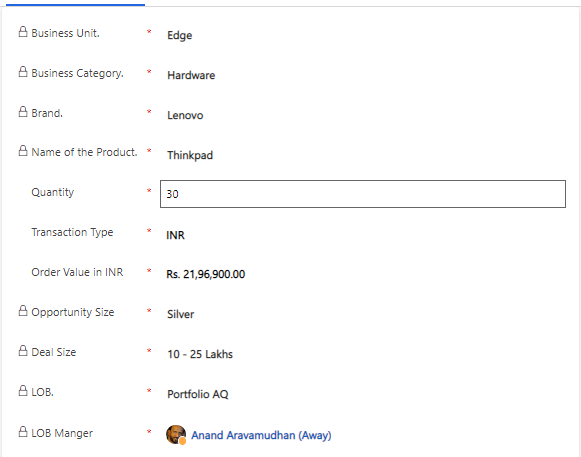
pastedimage1672720343624v1.png

I have the same question (0)
  • Suggested answer
    Abdul Wahab Profile Picture
    12,119 Moderator on at

    Hi Rajath Krishna S,

    Create an on-demand workflow with a similar logic. Use view or Bulk Workflow Execution (in XRM Tool Box) and run the workflow on the selected records.

    Even you can use Power Automate with the below components:

    1. Manually trigger a flowpastedimage1672727528089v1.png
    2. List rowspastedimage1672727555695v2.png
    3. Update a recordpastedimage1672727570694v3.png
  • Suggested answer
    Bipin D365 Profile Picture
    28,985 Moderator on at

    Hi,

    Another option is to create console application to update existing records

    learn.microsoft.com/.../quick-start-org-service-console-app

  • Rajath Krishna S Profile Picture
    62 on at

    Hi Abdul,

    Thanks for suggesting this method. But will it update the record based on new script? Because here I have to give multiple conditions for the entries.

  • Suggested answer
    Abdul Wahab Profile Picture
    12,119 Moderator on at

    Hi Rajath Krishna S,

    I am wondering whether I am getting you correctly or not. You need to write the logic as per the new script to make it work.

  • Suggested answer
    Amit Katariya007 Profile Picture
    10,409 Moderator on at

    Hello Rajath,

    If you have Fetch XMLs for respective record groups and you can update those records using Bulk Data Updater in XRM toolbox.

    www.xrmtoolbox.com/.../

    Thank you,

    Amit Katariya

Under review

Thank you for your reply! To ensure a great experience for everyone, your content is awaiting approval by our Community Managers. Please check back later.

Helpful resources

Quick Links

Introducing the 2026 Season 1 community Super Users

Congratulations to our 2026 Super Stars!

Congratulations to our 2025 Community Spotlights

Thanks to all of our 2025 Community Spotlight stars!

Leaderboard > Customer experience | Sales, Customer Insights, CRM

#1
ManoVerse Profile Picture

ManoVerse 180 Super User 2026 Season 1

#2
11manish Profile Picture

11manish 123

#3
CU11031447-0 Profile Picture

CU11031447-0 100

Last 30 days Overall leaderboard

Product updates

Dynamics 365 release plans
