web
You’re offline. This is a read only version of the page.
close
Skip to main content

Notifications

Announcements

No record found.

Community site session details

Community site session details

Session Id :
Microsoft Dynamics CRM (Archived)

Server side sync with CRM Online and Exchange on-premise

(0) ShareShare
ReportReport
Posted on by 260

Hi!


We have a solution where we want to use server side sync for a queue with an e-mailaddress. The e-mail server is on-premise. We have enabled basic authentication and created an impersionation service account as described here, technet.microsoft.com/.../mt622059.aspx, but still no go. The error message when testing the connection is "The SMTP address format is invalid". The impersonation user has a valid e-mailaddress according to the people hosting the Exchange server. Please see the attached screenshots. Any Exchange gurus knowing exactly how the impersonation user should have a valid e-mail address set?

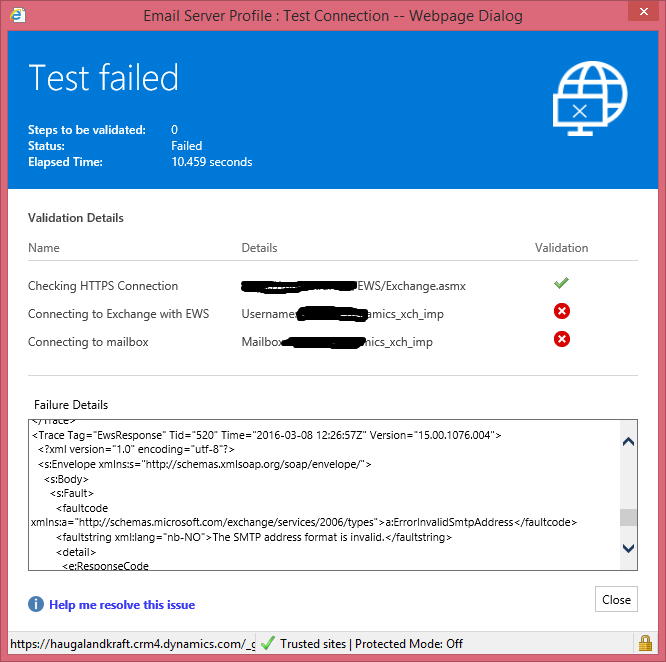
mail01.pngmail02.png

PK

*This post is locked for comments

I have the same question (0)
  • PerKr Profile Picture
    260 on at

    One step further. Using "user@domain.com" instead of "domain\user" when specifying the impersonation user gets rid of the "the smtp address is invalid" error. It however presents a new error stating that the user does not have a valid mailbox. Does the impersonation service account need it's own mailbox? Why? Can someone give a better explanation of server side sync with CRM Online and Exchange on-premise than what I linked to earlier?

  • Community Member Profile Picture
    on at

    Any update on this, as we have the same problem ...

    TIA,

    Jens

  • Community Member Profile Picture
    on at

    Any of you find a solution. We have the exact same problem.

    The only way I can get it to work is add user@domain.local as a SMTP address and add the autodiscover address manually.

    But this will not work at the end because we don't give our users a @domain.local SMTP address.

    Hope to hear a different solution without having to add @domain.local to everyones SMTP addresses.

  • Suggested answer
    Community Member Profile Picture
    on at

    It appears you only have to give them Impersonation user a user@domain.local SMTP address.

    So:

    - Set autodiscover address manually
    - Set username according to user@domain.local
    - Give user an SMTP address user@domain.local

  • Mario N Profile Picture
    95 on at

    What do you mean with "give user an SMTP address user@domain.local"? Is this an Exchange or a Dynamics setting? Could you please describe some more details?

    Thanks!

  • Preshma Linet Pereira Profile Picture
    70 on at

    Anyone Found a solution to this?? Still stuck at getting Exchange On Premise Configured for Dynamics CRM online with the same above error

  • Community Member Profile Picture
    on at

    With domain.local I mean the following:

    We have a local (on premise) domain called @something.local and we have a e-mail domain say @something.com.

    For some reason when using @something.com I was unable to make a working Email Server Profile.

    When using the users local domain: user@something.local I was able to make a working profile.

    But seeing our users normally don't have a %username%@something.local address at our organisation I had to make an alias.

    After making the alias email address I was able to get a validated connection using this address.

    Hope this helps.

Under review

Thank you for your reply! To ensure a great experience for everyone, your content is awaiting approval by our Community Managers. Please check back later.

Helpful resources

Quick Links

Responsible AI policies

As AI tools become more common, we’re introducing a Responsible AI Use…

Neeraj Kumar – Community Spotlight

We are honored to recognize Neeraj Kumar as our Community Spotlight honoree for…

Leaderboard > 🔒一 Microsoft Dynamics CRM (Archived)

#1
SA-08121319-0 Profile Picture

SA-08121319-0 4

#1
Calum MacFarlane Profile Picture

Calum MacFarlane 4

#3
Alex Fun Wei Jie Profile Picture

Alex Fun Wei Jie 2

Last 30 days Overall leaderboard

Featured topics

Product updates

Dynamics 365 release plans



