web
You’re offline. This is a read only version of the page.
close
Skip to main content

Announcements

No record found.

News and Announcements icon
Community site session details

Community site session details

Session Id :
Microsoft Dynamics AX (Archived)

Reporting Tree Definition in Financial Statement

(0) ShareShare
ReportReport
Posted on by 477

Guys,

I encounter i issue below:

I have a financial dimension " Project" setup with value 10100 till 99999.

All the while when i posting my transaction i did insert a financial value for my project.

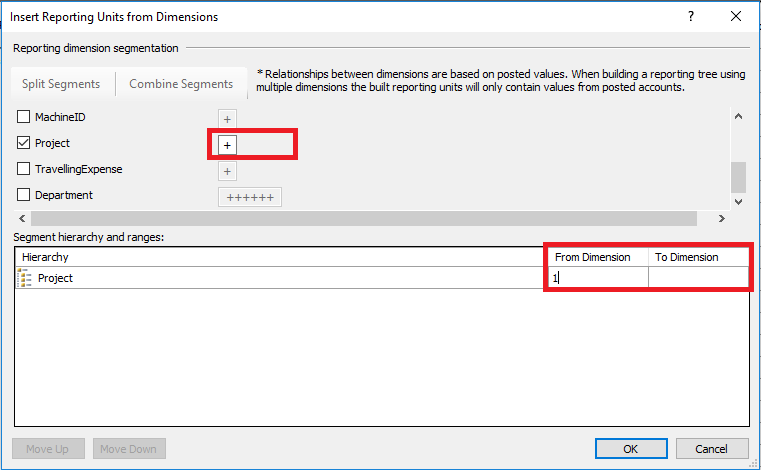
Now i am trying to build 1 Reporting Tree Definition in my financial statement for financial dimension "Project"

Suppose if i insert the from dimension 00001 to 99999 all the project values will come out automatically.  But i realize project value can only insert 1 digit. 

How can i make it to enter the value from 00001 to 99999?
Reporting-Tree.png

*This post is locked for comments

I have the same question (0)
  • Suggested answer
    Ludwig Reinhard Profile Picture
    Microsoft Employee on at

    Hi,

    Is it possible that your project financial dimension has only a single number? That is because I can only see a single Plus symbol. The same holds for the travelling expense financial dimension. Your departments must have six digits. Can you double check that?

    Can you also share a screenprint of the dimensions drop down field that you see for your project financial dimensions?

    Many thanks and best regards,

    Ludwig

  • Dexin Profile Picture
    477 on at

    Hi Ludwig

    My Project dimension consist of 5 digits of numeric no.

    Please refer below for my dimension values for the project

    GL-Journal.png

  • Verified answer
    Ludwig Reinhard Profile Picture
    Microsoft Employee on at

    Hello Dexin,

    I guess that this issue is related the the one you reported here: community.dynamics.com/.../824682

    Please get into contact with your system admins who should be able to get the MR setup right.

    Best regards,

    Ludwig

Under review

Thank you for your reply! To ensure a great experience for everyone, your content is awaiting approval by our Community Managers. Please check back later.

Helpful resources

Quick Links

Introducing the 2026 Season 1 community Super Users

Congratulations to our 2026 Super Stars!

Meet the Microsoft Dynamics 365 Contact Center Champions

We are thrilled to have these Champions in our Community!

Congratulations to the April Top 10 Community Leaders

These are the community rock stars!

Leaderboard > 🔒一 Microsoft Dynamics AX (Archived)

#1
CP04-islander Profile Picture

CP04-islander 24

#2
Michel ROY Profile Picture

Michel ROY 14

#3
Jagadabi Profile Picture

Jagadabi 6

Last 30 days Overall leaderboard

Featured topics

Product updates

Dynamics 365 release plans
