web
You’re offline. This is a read only version of the page.
close
Skip to main content

Notifications

Announcements

No record found.

Community site session details

Community site session details

Session Id :
Small and medium business | Business Central, N...
Answered

In Dimensions, how do you see if there were any transactions made in dimensions? What can you do if you want to move those in the wrong dimension to another dimension which is the correct one, in Navision 2018?

(0) ShareShare
ReportReport
Posted on by 4,971

Hi Community,

In Dimensions, how do you see if there were any transactions made in those dimensions that you have created?

What can you do if you want to move those in the wrong dimensions to another dimensions which is the correct one, in Navision 2018?

Thank you!

I have the same question (0)
  • Suggested answer
    Nitin Verma Profile Picture
    21,698 Moderator on at

    Hi Josh,

    By using the Dimension details report you can check the dimension posted, but there is no such option in dimension list page, which tell if there is any transaction posted using that dimension, but you can check the button "Where-used List" in dimension value list page, which helps to find where that dimension value is used and which master.

    Thanks.

  • Verified answer
    YUN ZHU Profile Picture
    95,329 Super User 2025 Season 2 on at

    Hi, It doesn't sound simple.
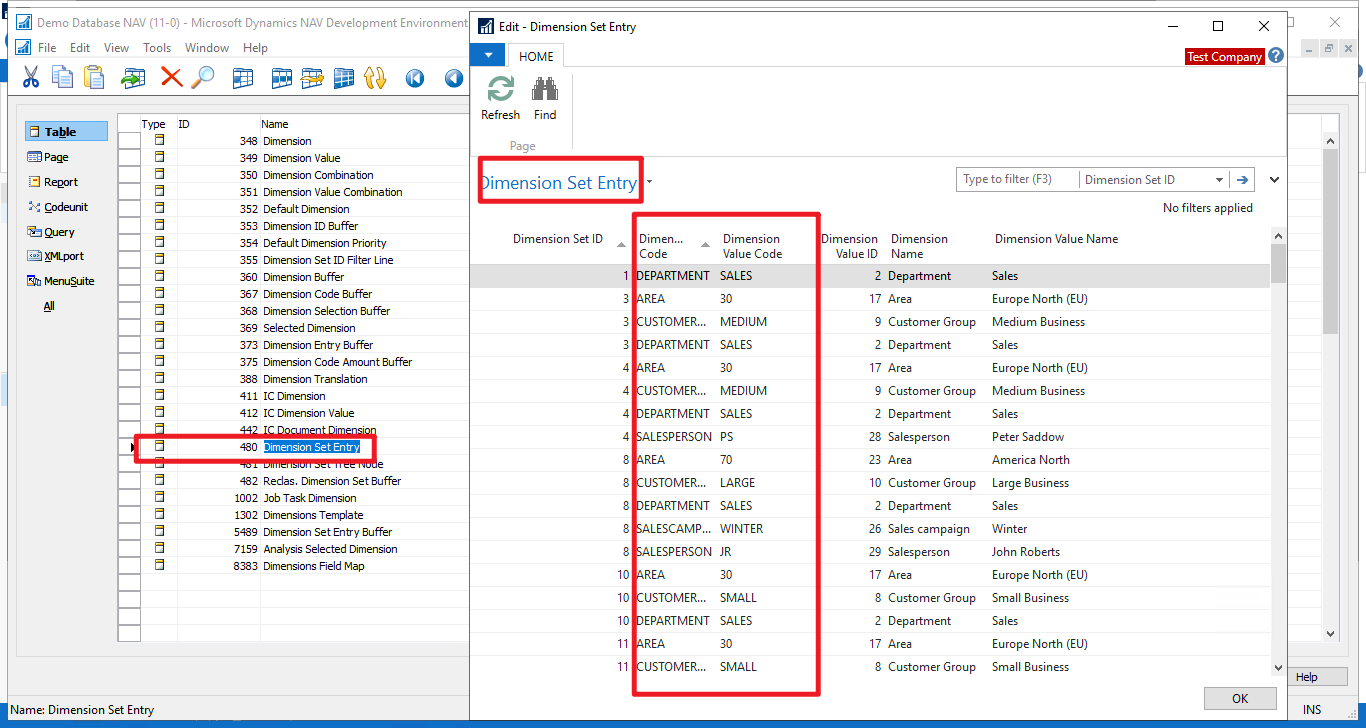
    I think you can try open the "480 Dimension Set Entry" table in the development environment directly. (This does not require a development license)

    Dimension in NAV is saved in the form of Dimension Set ID. A dimension set ID indicates a combination.

    You can search this table to see if your Dimension has been used.
    pastedimage1647301977266v1.png

    As for changing Dimensions, there is no good way in NAV2018.
    Only to revese documents, such as Dimenisons in Posted Sales invoice are wrong, this need to create Sales Credit Memo to cancel it first.

    Hope this will help.

    Thanks.

    ZHU

  • Verified answer
    Community Member Profile Picture
    on at

    Josh,

    You can use a few ways:

    1. Setup Analysis by Dimensions for your Dimensions and you will see the entries made by GL Account. You can drill into the entries to see them

    2. On the Chart of Accounts page, you can click into Balance/G/L Balance by Dimension. Then drill into the Account for detail

    As for corrections, not that easy in NAV 2018 so from my perspective as an Accountant, make a correcting entry reversing the incorrect posting and then replace with a correct posting.

    Hope this helps.

    Thanks,

    Steve

Under review

Thank you for your reply! To ensure a great experience for everyone, your content is awaiting approval by our Community Managers. Please check back later.

Helpful resources

Quick Links

Responsible AI policies

As AI tools become more common, we’re introducing a Responsible AI Use…

Neeraj Kumar – Community Spotlight

We are honored to recognize Neeraj Kumar as our Community Spotlight honoree for…

Leaderboard > Small and medium business | Business Central, NAV, RMS

#1
OussamaSabbouh Profile Picture

OussamaSabbouh 3,226

#2
Jainam M. Kothari Profile Picture

Jainam M. Kothari 2,047 Super User 2025 Season 2

#3
YUN ZHU Profile Picture

YUN ZHU 1,257 Super User 2025 Season 2

Last 30 days Overall leaderboard

Featured topics

Product updates

Dynamics 365 release plans



