web
You’re offline. This is a read only version of the page.
close
Skip to main content

Announcements

No record found.

News and Announcements icon
Community site session details

Community site session details

Session Id :
Business Central forum

Post Sales Order, Set Ship as default selection

(0) ShareShare
ReportReport
Posted on by 45

Hello,

Ist it possible to set Ship as default on posting (Sales and Purchase Orders)?
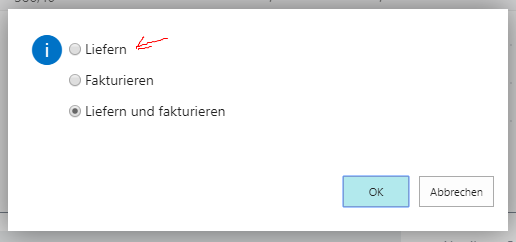
ship_5F00_on_5F00_post.PNG

My emploeeys should only ship orders and my accounting staff should create the invoice, only on a few exceptions my normal staff should be allowed to create an invoice

Categories:
I have the same question (0)
  • Verified answer
    Hannes Holst Profile Picture
    5,767 on at

    Hi,

    Codeunit 81 publishes the event "OnBeforeConfirmSalesPost" which comes with the parameter "DefaultOption".
    Create an Event-subscriber to this event and change DefaultOption to 1.

  • Suggested answer
    -Chris- Profile Picture
    45 on at

    Hi Hannes,

    Thanks so much, works like a charm, how did you get the name of the Event ? Is there some type of Documentation Available ?

    For any other person who is in need of this, feel free to use the following code:

    codeunit 50115 EventsSubscriber
    {
        EventSubscriberInstance = StaticAutomatic;
        [EventSubscriber(ObjectType::Codeunit, 81, 'OnBeforeConfirmSalesPost', '', false, false)]
        local procedure OverideDefaultOption(var DefaultOption: Integer)
        var
    
        begin
            DefaultOption := 1;
        end;
    }
  • Hannes Holst Profile Picture
    5,767 on at

    Hi,

    Normally, I just walk through the code.

  • -Chris- Profile Picture
    45 on at

    interesting...

    how can i walk through the code ?

  • Suggested answer
    Teddy Herryanto (That NAV Guy) Profile Picture
    14,300 Super User 2026 Season 1 on at

    If you have the OnPrem BC, you can look at the base code.

  • Hannes Holst Profile Picture
    5,767 on at

    In C/SIDE you can right click on a function or variable and select "Go To Definition".

    You can do the same in VSCode, but only one step into the base app.
    To walk deeper into the code, you have to go back to your extension, and declare the object you are interested in as variable. Then you can select "Go To Definition" again. You have to repeat this until you have found what you are looking for.

  • -Chris- Profile Picture
    45 on at

    Hello,

    Thanks for the great tipp, go to Definition in VS Code Works (Docker Image)

    But there is no Kind of list wich displays the codeunits/pages/etc .. and its names ?

Under review

Thank you for your reply! To ensure a great experience for everyone, your content is awaiting approval by our Community Managers. Please check back later.

Helpful resources

Quick Links

November Spotlight Star - Khushbu Rajvi

Congratulations to a top community star!

Forum Structure Changes Coming on 11/8!

In our never-ending quest to help the Dynamics 365 Community members get answers faster …

Dynamics 365 Community Platform update – Oct 28

Welcome to the next edition of the Community Platform Update. This is a status …

Leaderboard > Business Central

Last 30 days Overall leaderboard

Featured topics

Product updates

Dynamics 365 release plans
