Hi Marco,
For example:
If my event maximum event capacity is 5, and number of invitation per slot is 1, and remaining two option fields are set to "No".
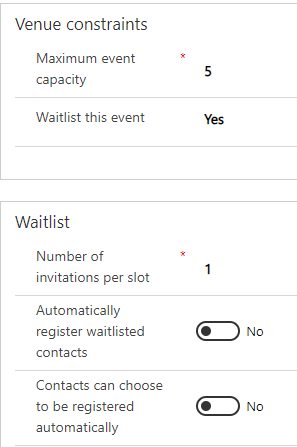
I added 7 event registration records(one record per minute), obviously, customer 6 and customer 7 will be added into waitlist.
Then I set one of registration record to inactive(cancel event registration),
due to slot is only 1, so only the 6th customer will be invited, the priority depends on registration date and time of customer on event website,
the earlier the registration, the higher the priority.

If I continue to deactivate an event registration record, then the 7th customer will be also invited automatically.
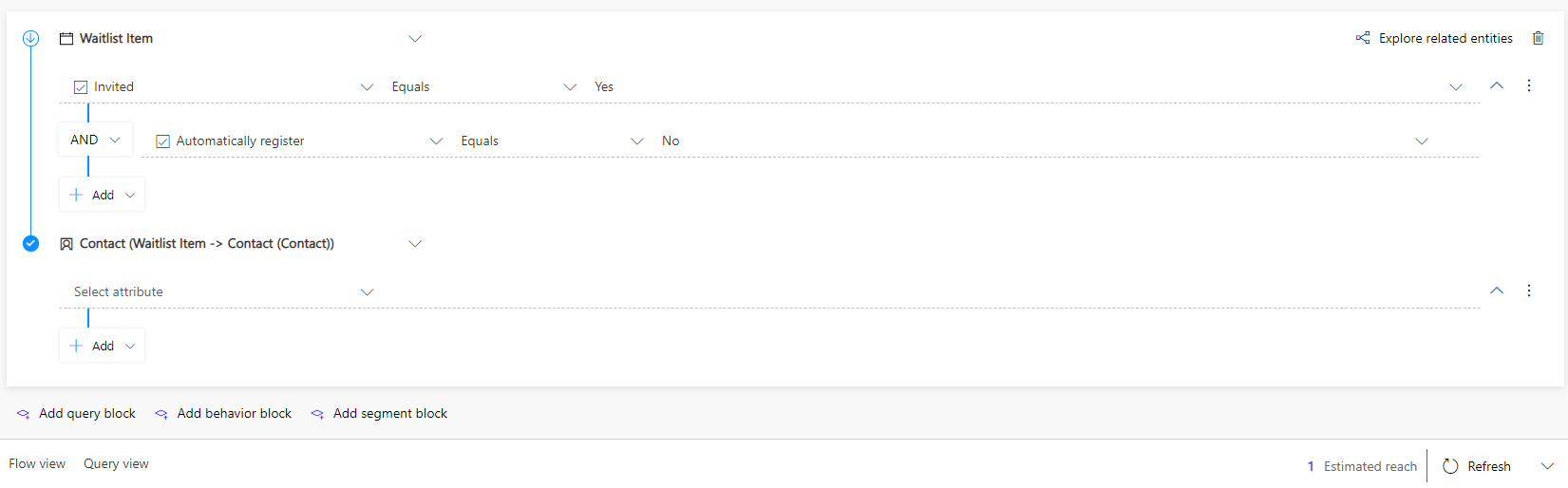
Now we can build a segment to query them and send invitation email,(Invited equals Yes)
by default Waitlist Item entity is not available in segment query, we should enable it in segment tool manually.(By following this tutorial.)
For the number, we might choose a higher number to increase the chance that at least one contact will follow through with the registration.
It is recommended to read waitlist function introduction from documentation, we can find more details from it.
https://docs.microsoft.com/en-us/dynamics365/marketing/event-waitlist#how-the-waitlist-works
https://docs.microsoft.com/en-us/dynamics365/marketing/event-waitlist#enable-a-waitlist-for-an-event(3. Number of invitations per slot)
Regards,
Clofly


