web
You’re offline. This is a read only version of the page.
close
Skip to main content

Notifications

Announcements

No record found.

Community site session details

Community site session details

Session Id :
Microsoft Dynamics GP (Archived)

Lot Number Per Quantity in Assembly Serial/Lot Entry

(1) ShareShare
ReportReport
Posted on by 2,346

My customer is using Bill of Materials and Assembly Transaction in Microsoft Dynamics GP. There are some assemblies with very large quantity which takes very long to process these. The reason is that because GP populates a line item of the Component Lot Number for each Qty on the Assembly Serial/Lot Entry automatically.
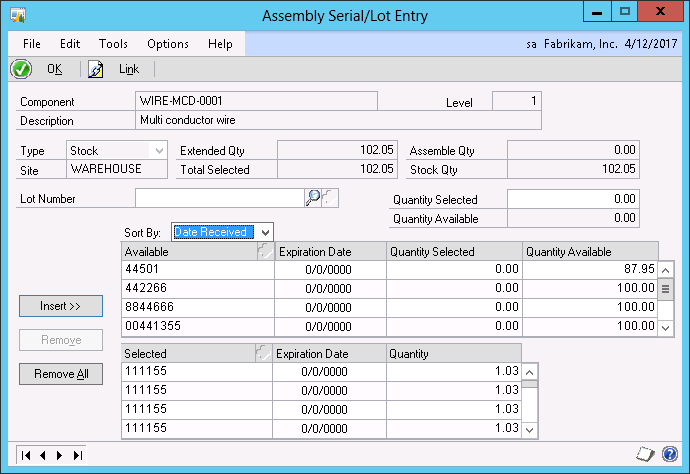
Whereas it should be like this:
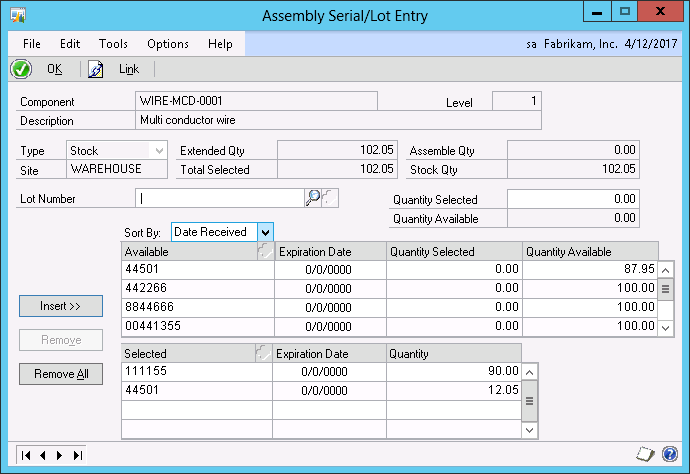
Will be grateful if anyone of you could let me know a way to configure GP so that it populates Assembly Serial/Lot Entry window shown in second screen shot.

In case you want to know, they are using Microsoft Dynamics GP 2013 Service Pack 2.

Thanks

Haroon

*This post is locked for comments

I have the same question (0)
  • soma Profile Picture
    24,410 on at

    Do you want to manually enter the serial/lot numbers for assembly entry transaction(Ex; screen shot 2)? and prevent automatic populate(Ex; screen shot 1)?

  • haroonattari Profile Picture
    2,346 on at

    Yes, I will manually enter the lot numbers. Can you please let me know how to prevent system from populating lot numbers automatically?

  • Suggested answer
    soma Profile Picture
    24,410 on at

    No option available for prevent auto assign lot/serial numbers in inventory module. So, you can't prevent the auto assign lot number for assembly entry transactions.

    Hope this helps!!!

  • haroonattari Profile Picture
    2,346 on at

    Any tech guy here who can let me know if there is any way I can speed up this process by adding index to any table or any other workaround?

  • Suggested answer
    soma Profile Picture
    24,410 on at

    Anyway you have decided to enter lot numbers as manually. So, before manually enters the lot numbers, just click the "Remove All" button instead of prevent system populated lot numbers automatically. If you click the remove all button, it will clear all the predefined lot numbers for the assembly components.

    Hope this helps!!!

  • haroonattari Profile Picture
    2,346 on at

    As I said in my first post, that there are some assemblies with very large quantity hence 'Posting' these Assembly transaction is taking very long. Also when 'Remove All' button is clicked it also takes penalty of time, hence I was looking for any solution through which I can speed this up.

    Anyway, thanks for your help.

    Regards

    Haroon

  • Suggested answer
    soma Profile Picture
    24,410 on at

    You can create a customization to block the auto populate process for serial/lot numbers to GP assembly serial lot tables(BM10400). But, it will not reduce the time for assembly enter release process. It will clear all the auto assigned serial/lot numbers from assembly serial/lot entry window(helps you to reduce a one step Remove All).

    Note: I would not recommend for breaking GP standard logic.

    Hope this helps!!!

  • Verified answer
    haroonattari Profile Picture
    2,346 on at

    I got the option within Microsoft Dynamics GP to aggregate Lot Number.

    There is a check box (Allow Linking of Component and Finished Good Serial and Lot Numbers) on Bill of Material Setup window (Inventory >> Setup >> Bill of Materials). Unmarking this checkbox did the magic.

  • Mahmoud Saadi Profile Picture
    32,738 on at

    Mr Haroon

    I have been following your post from the early beginning. Although I didn't have a proper answer for your inquiry, I was quite interested for any relevant and applicable solution.

    I am impressed with this option, absolutely thankful for your feedback as well.

  • soma Profile Picture
    24,410 on at

    Hi Haroon,

    Already I have tried to unmark this option earlier to my first suggested answer. But, this wasn't block the auto populate of serial/lot numbers in assembly entry transactions.

    Can you please check again and let us know?

    Your reply is much appreciated.

Under review

Thank you for your reply! To ensure a great experience for everyone, your content is awaiting approval by our Community Managers. Please check back later.

Helpful resources

Quick Links

Responsible AI policies

As AI tools become more common, we’re introducing a Responsible AI Use…

Neeraj Kumar – Community Spotlight

We are honored to recognize Neeraj Kumar as our Community Spotlight honoree for…

Leaderboard > 🔒一 Microsoft Dynamics GP (Archived)

#1
Community Member Profile Picture

Community Member 2

#2
mtabor Profile Picture

mtabor 1

#2
Victoria Yudin Profile Picture

Victoria Yudin 1

Last 30 days Overall leaderboard

Featured topics

Product updates

Dynamics 365 release plans
