web
You’re offline. This is a read only version of the page.
close
Skip to main content

Notifications

Announcements

No record found.

Community site session details

Community site session details

Session Id :
Small and medium business | Business Central, N...
Answered

I can't create more than 12 columns in Column Layouts For Account Schedules

(0) ShareShare
ReportReport
Posted on by 15

Hi there,

I went through the MS Learning training and the documentation but I somehow can't figure that out:

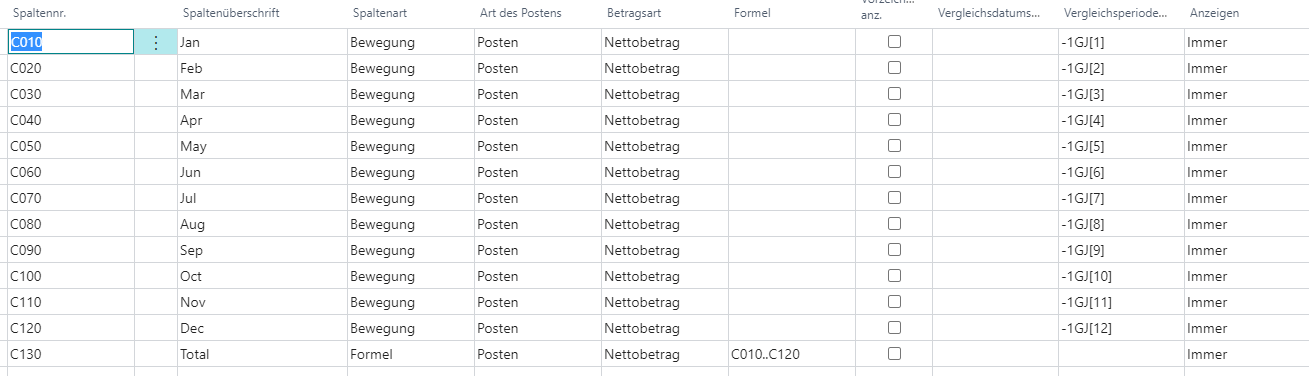
I am creating a column layout for account schedules. The columns show the numbers of each month (with me it equals period) of the last FY. 
pastedimage1611092903872v1.png

The problem: Colum C130 is NEVER shown.

I tried to delete one of the columns ABOVE of C130, then it is correctly shoen. So, does BC only support 12 Columns? Would be strange, i found articles and blocks talking about "endless columns".

What am I doing wrong?

I have the same question (0)
  • Verified answer
    Dirk Profile Picture
    on at

    Hi Eike,

    Indeed there is a product limitation.

    You can set up more than 12 columns, but you can only see 12 columns at a time.

    If you start the overview page you should see the first 12 columns.

    If you then in the ribbon you click Column / Next Column the first column should disappear and column no. 13 should appear as last column.

    If you export to Excel you should see all 13 columns.

    Maybe this workaround helps.

    Kind Regards

      Dirk

  • EikeKortz Profile Picture
    15 on at

    And here I was always wondering what this weird "Column / Next Column" buttons do..

    Thank you very much Dirk, that helps indeed!!

Under review

Thank you for your reply! To ensure a great experience for everyone, your content is awaiting approval by our Community Managers. Please check back later.

Helpful resources

Quick Links

Responsible AI policies

As AI tools become more common, we’re introducing a Responsible AI Use…

Neeraj Kumar – Community Spotlight

We are honored to recognize Neeraj Kumar as our Community Spotlight honoree for…

Leaderboard > Small and medium business | Business Central, NAV, RMS

#1
OussamaSabbouh Profile Picture

OussamaSabbouh 2,135

#2
YUN ZHU Profile Picture

YUN ZHU 733 Super User 2025 Season 2

#3
Sumit Singh Profile Picture

Sumit Singh 612

Last 30 days Overall leaderboard

Featured topics

Product updates

Dynamics 365 release plans



