web
You’re offline. This is a read only version of the page.
close
Skip to main content

Notifications

Announcements

No record found.

Community site session details

Community site session details

Session Id :
Microsoft Dynamics CRM (Archived)

SSIS package execution

(0) ShareShare
ReportReport
Posted on by 7,316

Hi,

I am trying to execute a ssis package to integrate with CRM 2013. But I am seeing this error. What does this error mean? I've added the xrm.sdk and crm.sdk.proxy dlls to the references.
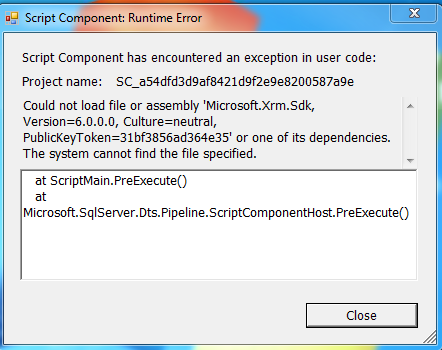
Thanks

*This post is locked for comments

I have the same question (0)
  • NatrajY Profile Picture
    3,040 on at

    Maybe try registering both these in the GAC, if it is a dev environment. Also check that a different version of the assemblies are not already in the GAC. To be honest, I haven't used the script component in SSIS. I have just used Cozyroc for interacting with CRM. Kingswaysoft SSIS connector is also another good option.

  • Verified answer
    ScottDurow Profile Picture
    21 on at

    Yes - adding to the GAC works - or you could put the assemblies in C:\Program Files\Microsoft SQL Server\120\DTS

    I agree that it would be far easier to use a tool such as Cozyroc or KingswaySoft's SSIS toolkit - I highly recommend the latter!

    Hope this helps,

    Scott

  • meenoo Profile Picture
    7,316 on at

    Thanks guys..

    I tried adding to GAC through command prompt. But it throws this error:

    Failure adding assembly to the cache: The system cannot find the file specified.

    Thanks

  • Verified answer
    NatrajY Profile Picture
    3,040 on at

    Maybe something to do with 32-bit/64-bit assemblies?

    EDIT: Realised that it could the command gacutil, not the assemblies themselves. Try running gacutil /? and see if you get the same error. If so, you have to add the path to gacutil to the PATH environment variable.

  • meenoo Profile Picture
    7,316 on at

    Got it guys.. I was able to add the assembly to gac through cmd.

    Nataraj - you are right, I was making mistake in adding the path to gacutil to the assembly path. It worked thanks. But then when I run the package this time it says "The authentication endpoint kerberos was not found on the configured secure token service."

    Thanks

  • meenoo Profile Picture
    7,316 on at

    Also, I've put the mentioned assembly in this location as well if that helps someone.

    C:\Program Files (x86)\Microsoft SQL Server\100\DTS\Binn

    Thanks

Under review

Thank you for your reply! To ensure a great experience for everyone, your content is awaiting approval by our Community Managers. Please check back later.

Helpful resources

Quick Links

Responsible AI policies

As AI tools become more common, we’re introducing a Responsible AI Use…

Neeraj Kumar – Community Spotlight

We are honored to recognize Neeraj Kumar as our Community Spotlight honoree for…

Leaderboard > 🔒一 Microsoft Dynamics CRM (Archived)

#1
SA-08121319-0 Profile Picture

SA-08121319-0 4

#1
Calum MacFarlane Profile Picture

Calum MacFarlane 4

#3
Alex Fun Wei Jie Profile Picture

Alex Fun Wei Jie 2

Last 30 days Overall leaderboard

Featured topics

Product updates

Dynamics 365 release plans



