web
You’re offline. This is a read only version of the page.
close
Skip to main content

Notifications

Announcements

No record found.

Community site session details

Community site session details

Session Id :
Small and medium business | Business Central, N...
Answered

VScode AL Cannot select custom dataitem when creating new report

(0) ShareShare
ReportReport
Posted on by 230

Hello,

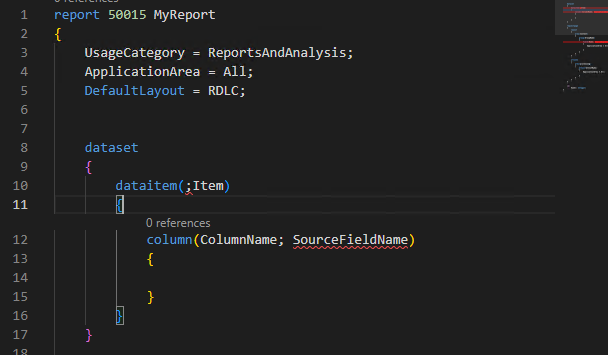
Just started creating BC365 report. I got it to download symbols and started creatign reprot, but I have problem when I'm trying to select table which our partner have created, it does not appear ir dataitem selection list. All I can see is standart BC tables. Partner developed tables appearing BC, but in code they seem not to exist. Where is my problem?

I'm talking in here, or should I select something different. Thanks for help guys. 
pastedimage1655107564852v1.png

I have the same question (0)
  • Suggested answer
    Vaishnavi J Profile Picture
    3,062 on at

    Hi,

    The objects which is created by your partner contains a different app id.
    So in order to access the objects (table, page, Report, Codeunits).
    You need to add dependency in your app.json file and then download the symbols again.
    After which you would see the partner package in your .al package folder.
    Below is the steps to add dependency

    Go to the extension management and then go to partner app which is installed in the BC. And then click on the Is installed field value to get the app information. And then refer the below screenshot pick those data from that app and add into your app.json file as dependency section.

    Image

     
    Format for adding dependencies.
    "dependencies": [
        {
        "id""<appid>"   // which will be  getting from your app information.,
        "publisher""<Publisher Name>",
        "name""<name of the app file>",
        "version""<Version No of the app>"
          }
    }
    If my answer was helpful to you, please verify it so that other users know it worked. Thank you very much
  • Suggested answer
    tanya07 Profile Picture
    1,638 on at

    Hi,

    1. Add the correct dependencies info in your app.json file

    2 . We mention the source table and dataitemname as below -

    pastedimage1655122404179v1.png

    pastedimage1655122496448v2.png

    I hope it helps.

    Thanks,

    TK

    Don't forget to help the community by verifying the answer if your question has been answered. It will let others know that the topic has a verified answer.

  • blank Profile Picture
    230 on at

    Instead of id, I needed to use appID and it worked like charm. Thank you very much.

Under review

Thank you for your reply! To ensure a great experience for everyone, your content is awaiting approval by our Community Managers. Please check back later.

Helpful resources

Quick Links

Responsible AI policies

As AI tools become more common, we’re introducing a Responsible AI Use…

Neeraj Kumar – Community Spotlight

We are honored to recognize Neeraj Kumar as our Community Spotlight honoree for…

Leaderboard > Small and medium business | Business Central, NAV, RMS

#1
OussamaSabbouh Profile Picture

OussamaSabbouh 2,468

#2
YUN ZHU Profile Picture

YUN ZHU 923 Super User 2025 Season 2

#3
Sumit Singh Profile Picture

Sumit Singh 607

Last 30 days Overall leaderboard

Featured topics

Product updates

Dynamics 365 release plans
