web
You’re offline. This is a read only version of the page.
close
Skip to main content

Announcements

No record found.

News and Announcements icon
Community site session details

Community site session details

Session Id :
Supply chain | Supply Chain Management, Commerce
Answered

Saved views:- Filter view by current user

(0) ShareShare
ReportReport
Posted on by 40

Is it possible to filter any list in D365 by the current user and then publish this as a saved view to all users. For example the All Sales orders view, can we filter the 'Sales Taker' column by the current logged in user eg "User A" and then publish. So if "User B" was to log in the list would be filtered by "User B":-

filter.JPG

I have the same question (0)
  • Suggested answer
    MelR Profile Picture
    80 on at

    It cannot be mass published, if the user goes in and filters themselves you can then save that view for that user individually - it would need to be done by "user A" and then "user B" etc.

  • Suggested answer
    Ramit Paul Profile Picture
    22,803 Most Valuable Professional on at

    Hi,

    I don't have system right now.

    Can you try with exporting the personalization and import the same to other user?

  • vinitgoyal2005 Profile Picture
    6,332 on at

    [Deleted]

  • Suggested answer
    Jake M Profile Picture
    78 on at

    Yes, you can do this!  At least what I think you are trying to achieve.

    Navigate to Options tab > Advanced filter or sort.

    Add the Table: Worker,  Field: Record-ID, Criteria: (HcmWorkerLookup::currentWorker())
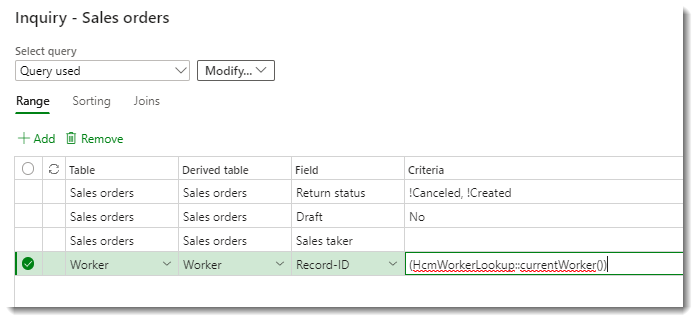
    currentWorker

    You can then publish it for other users.  The grid is then filtered to only show sales orders created by that user.

  • Kerry Moran Profile Picture
    40 on at

    perfect thank you. This worked and I was able to save it as a saved view and then publish it as a tile to users workspaces!

  • Holger Lamberti Profile Picture
    95 on at

    Hello Jake,

    do you know if this would be possible with a method for the current user?

    My use case is for Purchase Orders.

    Thank you,

    Holger

  • Suggested answer
    GirishS Profile Picture
    27,843 Moderator on at

    Hi Holger,

    Try to use the function with close and open brackets like below.

    (CurrentUserId())

    Thanks,

    Girish S.

  • Mohit Rampal Profile Picture
    12,573 Moderator on at

    (currentUserId()) is the correct syntax to use in Saved views.

Under review

Thank you for your reply! To ensure a great experience for everyone, your content is awaiting approval by our Community Managers. Please check back later.

Helpful resources

Quick Links

Introducing the 2026 Season 1 community Super Users

Congratulations to our 2026 Super Stars!

Congratulations to our 2025 Community Spotlights

Thanks to all of our 2025 Community Spotlight stars!

Leaderboard > Supply chain | Supply Chain Management, Commerce

#1
Mallesh Deshapaga Profile Picture

Mallesh Deshapaga 254

#2
Laurens vd Tang Profile Picture

Laurens vd Tang 192 Super User 2026 Season 1

#3
Syed Haris Shah Profile Picture

Syed Haris Shah 137 Super User 2026 Season 1

Last 30 days Overall leaderboard

Product updates

Dynamics 365 release plans
