web
You’re offline. This is a read only version of the page.
close
Skip to main content

Notifications

Announcements

No record found.

Community site session details

Community site session details

Session Id :
Microsoft Dynamics CRM (Archived)

Discovery Service of Crm Online 365 returns 401 - unauthorized

(0) ShareShare
ReportReport
Posted on by

Hello Guys,

I am trying to consume the discovery service of CRM Online through the web api but I can't make it work, I give you the details and hope someone of you can guide me to a solution.

BACKGROUND

I have a multitenant application where our clients login and we work with their data in CRM, I follow the new guidelines for CRM online 365 at (msdn.microsoft.com/.../mt790171.aspx).

Everything works but I need to consume as well the discovery service to check the organization details of the logged in user.

PROBLEM

I attempt the guidelines at https://msdn.microsoft.com/en-us/library/mt607485.aspx with no success.

For example if one tries the address https://globaldisco.crm.dynamics.com/api/discovery/v1.0/Instances(UniqueName='....org name....'), 404 is returned.

Since that happens I try then more generic urls, for example:

disco.crm.dynamics.com/.../Instances
globaldisco.crm.dynamics.com/.../Instances
globaldisco.crm.dynamics.com/.../Instances$select=DisplayName,Description&$filter=Type+eq+0 

but I always become the error that my token is not authorized.

That is not true, this is the same token I use to query CRM, if this token works in one webapi why will it not work in the other webapi?

More unfortunate is that Microsoft provides no example to consume them with the DiscoveryWebProxyClient.

TESTED

1- I am doing the tests with a user that is Administrator in CRM, AD and Office 365

2- I have tested the SOAP online service as described at (https://msdn.microsoft.com/en-us/library/gg328127.aspx) and works (It requires username and password although I need a solution that uses oauth2 token). This clearly means my user has permissions.

3- I create tokens as expected with AcquireToken method, nonetheless I have tried tokens created by using AcquireTokenSilent method.

4- I have queried the web api with the DiscoveryWebProxyClient class and as well with a Rest client from a web browser.

5- I attempt multiple Urls as explained above. (I am in Europe, I modify the url to crm4 server)

6- I tried to increase all permissions with the consent framework.

7- I switch the config and code to be single tenant, I used a token from that single tenant authority.

In every case I become 401 - unauthorized and makes no sense
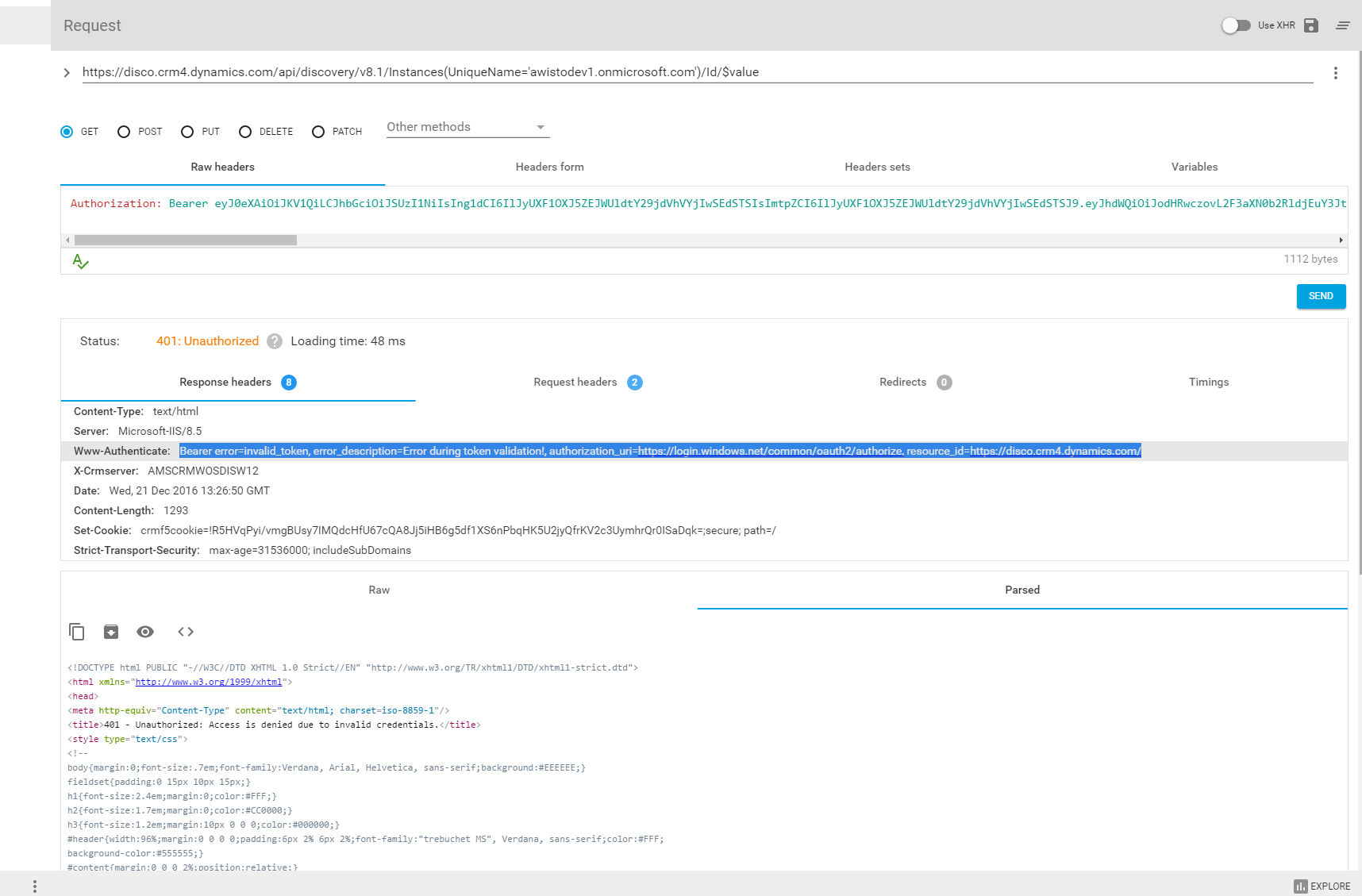
webapi1.png

Regards and good 2017,

George Charles Baxter

*This post is locked for comments

I have the same question (0)
  • Suggested answer
    ThomasN Profile Picture
    3,190 on at

    Hi George, Thanks for reaching out.

    I looked at your screenshot and your unique name seems odd. Are you sure that is the unique name showing in the Settings > Customizations > Developer Resources page?

    But that doesn't explain the authentication issue you are seeing. That would give a different endpoint error.

    For authentication I had a lot of trouble getting the application registered correctly in AD, and tokens. We ended up calling for a new token every day, and using that. May research some more around Azure AD and app registration.

    Let us know how you get on.

    Tom

  • Community Member Profile Picture
    on at

    Hello Tom,

    Yes, that was the name of my test domain.

    I mentioned my application is correctly configured in AD, one can login with openid/oauth2, connect to Crm online to do things and use the old Soap discovery service if one wants with username and password.

    The problem is to make any request to the new Rest webapi of the discovery service, it does not like the valid oauth2 tokens.

    We don't want to hard code the ids, endpoints and data from our clients, we want to discover them a t run time.

    That is one important point of multitenant applications.

    Gladly we already found a way to get everything we needed, including their 'app id' without using the discovery services.

    But it is very unsatisfactory that this webservice does not work.

    How come I can create a token that I can use it to work against crm online and then I send the same token to the discovery service and it says is invalid?

    George

  • ThomasN Profile Picture
    3,190 on at

    I see George, I would create a MSFT ticket for this. I get the same thing, and that is not right. Should be able to access a list of instances. Sorry for the misunderstanding.

  • Suggested answer
    Colin V Profile Picture
    on at

    Hi George, I recently went through this myself, the issue I think you might be experiencing is the resource that is being requested access to when you request your authentication token is incorrect. While you would think it would be https://globaldisco.crm.dynamics.com/, I actually been successfully with https://disco.crm.dynamics.com/ (ensure to include the trailing slash) as the resource.

    If your token is rejected then look at the WWW-Authenticate attribute in the response header and it will indicate the resource you should be requesting, as you have in your screenshot.

    After getting the right resource I was able to query the global disco service without issues and even though giving the NA disco resource returned instances from various regions. This worked on Azure AD tenants started in NA as well as the UK.

    I have blogged a full sample here - http://colinvermander.com/2017/01/19/calling-the-dynamics-global-discovery-service/

  • ajyendra Profile Picture
    1,738 on at

    Hi @Colin ,

    Can you please share the postman screenshot. I faced the same problem.

    Thanks in advance

Under review

Thank you for your reply! To ensure a great experience for everyone, your content is awaiting approval by our Community Managers. Please check back later.

Helpful resources

Quick Links

Responsible AI policies

As AI tools become more common, we’re introducing a Responsible AI Use…

Neeraj Kumar – Community Spotlight

We are honored to recognize Neeraj Kumar as our Community Spotlight honoree for…

Leaderboard > 🔒一 Microsoft Dynamics CRM (Archived)

#1
SA-08121319-0 Profile Picture

SA-08121319-0 4

#1
Calum MacFarlane Profile Picture

Calum MacFarlane 4

#3
Alex Fun Wei Jie Profile Picture

Alex Fun Wei Jie 2

Last 30 days Overall leaderboard

Featured topics

Product updates

Dynamics 365 release plans



