I'm sending an email to track three different link click actions. Basically:
- If person clicks the first link there's a link out; nothing happens in Dynamics.
- If person clicks the second link there's a link out; workflow A happens in Dynamics.
- If person clicks the third link there's a link out; workflow B happens in Dynamics.
- If person clicks nothing after 7 days, workflow A happens.
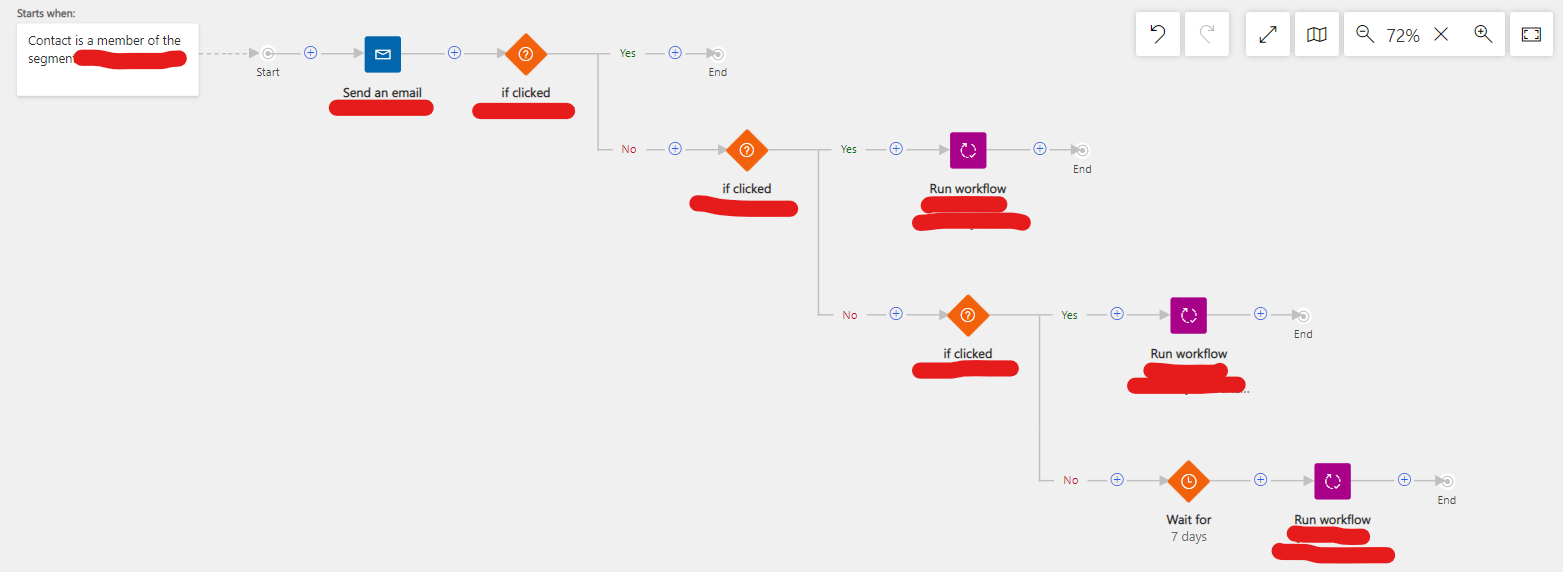
The nuts and bolts all seem to work, but the fact that there's a wait required baffles me a bit. As I understand it, the email works like this:
- Email is sent
- Journey waits specified time (X) to check if the first link was clicked
- If it was, nothing happens
- If it wasn't, contact is pushed down the "No" lane after X amount of time
- No lane #1-->Journey waits specified time (Y) to check if the second link was clicked
- If it was, workflow A happens in Dynamics
- If it wasn't, contact is pushed down the "No" lane after Y amount of time
- No lane #2-->Journey waits specified time (Z) to check if the third link was clicked
- If it was, workflow B happens in Dynamics
- If it wasn't, contact is pushed down the "No" lane after Z amount of time
- No lane #3-->Journey waits specified time (Q)
- After time is up, Workflow A happens in Dynamics
- Note: If this works how I think, there's really no point in waiting once a contact hits this lane
Final journey time to track my three clicks is X + Y + Z, with the email being unable to track the first link click after X is expired, unable to track the first and second link clicks after X + Y are expired and unable to track all three link clicks after X + Y + Z are expired. I do assume that it will check the second link click during the wait for X, etc.
Am I thinking about this the wrong way? Is there a different way to watch for all three clicks simultaneously until a certain time expires (or date)?


