web
You’re offline. This is a read only version of the page.
close
Skip to main content

Notifications

Announcements

No record found.

Community site session details

Community site session details

Session Id :
Microsoft Dynamics 365 | Integration, Dataverse...
Suggested Answer

Background flow not showing up as on demand on entity created on

(0) ShareShare
ReportReport
Posted on by 265

Hello Everyone, 

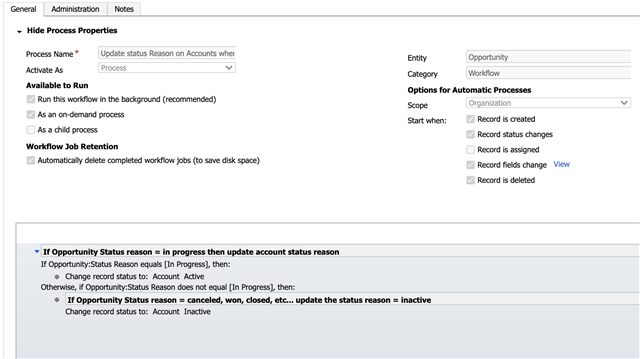
I have created a background workflow that will change the account status reason to inactive or active based on the opportunity status reason. See the workflow below. 
8741.pastedimage1603217880826v1.png

The problem is that even though I selected this to be an on-demand flow, I cannot see it in the UI of Dynamics when I click on "Flow". It will not load and so I cannot run it on demand even though I am trying to access this flow through the correct entity of opportunity to which I assigned the flow. 

6558.pastedimage1603217880826v2.png

It just never loads or shows up even after refreshing many many times. 

Does anyone know how to fix this?

Thank you for your help and all the best to you, 

Josh 

I have the same question (0)
  • Suggested answer
    Dribblej Profile Picture
    265 on at

    This appeared to be a problem with internet speed as I was able to video call a colleague and they were able to populate the flows and run them. I however could not because it would just keep loading...

    It is also worth noting that when an account is listed with status reason = in-active it enters a read-only format which is actually problematic 

  • LuHao Profile Picture
    40,892 on at

    Hi Josh,

    Have you tried to clean the browser cache or change another browser?

    Not only Account, all inactive entities records are read-only, this is by design.

    If you want to make the inactive account editable, then we can use business rules or Javascript to achieve.

Under review

Thank you for your reply! To ensure a great experience for everyone, your content is awaiting approval by our Community Managers. Please check back later.

Helpful resources

Quick Links

Responsible AI policies

As AI tools become more common, we’re introducing a Responsible AI Use…

Neeraj Kumar – Community Spotlight

We are honored to recognize Neeraj Kumar as our Community Spotlight honoree for…

Leaderboard > Microsoft Dynamics 365 | Integration, Dataverse, and general topics

#1
Martin Dráb Profile Picture

Martin Dráb 41 Most Valuable Professional

#2
iampranjal Profile Picture

iampranjal 39

#3
Satyam Prakash Profile Picture

Satyam Prakash 35

Last 30 days Overall leaderboard

Product updates

Dynamics 365 release plans



