web
You’re offline. This is a read only version of the page.
close
Skip to main content

Announcements

No record found.

News and Announcements icon
Community site session details

Community site session details

Session Id :
Small and medium business | Business Central, N...
Answered

Power BI: Column for Revenue, Column for Cost of Goods Sold

(0) ShareShare
ReportReport
Posted on by 3,518

Hi:

I know how to create a Power BI report that pulls amounts for dimensions based on the account categories of Revenue and Cost of Goods Sold.

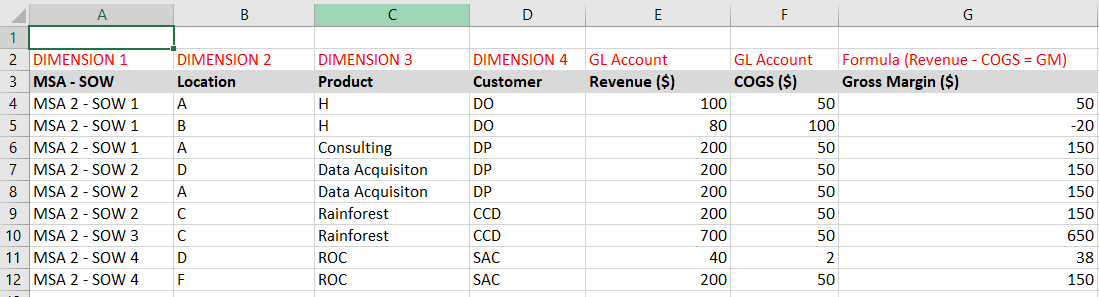
But, I cannot get the report to mirror what is shown in the screenshot below.

The tables that I'm using are GL Entries, Dimension Set Entries, and Chart of Accounts.

It seems that there is not an obvious way to have two separate columns for Revenue and COGS.

Has anyone out there found a way?

Thanks!

John
pastedimage1679076040786v2.png

I have the same question (0)
  • Suggested answer
    Inge M. Bruvik Profile Picture
    1,161 Moderator on at

    If I was to create a report like that I would use the Item Ledger Entries table. That holds both the revenue and the COGS.

  • john.ellis Profile Picture
    3,518 on at

    Thanks, Inge!

    Actually, inventory is not in the data.  :)

    John

Under review

Thank you for your reply! To ensure a great experience for everyone, your content is awaiting approval by our Community Managers. Please check back later.

Helpful resources

Quick Links

Introducing the 2026 Season 1 community Super Users

Congratulations to our 2026 Super Stars!

Congratulations to our 2025 Community Spotlights

Thanks to all of our 2025 Community Spotlight stars!

Leaderboard > Small and medium business | Business Central, NAV, RMS

#1
OussamaSabbouh Profile Picture

OussamaSabbouh 2,091 Super User 2026 Season 1

#2
YUN ZHU Profile Picture

YUN ZHU 1,032 Super User 2026 Season 1

#3
Dhiren Nagar Profile Picture

Dhiren Nagar 946 Super User 2026 Season 1

Last 30 days Overall leaderboard

Featured topics

Product updates

Dynamics 365 release plans
