web
You’re offline. This is a read only version of the page.
close
Skip to main content

Announcements

No record found.

News and Announcements icon
Community site session details

Community site session details

Session Id :
Customer experience | Sales, Customer Insights,...
Answered

enabling OrgDBOrgSettings in Dynamics Sales Professional for delegate access

(0) ShareShare
ReportReport
Posted on by 265

Hello Everyone, 

I am trying to configure delegate access so that assigned delegates can track items with the Dynamics app for Outlook. I am following this tutorial from Microsoft and I cannot find the "OrganizationSettingsEditor" in Advanced Settings -> Customizations -> Solutions -> All Solutions.

I am going to have the User who will be assigning the delegate do so from Outlook, but I am unsure if this will give the delegate the ability to track items with the Dynamics app for Outlook. 

Is there something else or somewhere else I should be looking to work enable OrgDBOrgSettings?

All the best to you, 

Josh 
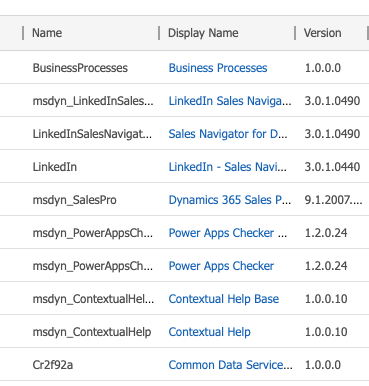
Screen-Shot-2020_2D00_08_2D00_26-at-2.02.24-PM.png

I have the same question (0)
  • Verified answer
    edmunch Profile Picture
    Microsoft Employee on at

    This is a solution you need to import into the org.  I think this link should still work:

    https://support.microsoft.com/en-us/help/2691237/orgdborgsettings-tool-for-microsoft-dynamics-crm

    Should also be available on Github.

  • Verified answer
    Bipin D365 Profile Picture
    28,985 Moderator on at

    Hi,

    Check below link to enable settings using OrgDBOrgSettings tool.

    xrmdynamicscrm.wordpress.com/.../

    Above article has steps to enable settings in that tool.

    Please mark my answer verified if i were helpful

  • Dribblej Profile Picture
    265 on at

    Bipin, You are always so helpful. Thank you for that and your time!

  • Dribblej Profile Picture
    265 on at

    Efrain, Thank you. This sent me in the right direction. Bipin's link with exact instruction really pushed it through as well.

Under review

Thank you for your reply! To ensure a great experience for everyone, your content is awaiting approval by our Community Managers. Please check back later.

Helpful resources

Quick Links

Introducing the 2026 Season 1 community Super Users

Congratulations to our 2026 Super Stars!

Meet the Microsoft Dynamics 365 Contact Center Champions

We are thrilled to have these Champions in our Community!

Congratulations to the March Top 10 Community Leaders

These are the community rock stars!

Leaderboard > Customer experience | Sales, Customer Insights, CRM

#1
ManoVerse Profile Picture

ManoVerse 184 Super User 2026 Season 1

#2
11manish Profile Picture

11manish 138

#3
CU11031447-0 Profile Picture

CU11031447-0 100

Last 30 days Overall leaderboard

Product updates

Dynamics 365 release plans
