web
You’re offline. This is a read only version of the page.
close
Skip to main content

Notifications

Announcements

No record found.

Community site session details

Community site session details

Session Id :
Microsoft Dynamics AX (Archived)

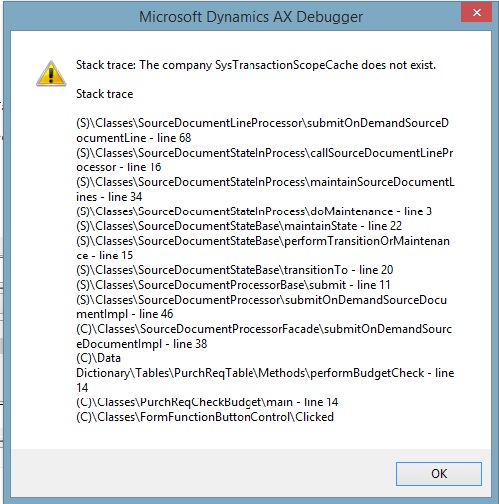
Stack trace: The company Sys TransactionScope Cache does not exist. Error while performing budget check in purchase requisition

(0) ShareShare
ReportReport
Posted on by 1,502

stack-trace-error.jpg

While modifying anything in requisitin or while performing budget check above stack trace error is found. 

I have cleared usage data also, but it's not resolved.

Please help me to resolve this issue ASAP. 

*This post is locked for comments

I have the same question (0)
  • Suggested answer
    Vilmos Kintera Profile Picture
    46,149 on at

    Did this work before and stopped working recently?

    Does your AX client executable version match the AX AOS executable version?

    Did you try to delete the AUC files while the client was closed? It is important to have it closed before, because that is when it is saving the currently cached objects again to disk.

    Also this topic is suggesting data issues in some tables, verify if all your data are intact for the specific requisition:

    https://community.dynamics.com/ax/f/33/t/164683

  • Jay Barot Profile Picture
    1,502 on at

    yes it was working fine before this issue occured, even i have tried to prepare new requisition and it is working fine.

    Yes, AX client and AOS executable(i.e kernal and application) versions matching correctly.

    AUC files were deleted while client was closed.  

    Regards,

    Jay

  • Suggested answer
    Vilmos Kintera Profile Picture
    46,149 on at

    Try to disable "Execute business operations in CIL" in your User options on the Development tab temporarily, reopen AX and retry - see if that helps. Maybe CIL code is not compiled correctly, or got broken within your environment.

    If that does not help, your last resort is to Debug and try to identify what circumstances lead to this error.

  • Jay Barot Profile Picture
    1,502 on at

    Thanks Vilmos.

    Execute business operations in CIL option is already disabled when i was doing this.

    I will try to debug.

    Regards,

    Jay

Under review

Thank you for your reply! To ensure a great experience for everyone, your content is awaiting approval by our Community Managers. Please check back later.

Helpful resources

Quick Links

Responsible AI policies

As AI tools become more common, we’re introducing a Responsible AI Use…

Neeraj Kumar – Community Spotlight

We are honored to recognize Neeraj Kumar as our Community Spotlight honoree for…

Leaderboard > 🔒一 Microsoft Dynamics AX (Archived)

#1
Priya_K Profile Picture

Priya_K 4

#1
Martin Dráb Profile Picture

Martin Dráb 4 Most Valuable Professional

#3
Ali Zaidi Profile Picture

Ali Zaidi 2

Last 30 days Overall leaderboard

Featured topics

Product updates

Dynamics 365 release plans
