web
You’re offline. This is a read only version of the page.
close
Skip to main content

Notifications

Announcements

Community site session details

Community site session details

Session Id :
Finance | Project Operations, Human Resources, ...
Answered

HowTo Customize Production parameter Table AX2012

(0) ShareShare
ReportReport
Posted on by 46

Hello all,

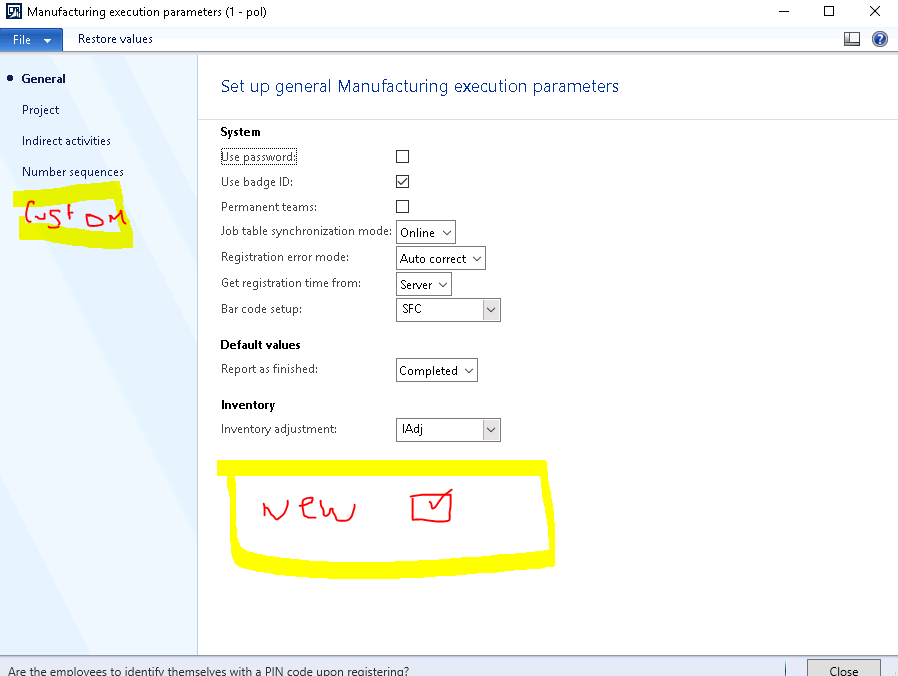
I was wondering if is possible to add new parameters into an original parameter table without any further repercussions. In this case I would like to add a new check box into the JmgParameter (Manu. Execution parameters)

in order to automatically stop all active jobs a worker is currenctly working on once we wants to stamp into a new job and this parameter (checkbox) is set to true.

right now the job registration promts the user to report feedback on any previous active job in order to stamp in a new one or when the worker wants to clock out. Actually a don't know if there is any predefined parameter for that.
pastedimage1593496364653v1.png

I have the same question (0)
  • Verified answer
    Sergei Minozhenko Profile Picture
    23,093 on at

    Hi Nestor,

    Adding new parameters to the existing parameter table is the totally fine and quite usual approach. But if you could, you need to plan how many new fields you would like to add in the future. If the planned number of fields is quite high, it's better to create own parameter table and use it in the form.

  • Fangyuan Hou Profile Picture
    on at

    Hi Nestor,

    Totally agreed with Sergei, please mark this as answer if you think the reply help.

  • CBNestor Profile Picture
    46 on at

    Hi Sergei,

    Thank you for the answer is usefull, I have added the custom field to the parameter table and now is shown in the form (sometimes is sais: unreatrieved) but I think is a matter of sync and compiliing right?

    the issue is about the logic now. Once the Worker is logged in the Job Registration and starts new job I make stop registration on all active jobs from the worker (this is doing Ok) the issue i later on I have a Exception thrown in Tables\JmgTermReg\calcProfiledate where sais: Cannot find profile for

    I wonder is maybe a better logic to apply or maybe a default parameter

    pastedimage1593611839704v1.pngpastedimage1593611990592v2.png

  • Sergei Minozhenko Profile Picture
    23,093 on at

    Hi Nestor C.

    About the error, do you see in the debugger if Worker field is empty or nor? Could it be that record in JmgEmployee was not created for worker?

  • Suggested answer
    CBNestor Profile Picture
    46 on at

    after the active jobs are custom stopped by code. the are still remaining in the JmgBundleJob\activejobs[] Map. that's why the problem.

    just needed to clear them. this job registration is a little headache to follow. thanks for the support Sergei!, I will set this as solved

    pastedimage1593754823310v1.png

Under review

Thank you for your reply! To ensure a great experience for everyone, your content is awaiting approval by our Community Managers. Please check back later.

Helpful resources

News and Announcements

Season of Giving Solutions is Here!

Quick Links

Responsible AI policies

As AI tools become more common, we’re introducing a Responsible AI Use…

Neeraj Kumar – Community Spotlight

We are honored to recognize Neeraj Kumar as our Community Spotlight honoree for…

Leaderboard > Finance | Project Operations, Human Resources, AX, GP, SL

#1
Abhilash Warrier Profile Picture

Abhilash Warrier 836 Super User 2025 Season 2

#2
André Arnaud de Calavon Profile Picture

André Arnaud de Cal... 441 Super User 2025 Season 2

#3
Martin Dráb Profile Picture

Martin Dráb 346 Most Valuable Professional

Last 30 days Overall leaderboard

Product updates

Dynamics 365 release plans
