web
You’re offline. This is a read only version of the page.
close
Skip to main content

Notifications

Announcements

No record found.

Community site session details

Community site session details

Session Id :
Finance | Project Operations, Human Resources, ...
Answered

Can't create collection letter for customer

(1) ShareShare
ReportReport
Posted on by

Hello everyone, 

I have been searching for an answer for the past couple of days for this issue, so I hope you can help me out. 

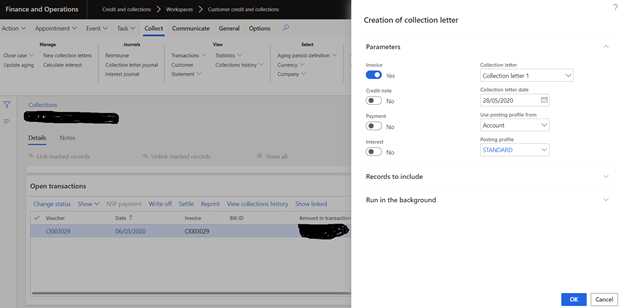
I want to generate a collection letter for a customer, since the customer is overdue on his payment. 

However, when trying to create the collection letter, the following notification appear: No collection letters were created for the criterion specified.

The customer is overdue with his payment since March, so there would be no reason for collection letter not to be created.
pastedimage1590664704815v1.png

The posting profile is the same as for the other customers, so that should not be the problem.

The collection letter sequence is also set. 

Any advice? 

Regards, 

Teodora Stefanovska

I have the same question (0)
  • Suggested answer
    saurabh bharti Profile Picture
    15,039 Moderator on at

    Did it worked earlier for this customer?? If not and this first time can you check for some other customer and also check the setup at customer master as well.

  • Community Member Profile Picture
    on at

    Hi Saurabh,

    This is the first time we try to generate a collection letter for this customer.

    I have compared his customer information with another customer for which we were able to generate a collection letter and the data is identical.

  • Suggested answer
    P.k.Kaushik Profile Picture
    1,031 on at

    Hello,

    Please review the customer transaction ,and make sure under the collection section the "collection letter" is set to yes.

    pastedimage1590679739141v1.png

    If this is set to yes , then the collection letter should be generated.

    Thanks, Kaushik

    This post is my own opinion and does not necessarily reflect the opinion or view of my company or Microsoft.

  • Community Member Profile Picture
    on at

    Hi Kaushik,

    From what I checked, the customer transaction has a check mark on it, and  a collection letter should be created. 

    pastedimage1590686298889v1.png

    In AR paeameters, we have set the creation of collection letters per transaction. 

    Regards, 

    Teodora

  • Suggested answer
    P.k.Kaushik Profile Picture
    1,031 on at

    Hello,

    As this is the first time collection letter is created for this customer

    Please go to collection letter journal as shown below.

    This should be empty. ( in case you find a record, it means the collection has already been created ) 

    pastedimage1590733427321v1.png

    Check the Customer group of the customer 

    Review the posting profile and make sure the Collection letter is attached to the Customer group

    pastedimage1590733761276v2.png

    If you have a test system where you are able to replicate this issue, then i would suggest you to create a new customer invoice ( post this invoice in the month of march and ensure due date is also in march )

    Run the Create Collection Letter process, see if the letter is generated.

    Thanks, Kaushik

  • Community Member Profile Picture
    on at

    Hello Kaushik, 

    Thank you for your help. 

    I actually found out what is the problem. When creating the numbering sequence, we have put SEK as a currency for the sequence. 

    pastedimage1590736084508v1.png

    This in turn, creates collection letters only for invoices made in SEK. This particular invoice was in EUR, so the currency criteria was not met. 

    When I changed the sequence currency to EUR, the collection letter was generated successfully. 

    But now I don't know how to go about this issue, since we have invoices in multiple currencies (EUR, SEK, CHF) and the sequence is set on the posting profile - which is the same for all customers. 

    Any advice? 

    Regards,

    Teodora

  • SThakur Profile Picture
    412 on at

    Can you check the following setups and share screenshot of the setup:

    Credit & collections module > Collection letter sequence form: Have you set up the collection letter codes, days etc.?

    5287.pastedimage1590736931010v10.jpeg

    - AR customer posting profiles form: Do you have a collection letter sequence and collection letter enabled in this form?

    6545.Collection-letter-sequence-on-customer-posting-profile.jpg

    The customer is associated with the same customer profile as setup above with the collection letter sequence?

    Also,  please refer to the below link for the collection letter setup and how to process them.

    https://docs.microsoft.com/en-us/dynamics365/finance/accounts-receivable/tasks/review-collections-information

    Thanks,

    Shilpi

  • Verified answer
    P.k.Kaushik Profile Picture
    1,031 on at

    Hello Teodara,

    It seems the currency field is mandatory and cant be kept as blank.

    If we are dealing in 3 currencies then i would suggest you to create 9 records 

    Collection Letter 1- SEK

    Collection Letter 2 - SEK

    Final Demand Notice SEK

    Collection Letter 1 CHF

    Collection Letter 2 CHF

    Final Demand Notice CHF

    Collection Letter 1 EUR

    Collection Letter 2 EUR

    Final Demand Notice EUR

    Make sure all the other relevant fields are correctly entered.

    Make some back dated multi currency invoices in test environment and check if it working as expected.

    Thanks, Kaushik

    This post is my own opinion and does not necessarily reflect the opinion or view of my company or Microsoft.

    P.S:- Please mark the answer as verified if the issue is Resolved.

  • Community Member Profile Picture
    on at

    Hi Kaushik,

    Thank you so much!

    It worked :)

  • Suggested answer
    d365 Dynamics  community Profile Picture
    8 on at
    Hi,
     
    you should enter a collection letter sequence in the posting profile setup for all groups
     
    Regards,
    Karim BELHEDI

Under review

Thank you for your reply! To ensure a great experience for everyone, your content is awaiting approval by our Community Managers. Please check back later.

Helpful resources

Quick Links

Responsible AI policies

As AI tools become more common, we’re introducing a Responsible AI Use…

Neeraj Kumar – Community Spotlight

We are honored to recognize Neeraj Kumar as our Community Spotlight honoree for…

Leaderboard > Finance | Project Operations, Human Resources, AX, GP, SL

#1
Martin Dráb Profile Picture

Martin Dráb 664 Most Valuable Professional

#2
André Arnaud de Calavon Profile Picture

André Arnaud de Cal... 522 Super User 2025 Season 2

#3
Sohaib Cheema Profile Picture

Sohaib Cheema 303 User Group Leader

Last 30 days Overall leaderboard

Product updates

Dynamics 365 release plans
