web
You’re offline. This is a read only version of the page.
close
Skip to main content

Notifications

Announcements

No record found.

Community site session details

Community site session details

Session Id :
Small and medium business | Business Central, N...
Suggested Answer

(Incorrect Notification) The person it comes from is sometimes incorrect. (Approval Workflow)

(1) ShareShare
ReportReport
Posted on by 15

Hello Business Central Community,

I hope you are doing great, Let me share a little about the issue that I am here for,

Our client is using the Workflow Approval process for the Purchase entities. In some of the cases The notification comes from incorrect person (user).

Let me share detail information of one incident.

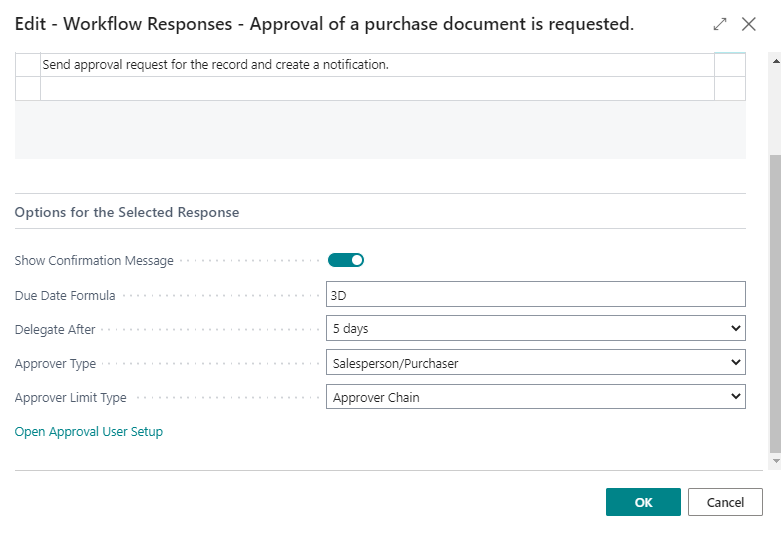
  • Here's the first image of Purchase Invoice Workflow. In which we have selected approver type as SalesPerson/Purchase and Approval Chain in Approval Limit Type.
    7840.png
     
  • Now, Second screen shot of Approval User Setup. In that we have user Mayank J. We don't have an value in Sales Purchaser code at this moment in to the Approval User Setup.

    3821.png


  • 3rd screen shot of the Purchase Invoice. Below Purchase Invoice is created by Mayank J. and We have added Viral L user as Purchaser Code.

    0550.png

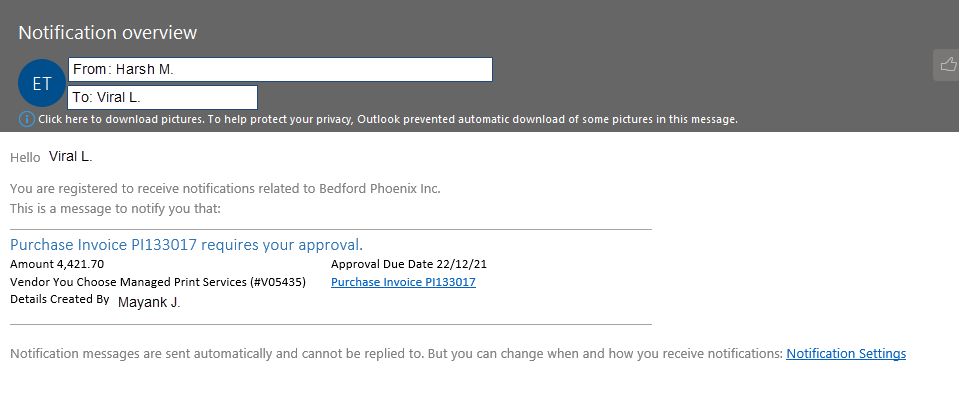
    - As a standard procedure, the email should be sent using the Mayank email id (Mayank J). but in this case business central have used random user Harsh M.

  • Screen shot of Email Notification which we have received from Harsh M. user. Harsh M user is not included in any of this processes.
            2451.png

 
Is it a Microsoft bug? or is it a default behavior to use random users? 90% is choosing the right user email, but in some cases we see an odd behavior.

Is there any way to find out the reason behind this incident?


Thanks & Regards,

I have the same question (0)
  • Suggested answer
    Vaishnavi J Profile Picture
    3,062 on at

    Hi,

    You can check following things

    1. Check your smtp setup or email accounts which is default set. (This generally defines the original source of sending the mail basically from part of mail)

    2. Check sent notification entries page in business central you will get a brief idea who was the sender (who send/raise the approval request ) and whose is the recipient.

    I believe maybe the smtp setup or email accounts page contains Harsh M  and its email address due to which you are getting the request from Harsh and not from Mayank.

    If my answer was helpful to you, please verify it so that other users know it worked. Thank you very much

  • D365 Dev Profile Picture
    15 on at

    Hello Vaishnavi Joshi ,

    • I have gone through Email Accounts in that we have D365.Admin2 user as default email account.

               3782.png

    • As per suggestion, I have gone through the Sent Notification Entries. In the recipient we have Viral L. and in the created by we have Mayank J.
      6862.png

     Harsh M user us not available into the Email Accounts.

    Thanks & Regards,

  • Suggested answer
    Vaishnavi J Profile Picture
    3,062 on at

    Hi,

    I can see you have applied filters in Sent Notification entries page. Can you remove it you must be having more than one entry in sent notification entries page.

    Also can you share entire screenshot of the approval user setup

    If my answer was helpful to you, please verify it so that other users know it worked. Thank you very much

  • D365 Dev Profile Picture
    15 on at

    Hello Vaishnavi J Good Morning,
    Thank you for your time.

    Yes, I have applied filter on the Sent Notification Entries Page. and Yes, We have more than two entries available.

    • Sent Notification Entries
      2-7_2D00_4_2D00_22.png
    • Approval User Setup
      1-7_2D00_4_2D00_22.png

    We have correct emails for all the users.

    Thanks & Regards,

  • Suggested answer
    Vaishnavi J Profile Picture
    3,062 on at

    Hi,

    your approval user setup seems to be incorrect if Mayank has raise a purchase invoice request then Sales person/Purchase code in purchase invoice document is VIRAL_L

    In your approval user setup make the below changes.

    User ID - MAYANK

    Sales person code - VIRAL_L

    Approver ID- RSHARDA

    If my answer was helpful to you, please verify it so that other users know it worked. Thank you very much

  • Suggested answer
    Alfredo_Iorio Profile Picture
    1,262 on at

    Hi

    This is a common issue and it's linked to the Approval user setup.

    The Purchaser/ Salesperson code used by the approval workflow does not depend on the filed in the purchase header.

    You need to set this up in the approval user setup. There is a field Salespers./Purchaser code in the user approval setup line.

    Once that is enabled, your workflow should work fine.

    pastedimage1649322580958v1.png 

Under review

Thank you for your reply! To ensure a great experience for everyone, your content is awaiting approval by our Community Managers. Please check back later.

Helpful resources

Quick Links

Responsible AI policies

As AI tools become more common, we’re introducing a Responsible AI Use…

Neeraj Kumar – Community Spotlight

We are honored to recognize Neeraj Kumar as our Community Spotlight honoree for…

Leaderboard > Small and medium business | Business Central, NAV, RMS

#1
OussamaSabbouh Profile Picture

OussamaSabbouh 3,226

#2
Jainam M. Kothari Profile Picture

Jainam M. Kothari 2,047 Super User 2025 Season 2

#3
YUN ZHU Profile Picture

YUN ZHU 1,257 Super User 2025 Season 2

Last 30 days Overall leaderboard

Featured topics

Product updates

Dynamics 365 release plans



