web
You’re offline. This is a read only version of the page.
close
Skip to main content

Announcements

No record found.

News and Announcements icon
Community site session details

Community site session details

Session Id :
Microsoft Dynamics AX (Archived)

Tax Setup Issue - GST-India Setup

(0) ShareShare
ReportReport
Posted on by 246

Hi Friends,

While doing Tax Setup not able create New configuration for (GST setup-India).

based on TaxEngineAx2012 document for GST setup i have setup, but not able to find new configuration for GST.

please find the below screen shot's and suggest on the same.
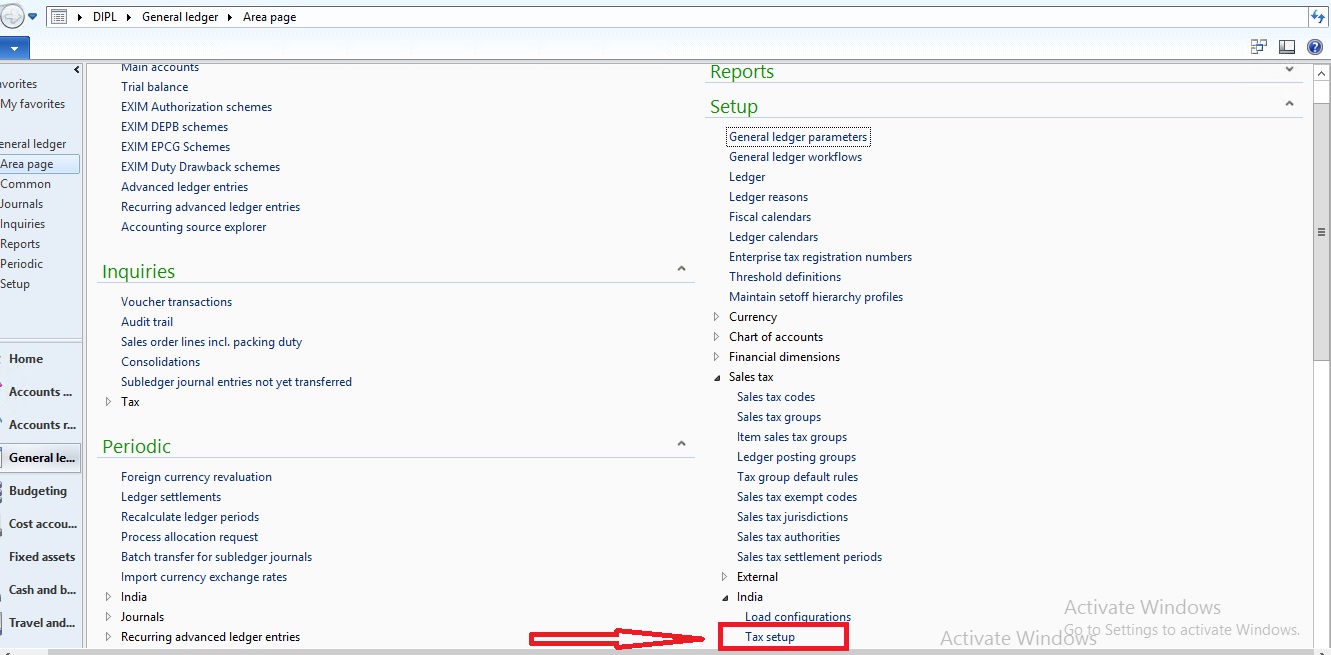
Load-configuration4.jpg

While click on new button in Tax setup under Available configurations.
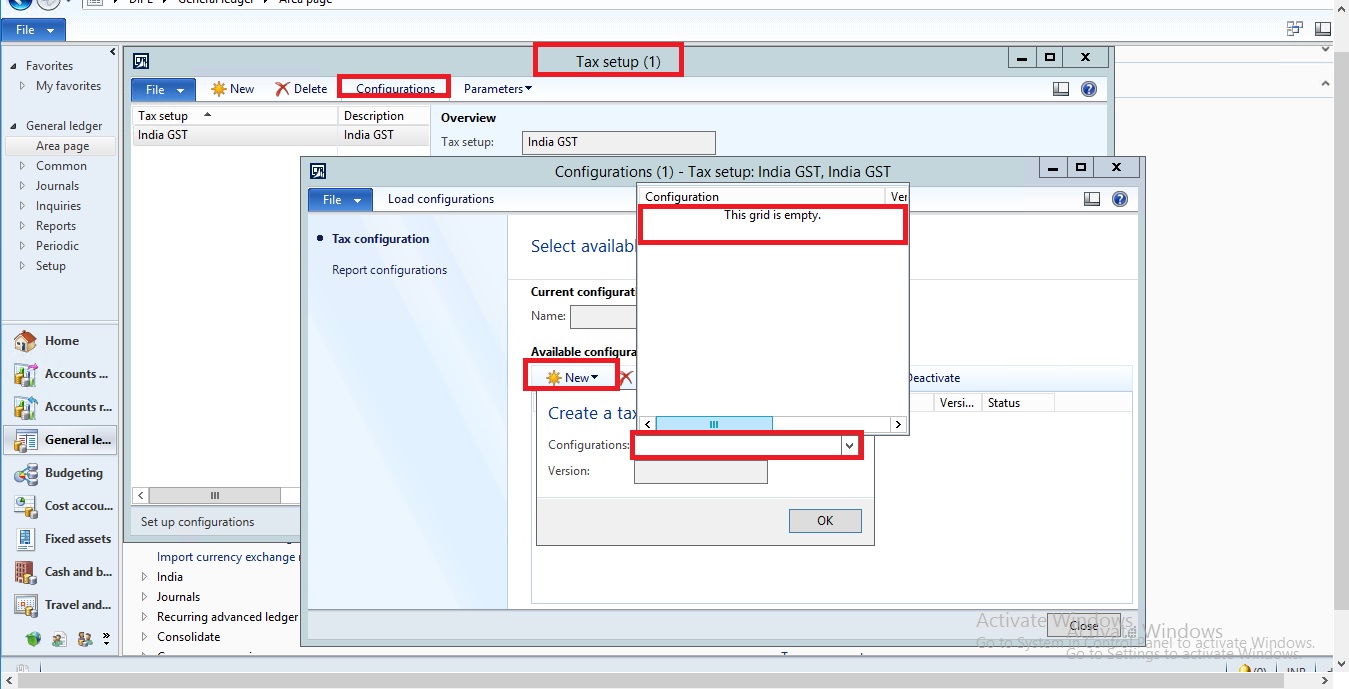
Load-configuration2.jpg

Regards,

Raghav.

*This post is locked for comments

I have the same question (0)
  • Verified answer
    Community Member Profile Picture
    on at

    Hello Raghav,

    Have you upload  configuration folder and load config configuration as below screen shot? If not then download configuration then upload all configuration file and check again.

    7585.1.png

  • RaghavR Profile Picture
    246 on at

    Hi Harpal,

    Thanks for quick response, no one is responding on GST-India issues.

    ok, based on TaxEngine2012 (GST setup given by AX for india) doing setup's based on following link.

    mbs.microsoft.com/.../GST-India

    => Ya in the same path i have selected Load configuration and system given message as (Load configuration has been saved successfully).

    -> Next I have created Tax setup and selected configuration button but when i select

    New button under Available configuration, Tax configuration is not showing. it showing empty field.

    is this patch installation problem or setup problem.

    One more note, when i saved load configuration system is giving message as (Load configuration has been saved successfully). but when i check in that folder it is empty.

    when you save load configuration file in system is it saving any files in system.??

    Please suggest.

    Regards,

    Raghav.

  • Suggested answer
    Community Member Profile Picture
    on at

    Hi Raghav,

    Have you copied .xml files in configuration folder? You get these files under configuration folder which you have download from partner source.

    Copy below files to C:\GST Configuration [As folder name given in your setup]

    GSTR-1 CSV.version.1.1.xml

    GSTR-1 JSON.version.1.1.xml

    GSTR-2 CSV.version.1.1.xml

    GSTR-2 JSON.version.1.1.xml

    GSTR-3 JSON.version.1.1.xml

    GSTReturns.version.1.xml

    Tax (India GST).version.44.86.138.xml

    Taxable Document (India).version.44.86.xml

    Taxable Document.version.44.xml

  • Suggested answer
    Community Member Profile Picture
    on at

    Hi Raghav,

    Have you copied .xml files in configuration folder? You get these files under configuration folder which you have download from partner source.

    Copy below files to C:\GST Configuration [As folder name given in your setup]

    GSTR-1 CSV.version.1.1.xml

    GSTR-1 JSON.version.1.1.xml

    GSTR-2 CSV.version.1.1.xml

    GSTR-2 JSON.version.1.1.xml

    GSTR-3 JSON.version.1.1.xml

    GSTReturns.version.1.xml

    Tax (India GST).version.44.86.138.xml

    Taxable Document (India).version.44.86.xml

    Taxable Document.version.44.xml

  • Verified answer
    Community Member Profile Picture
    on at

    Hi Raghav,

    Have you copied .xml files in configuration folder? You get these files under configuration folder which you have download from partner source.

    Copy below files to C:\GST Configuration [As folder name given in your setup]

    GSTR-1 CSV.version.1.1.xml

    GSTR-1 JSON.version.1.1.xml

    GSTR-2 CSV.version.1.1.xml

    GSTR-2 JSON.version.1.1.xml

    GSTR-3 JSON.version.1.1.xml

    GSTReturns.version.1.xml

    Tax (India GST).version.44.86.138.xml

    Taxable Document (India).version.44.86.xml

    Taxable Document.version.44.xml

  • Verified answer
    RaghavR Profile Picture
    246 on at

    Thanks Harpal,

    its working now.

  • RaghavR Profile Picture
    246 on at

    Hi Harpal,

    I have another issue in GST setup when i create project invoice GST not calculating but if i create Free text invoice with same customer system calculating GST.

    Please suggest on the same.

    community.dynamics.com/.../241366

  • SebastiJackson Profile Picture
    10 on at

    where we can find this  XML  file Tax (India GST).version.44.86.138.xml

  • In AX2012 in the InventOnHandItemListPage I need to be able to f Profile Picture
    499 on at

    Need help in configuring GST Tax Engine

    Please reply back

  • In AX2012 in the InventOnHandItemListPage I need to be able to f Profile Picture
    499 on at

    Need help in configuring GST Tax Engine

    Please reply back

Under review

Thank you for your reply! To ensure a great experience for everyone, your content is awaiting approval by our Community Managers. Please check back later.

Helpful resources

Quick Links

Introducing the 2026 Season 1 community Super Users

Congratulations to our 2026 Super Stars!

Meet the Microsoft Dynamics 365 Contact Center Champions

We are thrilled to have these Champions in our Community!

Congratulations to the March Top 10 Community Leaders

These are the community rock stars!

Leaderboard > 🔒一 Microsoft Dynamics AX (Archived)

#1
CP04-islander Profile Picture

CP04-islander 39

#2
Michel ROY Profile Picture

Michel ROY 14

#3
imran ul haq Profile Picture

imran ul haq 8

Last 30 days Overall leaderboard

Featured topics

Product updates

Dynamics 365 release plans
