web
You’re offline. This is a read only version of the page.
close
Skip to main content

Notifications

Announcements

No record found.

Community site session details

Community site session details

Session Id :
Microsoft Dynamics AX (Archived)

Disable Modules Selection Option from File Menu

(0) ShareShare
ReportReport
Posted on by 160

Hi All,

There is a requirement based on which we are trying to disable a module through x++ code by modifying startupPost method of Info class, then to disable addition through Navigation Pane Options, we've written code on that method too, but the problem lies in the File Menu from where User can still add Modules, how can this option be disabled.
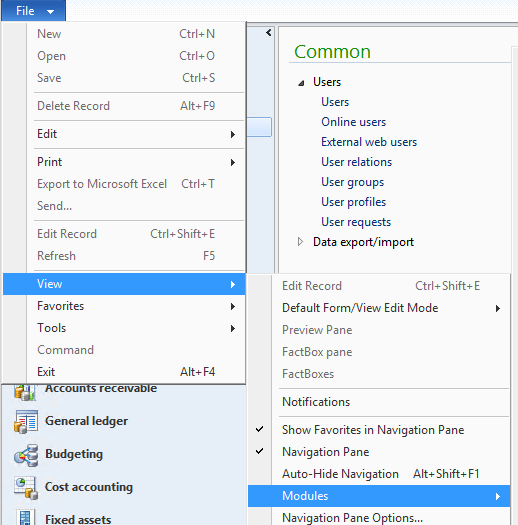
6177.Capture.PNG

Regards,

*This post is locked for comments

I have the same question (0)
  • Suggested answer
    André Arnaud de Calavon Profile Picture
    300,915 Super User 2025 Season 2 on at

     when Hi Abdul,

    This question has been asked before on the forum. When you are not granting acces, the user will not see the menu items. If the user has no access to all menu items from a menu, then the menu is hidden. When a user has access, he would be able to vies/show/hide the menu. Hiding them by setting changes to the user personalization is possible, but indeed the user can revert this change.

    There are some menu items which are present in more than one menu. E.g. All vendors in Account Payable and Procurement. If you then want to hide the Procurement menu, this is not fully possible. Or you have to create additional menu items and replace the original in e.g. the procurement menu. Then you are able to fully hide the menu. But this might be a very cumbersome task. 

    My recommendation would be to not do any effort to hide the menu as it will not lead to any abuse.

  • AbdulKhaliq Profile Picture
    160 on at

    Hi Crispin,

    Its both options, I have done the coding to restrict access to a module but the thing is, the user can add the module again by using File Menu

  • AbdulKhaliq Profile Picture
    160 on at

    I actually need it at the display level, can we somehow hide the option from FileMenu ?

  • Verified answer
    André Arnaud de Calavon Profile Picture
    300,915 Super User 2025 Season 2 on at

    Hi Abdul,

    As said above, this is indeed not possible. If the user has access to a menu item within the menu, he would be able to see it. It is indeed managed in the kernel where we don't have access to change it.

  • AbdulKhaliq Profile Picture
    160 on at

    Thanks..

Under review

Thank you for your reply! To ensure a great experience for everyone, your content is awaiting approval by our Community Managers. Please check back later.

Helpful resources

Quick Links

Responsible AI policies

As AI tools become more common, we’re introducing a Responsible AI Use…

Neeraj Kumar – Community Spotlight

We are honored to recognize Neeraj Kumar as our Community Spotlight honoree for…

Leaderboard > 🔒一 Microsoft Dynamics AX (Archived)

#1
Martin Dráb Profile Picture

Martin Dráb 4 Most Valuable Professional

#1
Priya_K Profile Picture

Priya_K 4

#3
MyDynamicsNAV Profile Picture

MyDynamicsNAV 2

Last 30 days Overall leaderboard

Featured topics

Product updates

Dynamics 365 release plans
