web
You’re offline. This is a read only version of the page.
close
Skip to main content

Notifications

Announcements

No record found.

Community site session details

Community site session details

Session Id :
Microsoft Dynamics 365 | Integration, Dataverse...
Answered

Is it possible to save the Forms Pro Dynamic link with each contact?

(0) ShareShare
ReportReport
Posted on by 803

Hello, 

In voice of the customer, we could create a unique survey for each contact and then share that unique url with them. In Forms Pro, the only way I can see to get the dynamic link to the survey is by including it in the email. We want to save that dynamic link with each contact record when that contact is created (we communicate with our contacts through a messaging app, so we just want  to copy the link in he app for them). I tried using Flow to have the email just sent to me, and thinking I would copy the link from the email and  just save it with the correct contact. Crude, but it would be a good enough start. The problem is that each survey response ends up looking like the same person took it b/c I hardcoded the email (pic attached for reference). 
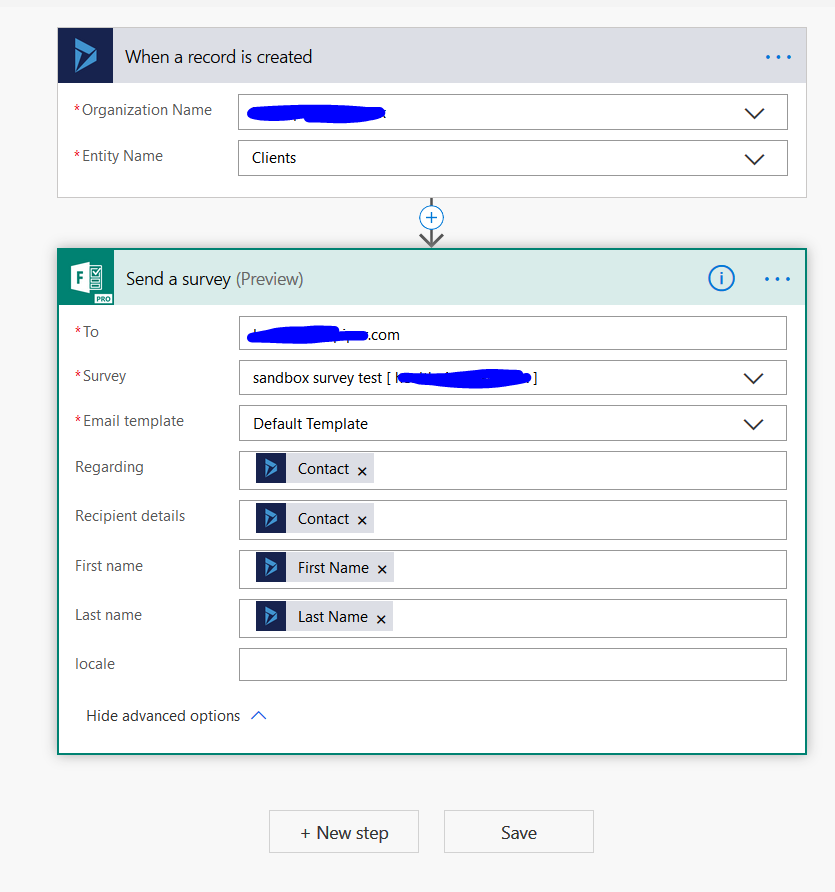
working-flow.PNG

My other thought is we could use the general public link, ask them to enter their email for one question, and use Power Automate to match up the responses with the Contact based on the email. Not sure if it's possible, and it doesn't sound easy. We were hoping for an easy, relatively user friendly path with Forms Pro. Really we just want to get the Dynamic Survey link saved with each Contact. Is there a simple way to do this? Thank you, any thoughts are appreciated. 

I have the same question (0)
  • LeoAlt Profile Picture
    16,331 Moderator on at

    Hi partner,

    I recommend you to find more professional help in Forms Pro Community :-)

    techcommunity.microsoft.com/.../ssoregistrationpage

    Regards,

    Leo

  • Verified answer
    Chris Haley Profile Picture
    on at

    There's a different action that you can use on the Forms Pro Power Automate connector which returns the personalised invitation link as a string, so you can use that value to send as a message in the chat app!

    docs.microsoft.com/.../

  • Chris Haley Profile Picture
    on at

    You might also find this blog useful:

    meganvwalker.com/.../

  • Ben T Profile Picture
    803 on at

    Thank Chris, this looks like the most promising avenue and maybe just what we want, but it's a bit out of realm of expertise. I'll ask a few questions and it would be great if you can help, but I can head over to forms pro if need be. So this action can create a survey link for you, as example, and return that link to me? And the only way to set this up is via Power Automate, correct? Ty.

  • Verified answer
    Chris Haley Profile Picture
    on at

    Hi Ben, that's right, the survey link is returned by the action as part of the Power Automate flow and you can use that value in a subsequent action. Perhaps what you need is another action to update the contact record in Dynamics by setting the value of a field (maybe a custom field) with the link URL?

    If you're brand new to Power Automate perhaps run through some of the online training materials such as here:

    docs.microsoft.com/.../

  • Ben T Profile Picture
    803 on at

    Chris, thank you for confirming the use case is doable - that is EXACTLY what we need. I will look through the materials. I have done a few flows, but really simple ones. I was hoping this would be something to be pulled off in a day or two, but it may take longer at my skill level, I'll go through the training stuff and that'll help see where I stand. With that being said, on a scale of 1-10 with 1 being the easiest flow an 10 being the most complex/time intensive to build, where you put this use case of this thread, returning the survey invite URL and update a dynamics custom field with it? I'm gonna to look into it for sure but your thoughts will be appreciated.

  • Chris Haley Profile Picture
    on at

    Hey Ben, sorry I've not been logged into the forum for a couple of weeks.

    I'd put this at complexity 3, it should be quite easy (but that's easy for me to say isn't it!!)

    Would love to know if you solved it - let us know, hopefully you're the expert by now :)

Under review

Thank you for your reply! To ensure a great experience for everyone, your content is awaiting approval by our Community Managers. Please check back later.

Helpful resources

Quick Links

Responsible AI policies

As AI tools become more common, we’re introducing a Responsible AI Use…

Neeraj Kumar – Community Spotlight

We are honored to recognize Neeraj Kumar as our Community Spotlight honoree for…

Leaderboard > Microsoft Dynamics 365 | Integration, Dataverse, and general topics

#1
Siv Sagar Profile Picture

Siv Sagar 93 Super User 2025 Season 2

#2
#ManoVerse Profile Picture

#ManoVerse 76

#3
Martin Dráb Profile Picture

Martin Dráb 64 Most Valuable Professional

Last 30 days Overall leaderboard

Product updates

Dynamics 365 release plans



