web
You’re offline. This is a read only version of the page.
close
Skip to main content

Announcements

No record found.

News and Announcements icon
Community site session details

Community site session details

Session Id :
Microsoft Dynamics AX (Archived)

customized field on stopping condition on workflow

(0) ShareShare
ReportReport
Posted on by 351

Hi All,

I have created customized workflow on new table. There are few fields in new table.

This field has to use during workflow configuration for stopping condition.

However there are no columns from my customized table while selecting stopping condition 
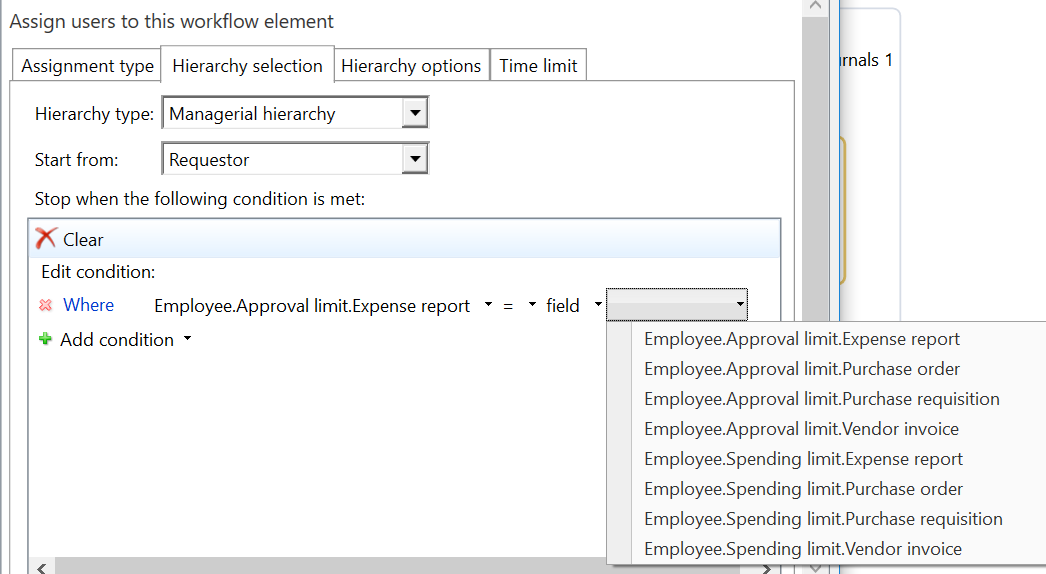
6557.image3.png

I have checked similar requirement in earlier post and followed recommended step

https://community.dynamics.com/ax/f/33/t/208763

However still my table field list not visible at workflow editor.

Any guidance ?

*This post is locked for comments

I have the same question (0)
  • André Arnaud de Calavon Profile Picture
    304,307 Super User 2026 Season 1 on at

    Hi Neetu,

    To be sure, you did add the field on the document query belonging to the workflow? You also did create a new full CIL? Did you restart the AOS service(s)?

  • CU13051429-0 Profile Picture
    351 on at

    Thanks Andre.

    Yes Andre, I have a customized query based on my new table. There are few new fields in query however  in my workflow editor there is no fields of new table.

    Thanks

    Neetu

  • André Arnaud de Calavon Profile Picture
    304,307 Super User 2026 Season 1 on at

    i Neetu,

    Is your question really the same as the the other question you shared? I noticed now that you are trying to extend the Managerial hierarchy. In that case, you have to check the class WorkflowLimitHierarchyProvider. Create a copy and then try to make changes to get your result.

  • CU13051429-0 Profile Picture
    351 on at

    Hi Andre,

    Yes, my requirement is almost same as in previously discussed thread. There is no extension for Managerial Hierarchy.

    To find root cause of issue , I have provided native query  (purchlinedocument) to workflowdocument, It seems fields of purchase order are available on workflow editor for customized workflow

  • CU13051429-0 Profile Picture
    351 on at

    Hi Andre,

    My Custom table is a global table where SaveDataPerCompany is false. When I am providing my global table as datasource to Workflow's query, then none of fields are available for stopping condition. I have again tried to provide another customized (new ) table where SaveDataPerCompany=true, all columns are available for stopping condition for same workflow.

    I have checked PurchReqDocument query, which is for purchase requisition Workflow for underlying table is also global. however those columns at line are available in workflow.

    is there any properties or relation which needs to be added as part of global tables to workflow condition?

    Thanks

    Neetu

Under review

Thank you for your reply! To ensure a great experience for everyone, your content is awaiting approval by our Community Managers. Please check back later.

Helpful resources

Quick Links

Introducing the 2026 Season 1 community Super Users

Congratulations to our 2026 Super Stars!

Meet the Microsoft Dynamics 365 Contact Center Champions

We are thrilled to have these Champions in our Community!

Congratulations to the March Top 10 Community Leaders

These are the community rock stars!

Leaderboard > 🔒一 Microsoft Dynamics AX (Archived)

#1
CP04-islander Profile Picture

CP04-islander 26

#2
imran ul haq Profile Picture

imran ul haq 8

#3
André Arnaud de Calavon Profile Picture

André Arnaud de Cal... 4 Super User 2026 Season 1

Last 30 days Overall leaderboard

Featured topics

Product updates

Dynamics 365 release plans
