web
You’re offline. This is a read only version of the page.
close
Skip to main content

Notifications

Announcements

No record found.

Community site session details

Community site session details

Session Id :
Small and medium business | Business Central, N...
Answered

AL Code - Phys. Invt. Order; Calculate Total Amount (Quantity x Unit Amount)

(0) ShareShare
ReportReport
Posted on by 5

Hi

I would like to calculate a new field in table "Phys. Invt. Order Line" called "EQ_Value (Base)":
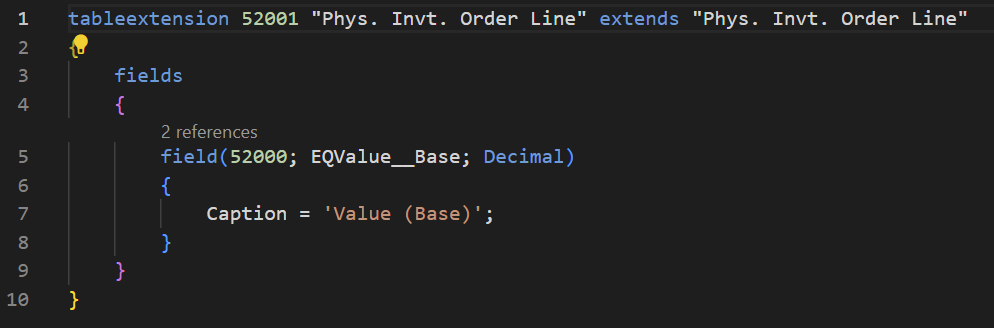
pastedimage1670531090565v1.png

This field should be calculated every time the Physical Inventory Order got finished.

pastedimage1670531386179v2.png

Can anybody assist me how to fill this new field (EQValue__Base) with the automated calculation (Unit_Cost * Quantity__Base_) on finishing the Inventory Order.

Thanks for your support!

I have the same question (0)
  • Suggested answer
    YUN ZHU Profile Picture
    95,329 Super User 2025 Season 2 on at

    Hi, It looks like you are only missing the code for the calculation.
    You can add it to the OnValidate Trigger of the Quantity__Base_ field, or the OnInsert Trigger and OnModify Trigger of the "Phys. Invt. Order Line" table, which should meet your needs.

    Hope this helps.

    Thanks.

    ZHU

  • Breefer Profile Picture
    5 on at

    Hi ZHU

    Thanks for your response.

    I tried to implement your assistance in different ways, unfortunately the field wouldn't calculate, actually.

    pastedimage1670573050129v1.png

    Even if I am reopening / closing the Phys Inventory Order:

    pastedimage1670573113978v2.png

  • Suggested answer
    DAnny3211 Profile Picture
    11,397 on at

    Hi

    you must enter the calculation of your new field in two places:

    in the onvalidate of the Unit_Cost field and in the onvalidate of the Quantity__Base_ field.

    this way you ensure that when you validate both of the above fields, your custom field will also be updated

    check my answer if it helped you, thanks

    DAniele

  • Breefer Profile Picture
    5 on at

    Hi Daniela

    Also thank you for your response.

    I am so sorry, I couldn't resolve my problem with your assistance.

    pastedimage1670575506737v1.png

    Where am I wrong? 

  • Verified answer
    DAnny3211 Profile Picture
    11,397 on at

    Hi

    I didn't mean it that way!

    define a codeunit and use this code:

        [EventSubscriber(ObjectType::table, 5876 , 'OnAfterValidateEvent', 'Unit Amount', false, false)]
        local procedure Set_EQValue_BaseFromAmount(var Rec: Record "Phys. Invt. Order Line")
        begin
            EQValue_Base:=rec."Quantity (Base)"*rec."Unit Amount";
        end;

        [EventSubscriber(ObjectType::table, 5876 , 'OnAfterValidateEvent', 'Quantity (Base)', false, false)]
        local procedure Set_EQValue_BaseFromQuantity(var Rec: Record "Phys. Invt. Order Line")
        begin
            EQValue_Base:=rec."Quantity (Base)"*rec."Unit Amount";
        end;
    check my answer if it helped you, thanks
    DAniele
  • Breefer Profile Picture
    5 on at

    Hi Daniele

    Thank you so much for your support!

    I defined a CodeUnit, the EQValue__Base_ reference needed a 'Rec.' before it.
    And now it works perfectly!

    pastedimage1670578228197v1.png

    pastedimage1670578254960v2.png

    Am I right?

  • Suggested answer
    DAnny3211 Profile Picture
    11,397 on at

    yes

    great! this is the right solution!

    Thank you

    Daniele

  • Breefer Profile Picture
    5 on at

    Thank you for your support!

    One last question Daniele;

    In my Production Environment it's causing an error, that I am not authorized to run the new CodeUnit with my License. I am owning the Business Central Essentials License - is that a problem?

    In my Test Environment everything runs perfectly.

  • Suggested answer
    DAnny3211 Profile Picture
    11,397 on at

    hi

    look this

    learn.microsoft.com/.../devenv-permissionset-object

    but I recommend you also study this new solution

    learn.microsoft.com/.../devenv-inherent-permissions

    check my answer if it helped you, thanks

    DAniele

Under review

Thank you for your reply! To ensure a great experience for everyone, your content is awaiting approval by our Community Managers. Please check back later.

Helpful resources

Quick Links

Responsible AI policies

As AI tools become more common, we’re introducing a Responsible AI Use…

Neeraj Kumar – Community Spotlight

We are honored to recognize Neeraj Kumar as our Community Spotlight honoree for…

Leaderboard > Small and medium business | Business Central, NAV, RMS

#1
OussamaSabbouh Profile Picture

OussamaSabbouh 3,229

#2
Jainam M. Kothari Profile Picture

Jainam M. Kothari 1,867 Super User 2025 Season 2

#3
YUN ZHU Profile Picture

YUN ZHU 1,153 Super User 2025 Season 2

Last 30 days Overall leaderboard

Featured topics

Product updates

Dynamics 365 release plans



