web
You’re offline. This is a read only version of the page.
close
Skip to main content

Notifications

Announcements

No record found.

Community site session details

Community site session details

Session Id :
Microsoft Dynamics CRM (Archived)

After deleting a value, Global option-set still shows a value in report

(0) ShareShare
ReportReport
Posted on by 2,003

HI,

After deleting some value from global option set 'caseorigincode'. It still shows values in report dropdown value. 

Below is a sql query i am using to fetch global option set to create a database.

SELECT OS.NAME, L.LABEL, AV.VALUE FROM ATTRIBUTEPICKLISTVALUEASIFPUBLISHEDLOGICALVIEW AV
JOIN OPTIONSETASIFPUBLISHEDLOGICALVIEW OS
ON AV.OPTIONSETID = OS.OPTIONSETID
JOIN LOCALIZEDLABELASIFPUBLISHEDLOGICALVIEW L
ON L.OBJECTID = AV.ATTRIBUTEPICKLISTVALUEID
WHERE OS.ISGLOBAL = 1 AND OS.ISCUSTOMOPTIONSET = 0
AND L.OBJECTCOLUMNNAME = 'DisplayName'
AND OS.NAME ='incident_caseorigincode'

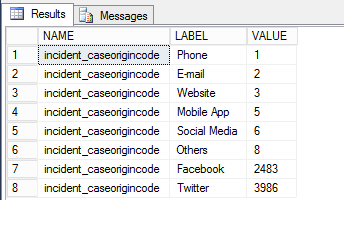
Below is a result
result1.png

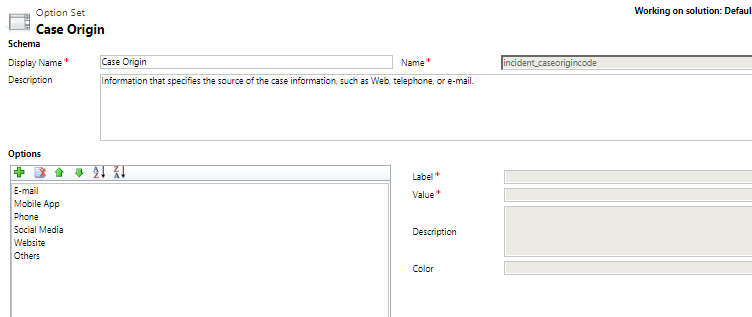
it still shows a value Facebook and twitter though i have deleted it from MS crm,saved and publish.
result2.png

Let me know what mistake i am doing. Thanks.

*This post is locked for comments

I have the same question (0)
  • Suggested answer
    PranavShroti Profile Picture
    4,510 on at

    CRM might have soft deleted... check in Advance Find by selecting particular colums and see what values comes for filtering.

    Hope this helps.

  • Suggested answer
    Kokulan Profile Picture
    18,054 on at

    Hi

    Make sure the report is connecting to the same instance that you have deleted the optionset value from.

    You could try a publish all and see that makes a difference

  • Abhishek Gupta Profile Picture
    2,003 on at

    Hi,

    Yes report are connected to right environment. I checked in advance find to, it shows below snapshot.

    0028.Push.png

    Thanks

    Abhishek

  • Suggested answer
    PranavShroti Profile Picture
    4,510 on at

    So advance filter will only pick records that are active in CRM DB. Now you need to update your query to only fetch active records from table.

    Hope this helps.

  • Abhishek Gupta Profile Picture
    2,003 on at

    Hi ,

    Thanks for clue. I found the solution in the ComponentState attribute.

    https://docs.microsoft.com/en-us/previous-versions/dynamicscrm-2016/developers-guide/gg328546(v=crm.8)#bkmk_componentstate

    ComponentState.png

    So i modify my query to  bring values from global option set where component state =0

    WHERE OS.ISGLOBAL = 1 AND OS.ISCUSTOMOPTIONSET = 0

    AND L.OBJECTCOLUMNNAME = 'DisplayName'

    AND OS.NAME ='incident_caseorigincode' and AV.ComponentState=0

    Thanks

    Abhishek

Under review

Thank you for your reply! To ensure a great experience for everyone, your content is awaiting approval by our Community Managers. Please check back later.

Helpful resources

Quick Links

Responsible AI policies

As AI tools become more common, we’re introducing a Responsible AI Use…

Neeraj Kumar – Community Spotlight

We are honored to recognize Neeraj Kumar as our Community Spotlight honoree for…

Leaderboard > 🔒一 Microsoft Dynamics CRM (Archived)

#1
SA-08121319-0 Profile Picture

SA-08121319-0 4

#1
Calum MacFarlane Profile Picture

Calum MacFarlane 4

#3
Alex Fun Wei Jie Profile Picture

Alex Fun Wei Jie 2

Last 30 days Overall leaderboard

Featured topics

Product updates

Dynamics 365 release plans



