web
You’re offline. This is a read only version of the page.
close
Skip to main content

Notifications

Announcements

No record found.

Community site session details

Community site session details

Session Id :
Small and medium business | Business Central, N...
Suggested Answer

Data Exchange Definition for exporting payment file does not work

(0) ShareShare
ReportReport
Posted on by 309

Hello, 

I have created a Data Exchange Definition to export payment files. The bank requires the following information: 

1. Document Type 

2. Vendor Account

3. Vendor Bank Account Number

4. Vendor Sort Code

5. Company making the payment

I completed the General fields as below in the data exchange definition as below:

pastedimage1674549898398v1.png

I have created two line definitions:

1. Lines from Payment Journal

pastedimage1674560012991v2.png

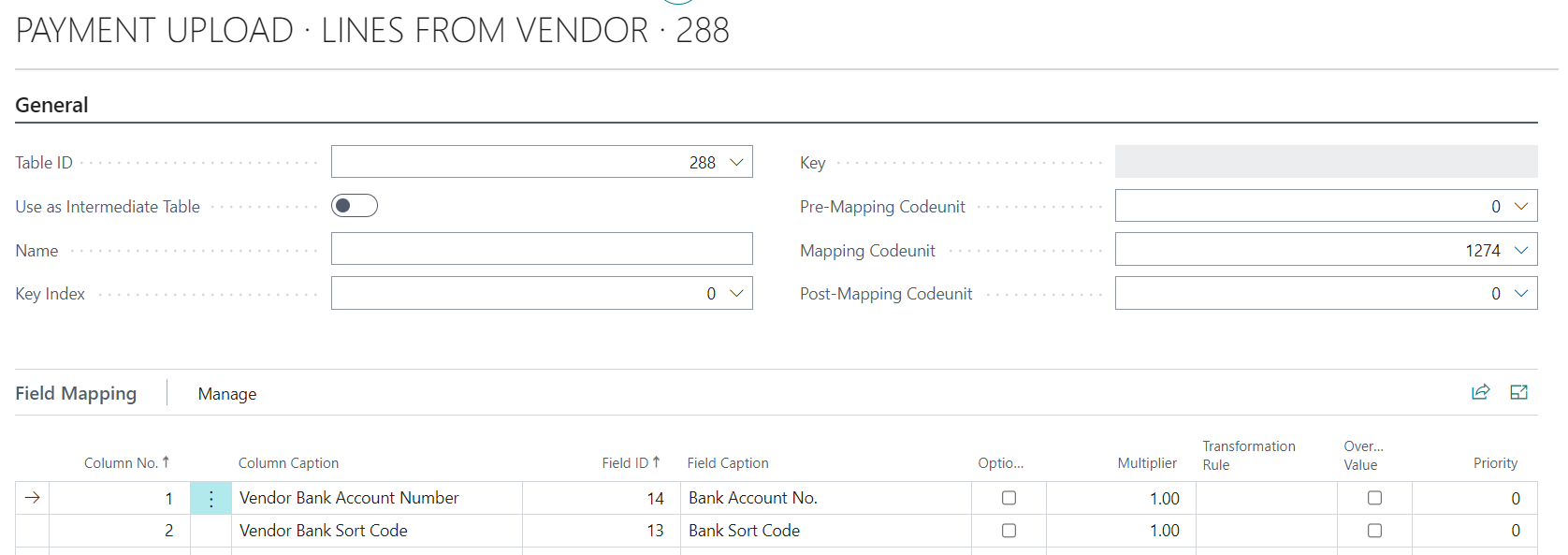
2. Lines from Vendor

pastedimage1674560049812v3.png

The problem is when I create a Payment Journal and try to export it I'm getting this error

Record(1220) is not compatible with Codeunit.Run(Record(81)).

Table 1220 is Data Exchange and Table 81 is the Gen Journal line table. 

Any ideas why I'm getting this error?

Many thanks, 


Alejandra

I have the same question (0)
  • Suggested answer
    Dallefeld Profile Picture
    211 User Group Leader on at

    Are you doing and ACH/EFT export? If so, why re-create the wheel?

    Looks like you are mapping to vendor information and that's not generally what the data definition is for.

  • AleAlonso Profile Picture
    309 on at

    Hi Kim,

    EFT is not an option for me as I'm in the UK.

    There is a SEPA Credit Transfer Bank Export format. However I can't use it as SEPA credit transfers can only be made in the EURO currency and my company is all transactions related are in GBP.

    Thanks

    Alejandra

  • Suggested answer
    YUN ZHU Profile Picture
    95,729 Super User 2025 Season 2 on at

    Hi, I feel it is still a setting problem, please refer to the following MS Learn (Docs).

    https://learn.microsoft.com/en-us/dynamics365/business-central/across-how-to-set-up-data-exchange-definitions

    In addition, you can also consider customizing, and it is not very difficult to create a program that exports XML using XMLPort.

    More details: https://yzhums.com/4809/

    Hope this helps.

    Thanks.

    ZHU

  • Suggested answer
    Dallefeld Profile Picture
    211 User Group Leader on at

    First, sorry, being in the US, I answer for US. We need to have something that shows version and country when posting questions so everyone can respond and get answers quicker.

    So the question is how did you know what codeunits to enter in your definition? The codeunits are processing using certain tables and apparently one is wrong. I know for the US mine are very different than yours.

Under review

Thank you for your reply! To ensure a great experience for everyone, your content is awaiting approval by our Community Managers. Please check back later.

Helpful resources

Quick Links

Responsible AI policies

As AI tools become more common, we’re introducing a Responsible AI Use…

Neeraj Kumar – Community Spotlight

We are honored to recognize Neeraj Kumar as our Community Spotlight honoree for…

Leaderboard > Small and medium business | Business Central, NAV, RMS

#1
OussamaSabbouh Profile Picture

OussamaSabbouh 2,362

#2
YUN ZHU Profile Picture

YUN ZHU 867 Super User 2025 Season 2

#3
Sumit Singh Profile Picture

Sumit Singh 607

Last 30 days Overall leaderboard

Featured topics

Product updates

Dynamics 365 release plans