web
You’re offline. This is a read only version of the page.
close
Skip to main content

Notifications

Announcements

No record found.

Community site session details

Community site session details

Session Id :
Microsoft Dynamics NAV (Archived)

Sales Invoice - Print different Bank Details in footer, depending on Payment Method Code of the Customer

(0) ShareShare
ReportReport
Posted on by 75

Hello 

We are a Swiss Dynamics NAV Customer.

Now we have a requirement, that we need to print the bank details information on the Sales Invoice based on the Payment Method Code of the customer. Beacuse we have different Banks/Accounts, depending on the 

For example:

We have customers from Germany which have the Payment Method Code "Euro", on invoices for these customer we would need to print a different bank information than a Swiss customer who has the payment method code "paying-in slip Bank1" or another customer who has the code "paying-in slip Bank2" would need also different information.

I know that in the default scenario that the Bank Information on the invoice footer comes from the company information, so its the same bank details on every invoice no matter which customer.

So my question now, is there a way to handle this with Dynamics NAV2018 and how do you set it up? So that we get the correct bank details on the invoice based on the customers payment method?

I attached a screenshot of an invoice and marked the line, so you can see which information I am relating too.
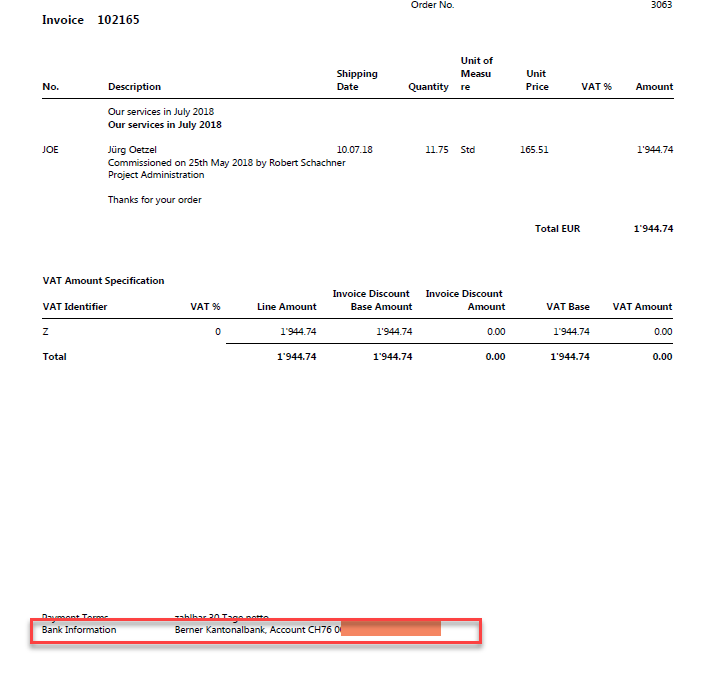
BankInfoOnSalesInvoiceNAV2018.png

Thanks for every suggestion.

Best Regards

Joshua

*This post is locked for comments

I have the same question (0)
  • Hannes Holst Profile Picture
    5,767 on at

    Hello,

    In NAV-standard the bank account on the sales invoice-document obtains the data from the Company Information.

    One solution could be to add a new field to the Customer and utilize this field in the sales invoice-report to select a bank account.

    Or you add a new field in the Payment Terms-Table in which you select the for the payment term corresponding bank account.

    Best solution depends on your company's requirements.

  • Joshua-Lehmann Profile Picture
    75 on at

    Hannes Holst 

    Thanks for your suggestions Hannes, so if I get you right, it is not possible in any way to get different account information on a sales invoice without modifying the code?

    Now to your suggestions:

    My problem is not how to select the right bank account, I already know because of the Payment method code, but I am not able to print the information out in the report.

    With your solution I would have a field that say for examlpe for Customer 1 use BankInfoA and for customer 2 use BankInfoB right? But I still would need to customize the Code in the Report 206 and also customize the layout and add new fields/spaces on the report for the information?

    I am open for any suggestions.

  • Hannes Holst Profile Picture
    5,767 on at

    Hi,

    It's common to amend the Sales Invoice to the individual requirements of the company.

    Yes you must go into the report and amend the Object.

    Talk to your NAV-Partner. I'm sure they are happy to help you.

Under review

Thank you for your reply! To ensure a great experience for everyone, your content is awaiting approval by our Community Managers. Please check back later.

Helpful resources

Quick Links

Responsible AI policies

As AI tools become more common, we’re introducing a Responsible AI Use…

Neeraj Kumar – Community Spotlight

We are honored to recognize Neeraj Kumar as our Community Spotlight honoree for…

Leaderboard > 🔒一 Microsoft Dynamics NAV (Archived)

Last 30 days Overall leaderboard

Featured topics

Product updates

Dynamics 365 release plans
