web
You’re offline. This is a read only version of the page.
close
Skip to main content

Notifications

Announcements

No record found.

Community site session details

Community site session details

Session Id :
Small and medium business | Business Central, N...
Suggested Answer

Finnish localization: Help with "Invoice message" field on Purchase Invoice

(0) ShareShare
ReportReport
Posted on by 8

Hi

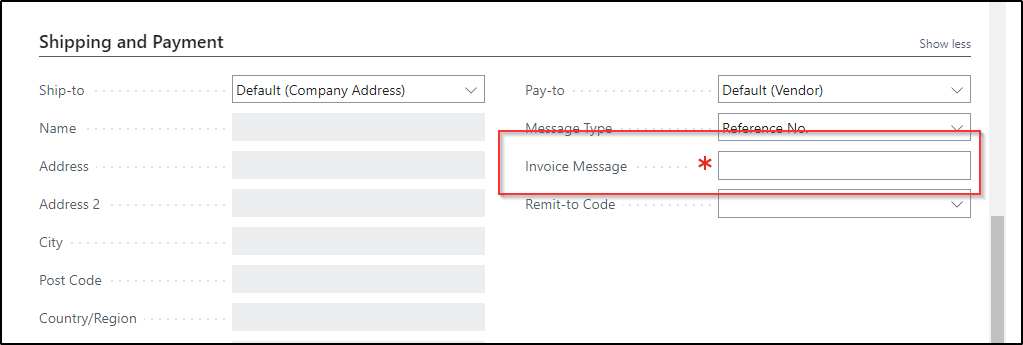
I am currently in the process of assisting a customer who has a finnish entity. On the Purhase Order/Invoice - in Shipping and Payment - there is a mandatory field: Invoice message
pastedimage1679402653792v1.png

Can somebody help me understand this field and how it is supposed to be filled?

Thanks

/Thomas

I have the same question (0)
  • AbhinavMehra Profile Picture
    364 on at

    Hi,

    Invoice message is a free-text field where you can provide additional information related to the invoice or purchase order.

    you can give any reference number or any specific description.

    Thanks,

    Abhinav Mehra 

  • t_lundoe Profile Picture
    8 on at

    Hi - and thanks!

    But it is not optional at my customer - the invoice can't be posted without it being filled. And I don't know if it has something to do with electroning invoicing in Finland?

  • Suggested answer
    Mohana Yadav Profile Picture
    61,005 Super User 2025 Season 2 on at

    It depends on the Message Type field option you selected.

    Reference No./Invoice Information/Message etc.

  • t_lundoe Profile Picture
    8 on at

    Okay - I see that. But it looks mandatory no matter which type I chose.

  • Suggested answer
    Mohana Yadav Profile Picture
    61,005 Super User 2025 Season 2 on at

    yes, if it is reference no type then you have to enter only the numbers related to vendor reference

    Invoice Information then if you have Our account No. filled then it is adding OurAccountNo. + someother data (I need to check the code)

    If it is message etc. then it is a free text

  • Community member Profile Picture
    9 on at
    Is there anyway to make this field not mandatory? 
  • Rasmus Profile Picture
    163 on at
    Hi,

    I have the same question and so far no one has answered any part of this mystery.

    We know where the fields are and what they could contain. What we don't know is still all the important parts:

    1. What it is. Microsoft has no documentation of it?

    2. Where do I change so that this isn't a problem anymore. I checked Purchase setup and changed something that sounded right but no... nothing.

    3. What is the best way to disable it? Just make it non-mandatory?

Under review

Thank you for your reply! To ensure a great experience for everyone, your content is awaiting approval by our Community Managers. Please check back later.

Helpful resources

Quick Links

Responsible AI policies

As AI tools become more common, we’re introducing a Responsible AI Use…

Neeraj Kumar – Community Spotlight

We are honored to recognize Neeraj Kumar as our Community Spotlight honoree for…

Leaderboard > Small and medium business | Business Central, NAV, RMS

#1
OussamaSabbouh Profile Picture

OussamaSabbouh 2,238

#2
YUN ZHU Profile Picture

YUN ZHU 773 Super User 2025 Season 2

#3
Sumit Singh Profile Picture

Sumit Singh 630

Last 30 days Overall leaderboard

Featured topics

Product updates

Dynamics 365 release plans
