web
You’re offline. This is a read only version of the page.
close
Skip to main content

Notifications

Announcements

No record found.

Community site session details

Community site session details

Session Id :
Customer experience | Sales, Customer Insights,...
Suggested Answer

Text line height gets bigger on mobile

(0) ShareShare
ReportReport
Posted on by 160

Hi all. 

The text in my email gets very big line height on mobile, but looks good on desktop. Even tried to make the line height smaller but it only showed on desktop, had the same line height on mobile. How can I reduce it for mobile? Is there any code or is there something you can do in the designer tab?

I have the same question (0)
  • HamzaUsman Profile Picture
    50 on at

    Hi Filippa,

    Can you share snapshot of how it is appearing on your mobile device?

    Moreover, have you tried Litmus preview to check the device preview? I have had the same issue on some of the iPhone devices.

    Thanks,

    Hamza

  • Filippa f Profile Picture
    160 on at

    Hi Hamza,

    (This is sat as heading 3)

    Screenshot-2021_2D00_05_2D00_19-at-15.56.05.png

    This is how it looks on desktop with line height 1.0

    And this is how it looks on mobile:

    Screenshot-2021_2D00_05_2D00_19-at-15.56.17.png

    I just sat the line height to 1.0 because i want it smaller on mobile but however small it is, it still looks like thison mobile, but looks super small on desktop.

    This is the html:
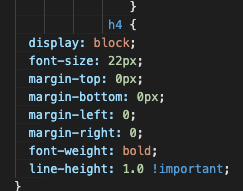
    Screenshot-2021_2D00_05_2D00_19-at-16.02.39.png

    In Litmus it looks good, but not when you test send the real deal .. :/

    Were you able to solve your problem?

  • Suggested answer
    HamzaUsman Profile Picture
    50 on at

    Hi Filippa,

    Have you tried using this toggle? If the same html is behaving differently on different devices, you can prevent marketing application from automatically applying adjustments. Hope it helps.

    pastedimage1621435120469v1.png

    If this doesn't work, please share the HTML code.

    Regards,

    Hamza

  • Filippa f Profile Picture
    160 on at

    Hi,

    Unfortunately it did not work.

    Would it be ok if I just shared the CSS, it's for a client and i don't think they would be happy if I shared the whole code. Or do you need it all? :)

    Filippa

  • Suggested answer
    HamzaUsman Profile Picture
    50 on at

    Hi Filippa,

    Can you try using line-height as normal? as shown below:

    /* Keyword value */

    line-height: normal;

    /* Unitless values: use this number multiplied

    by the element's font size */

    line-height: 3.5;

    /* <length> values */

    line-height: 3em;

    /* <percentage> values */

    line-height: 34%;

    /* Global values */

    line-height: inherit;

    line-height: initial;

    line-height: unset;

    Regards,

    Hamza

Under review

Thank you for your reply! To ensure a great experience for everyone, your content is awaiting approval by our Community Managers. Please check back later.

Helpful resources

Quick Links

Responsible AI policies

As AI tools become more common, we’re introducing a Responsible AI Use…

Neeraj Kumar – Community Spotlight

We are honored to recognize Neeraj Kumar as our Community Spotlight honoree for…

Leaderboard > Customer experience | Sales, Customer Insights, CRM

#1
Tom_Gioielli Profile Picture

Tom_Gioielli 70 Super User 2025 Season 2

#2
Gerardo Rentería García Profile Picture

Gerardo Rentería Ga... 33 Most Valuable Professional

#3
Daniyal Khaleel Profile Picture

Daniyal Khaleel 32 Most Valuable Professional

Last 30 days Overall leaderboard

Product updates

Dynamics 365 release plans
