web
You’re offline. This is a read only version of the page.
close
Skip to main content

Notifications

Announcements

No record found.

Community site session details

Community site session details

Session Id :
Microsoft Dynamics GP (Archived)

Reconcile to GL - Receivables Management

(0) ShareShare
ReportReport
Posted on by

Hi:

One of my customers is trying to run the Reconcile to GL feature of GP 10.0 to reconcile Receivables and they are having the following message:
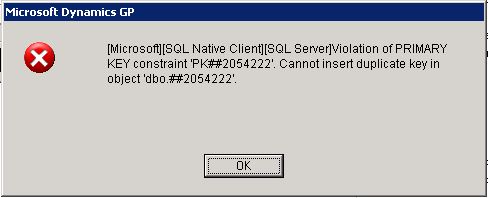
I ran a trace using SQL Profiler and when the message appears was in the following process:

glGetRMTransactions.

this is a Dynamics Stored procedure (very long one) that get the RM transactions into temporary tables to do the reconciliation. It seems that there is something duplicated in the data for the date range that I selected. So far we determine which is the date range and the information of the index : TRXSORCE,DOCNMBR,RMDTYPAL,CUSTNUMBR.  the problem is that I can not run the stored procedure alone to review the data.  I need some guide here, please help!!!

 Here is the stored procedure (a link for a text file, it is too long to paste it here):

http://jumbofiles.com/juqhv2y92rhk


*This post is locked for comments

I have the same question (0)
  • Verified answer
    Community Member Profile Picture
    on at

    You have some data corruption in eithre the RM Transaction Open or RM History tables.

    I would query those tables and order the results by the fields you identify above to soo if there is any blank / missing data.

    If you could narrow down the error to a very short date range, then you could filter the query to transaction in this date range and look for duplicates.

    I'm pretty sure there are scripts available on customer/partnersource that will find duplicates. Search for them and see what you can find.

    Ian.

  • Verified answer
    Community Member Profile Picture
    on at

    I found out what was happening. We have 3 debit memo transactions without Batch Source nor Batch No, they were void. I checked the distributions and there are two sets of of distributions one set with date 01/04/2011 and second set with date 01/11/2011. I delete both sets and the message disappears.

    Jesus

Under review

Thank you for your reply! To ensure a great experience for everyone, your content is awaiting approval by our Community Managers. Please check back later.

Helpful resources

Quick Links

Responsible AI policies

As AI tools become more common, we’re introducing a Responsible AI Use…

Neeraj Kumar – Community Spotlight

We are honored to recognize Neeraj Kumar as our Community Spotlight honoree for…

Leaderboard > 🔒一 Microsoft Dynamics GP (Archived)

#1
mtabor Profile Picture

mtabor 1

Last 30 days Overall leaderboard

Featured topics

Product updates

Dynamics 365 release plans
