You can create a Provider Definition using the Wizard, or by using the solution. They both result in the same thing.
This gives you a Provider Definition. You should not "Deactivate" this. Unfortunately Power Platform has the concept of Active/Inactive for records. By "Deactivating" the Provider Definition, you have moved it into an Inactive state, which will hide it in the UI. You can reactivate this Provider Definition
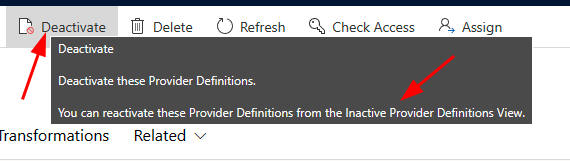
Unfortunately, that button should not be there and I have opened a bug to address that. Even more unfortunate is that we don't expose the Inactive Provider Definition View. You can go into Dataverse > Tables > Provider Definition and find your Provider and set the State to Active (You may need to Edit in Excel using the button at the top).
You shouldn't ever delete the Provider Definition unless you no longer need it. The only time you should be doing anything with the Provider Definition is adding/updating/removing artifacts from it (Actions, Logic Definitions, Transformations, Parameters).
Hopefully that addresses what you should or should not be doing with a Provider Definition.
Once you have a Provider Definition you will want to use it in your system. To do this, you activate it by using the LIbrary within IOM.

When you do this, you are creating an Installed Provider Instance that reflects the same Actions, Logic Definitions, Parameters and Transformations that exist at that point in time.
You can Deactivate a Provider Instance (Installed, NOT Library)
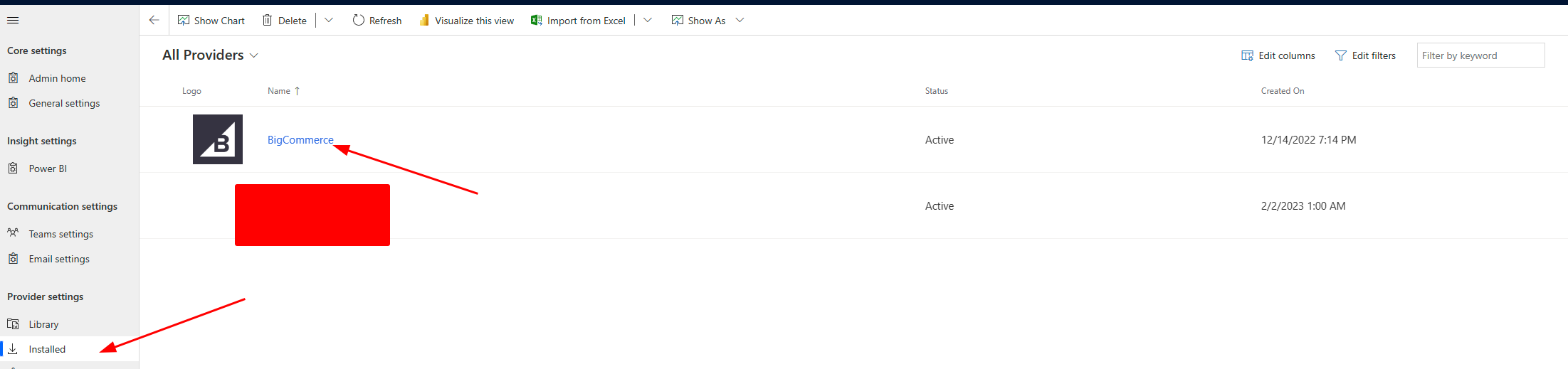
Click on your Provider Instance and then click Deactivate
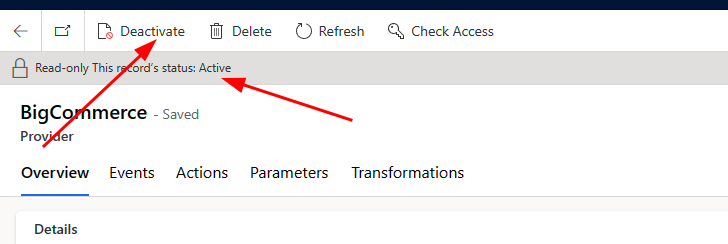
This allows you to make changes to the Instance. Making changes here will take affect when you Activate it again. These do not update the Provider Definition, only the running instance.
If you want to make changes to the Provider Definition you can change it in the definition and then activate it again from the library. This NEW instance will have your changes. You can have multiple instances running with multiple different versions of your Provider Definition
Provider Definition (v1)
Logic Definition - Update Sales Order
Parameter - StoreId
Transformation - Transform Sales Order
Activate via Library - You now have an instance with those 3 artifacts
Now you want to add another Logic Definition to bring in Orders, so you edit the above
Provider Definition (v2)
Logic Definition - Update Sales Order
Parameter - StoreId
Transformation - Transform Sales Order
Logic Definition - Pull Sales Orders
Activate via Library - You will now have an instance with those 4 artifacts
At this point in time, you will have 2 running instances
Provider Instance (v1)
Provider Instance (v2)
If you Deactivate AND Delete Provider Instance (v1), because your Provider Definition has been updated, you will not be able to create a Provider Instance (v1) anymore. This is why you Deactivate/Activate an Instance unless you are certain that you will never need it again.





 Share
Share Report
 65
65 All responses (
 Answers (










