web
You’re offline. This is a read only version of the page.
close
Skip to main content

Notifications

Announcements

No record found.

Community site session details

Community site session details

Session Id :
Finance | Project Operations, Human Resources, ...
Suggested Answer

Renaming primary field (Vendor ID) issue

(0) ShareShare
ReportReport
Posted on by 10

Hi there,

I was trying to rename the vendor account in "All Vendors" from UI using Options--> Record info--> "Rename" button from D365 F&O.
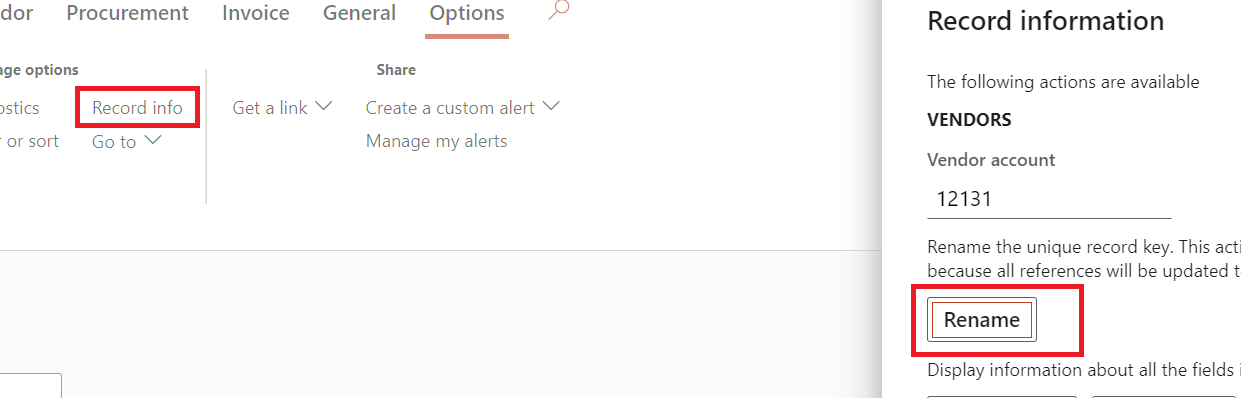
pastedimage1669192628445v1.png

  The vendor account got renamed successfully and is visible in UI . But when I am trying to create "Vendor payment journal" for this newly renamed vendor , I am getting below error : Vendor "XX"  doesn't exist.

There is no custom code involved in this. 

Please let me know if anyone has any suggestions.

Appreciate your help !

Thanks,

Sampada

I have the same question (0)
  • AnithaEswaran Profile Picture
    2,032 on at

    Hi Sampada,

    Are you trying to create the payment journal immediately after this change?

    This action might take time as mentioned in the form option. 

    pastedimage1669202846450v1.png

  • Sampada B Profile Picture
    10 on at

    Yes. I waited for hours before creating the Payment journal, but no luck.

  • AnithaEswaran Profile Picture
    2,032 on at

    Have you tried restarting the service ?

    Can you check if the table relation is defined in Payment journal ? I remember, table relation is not defined, such updates are skipped.

  • Sampada B Profile Picture
    10 on at

    Anita,

    Service restart was tried and there was no luck.  There is already table relation as per standard.

    Actually it is trying to find  the original vendor account in LedgerTrans table --> findvendTable()  when I am trying to create the journal with the renamed vendor account. Some how the new renamed account is not getting referenced hence even the error message says "original vendor account doesn't exist".

  • GirishS Profile Picture
    27,827 Moderator on at

    Hi Sampada B,

    Try full DB synchronization.

    Thanks,

    Girish S.

  • Deepak Agarwal Profile Picture
    8,602 on at

    Try to reset your user usages data and full DB synch.

  • AnithaEswaran Profile Picture
    2,032 on at

    Hi Sampada,

    If you  have access to SQL, can you check if the new vendor account is present?

  • Sampada B Profile Picture
    10 on at

    Anita,

    Yes. Its present . I am able to  create purchase order with the new renamed account where as Payment journal is only giving this issue.  

  • Sampada B Profile Picture
    10 on at

    Girish,

    We have already tried full db. sync and that didn't resolve the issue.

    Deepak,

    Tried with "Reset usage data" , but no luck.

    Thanks,

    Sampada

  • Suggested answer
    Ramit Paul Profile Picture
    22,797 Most Valuable Professional on at

    Hi,

    Are you saying you have an open balance in the previously named vendor and you trying to use the new account?

    Can you try creating a payment journal without any invoices marked? if working then you may have to create a payment journal and then mark the same for settlement manually.

Under review

Thank you for your reply! To ensure a great experience for everyone, your content is awaiting approval by our Community Managers. Please check back later.

Helpful resources

Quick Links

Responsible AI policies

As AI tools become more common, we’re introducing a Responsible AI Use…

Neeraj Kumar – Community Spotlight

We are honored to recognize Neeraj Kumar as our Community Spotlight honoree for…

Leaderboard > Finance | Project Operations, Human Resources, AX, GP, SL

#1
Martin Dráb Profile Picture

Martin Dráb 646 Most Valuable Professional

#2
André Arnaud de Calavon Profile Picture

André Arnaud de Cal... 529 Super User 2025 Season 2

#3
Sohaib Cheema Profile Picture

Sohaib Cheema 285 User Group Leader

Last 30 days Overall leaderboard

Product updates

Dynamics 365 release plans
