web
You’re offline. This is a read only version of the page.
close
Skip to main content

Announcements

News and Announcements icon
Community site session details

Community site session details

Session Id :
Small and medium business | Business Central, N...
Suggested Answer

Business Central Online General Ledger Entries Page Open In Edit Mode By Default

(0) ShareShare
ReportReport
Posted on by 20

Hi All,

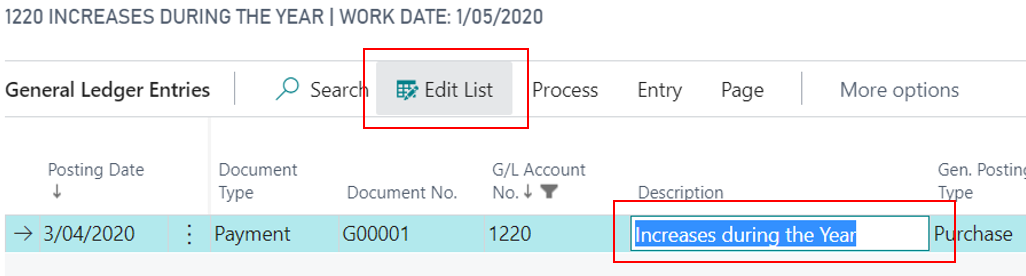
Can someone please advise whether it is possible to have the page open not in Edit Mode whereby the Desciption and Reference fields are editable?

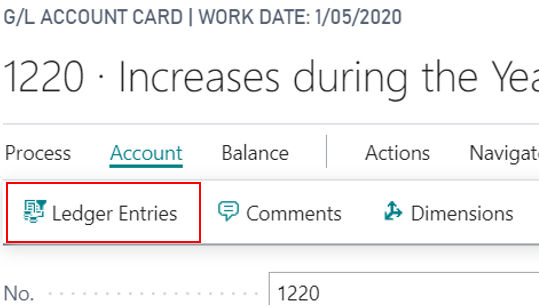
It appears it is only when we access General Ledger Entries via the Vendor/Customer/GL Account card page.

If we open the General Ledger Entries page via the Search link or by clicking on the General Ledger amounts then it will open not in Edit Mode (i.e. I need to click the Edit List button before I can edit the Description or Reference fields.

This is required so that users won't be able to accidently delete descriptions and references without knowing they're in Edit Mode already.

By opening Ledger Entries from Card Page
pastedimage1596694190422v2.png

Ledger Entries Page is already in Edit Mode by default on open
pastedimage1596694309593v4.png

Any help is much appreciated.

Regards,

Infy

I have the same question (0)
  • Suggested answer
    JAngle Profile Picture
    159 on at

    Possible with a modification yes. When you run a page directly you are governed by any code on that page. When you run a page via another one you can set some additional properties. More on this explained here: docs.microsoft.com/.../page-data-type

    In your case you want to set in the OnOpenPage trigger that the pages editable property is true or false accordingly.

  • Suggested answer
    Dirk Profile Picture
    Microsoft Employee on at

    The best way to get this changed on the long run is to create a suggestion in “ideas”, our product suggestion system, and collect votes for your suggestion from others.

    As soon as a suggestion gets a certain number of votes from different customers/partners it will be promoted automatically and then discussed with partners in certain yammer groups.
    https://aka.ms/bcideas

Under review

Thank you for your reply! To ensure a great experience for everyone, your content is awaiting approval by our Community Managers. Please check back later.

Helpful resources

Quick Links

Season of Sharing Community Challenge Winners!

Congratulations to our community stars!

Women in Power Builds Momentum

Expanding mentorship, skilling, and AI innovation

Congratulations to the June Top 10 Community Leaders

These are the community rock stars!

Leaderboard > Small and medium business | Business Central, NAV, RMS

#1
OussamaSabbouh Profile Picture

OussamaSabbouh 580 Super User 2026 Season 1

#2
YUN ZHU Profile Picture

YUN ZHU 480 Super User 2026 Season 1

#3
Grigorios Mavrogeorgis Profile Picture

Grigorios Mavrogeorgis 261 Super User 2026 Season 1

Last 30 days Overall leaderboard

Featured topics

Microsoft Training Manuals

Product updates

Dynamics 365 release plans
