web
You’re offline. This is a read only version of the page.
close
Skip to main content

Announcements

News and Announcements icon
Community site session details

Community site session details

Session Id :
Microsoft Dynamics CRM (Archived)

Custom Action Output Parameter not being returned from the plugin

(0) ShareShare
ReportReport
Posted on by 1,532

Hi

I am using CRM 

Microsoft Dynamics® CRM 2016(8.1.0.359) (DB 8.1.0.359)

I am using a custom action and plugin.

The output parameter that I am setting is called "IsStatus".   I response result is coming back with nothing.  Not sure what I am doing wrong.
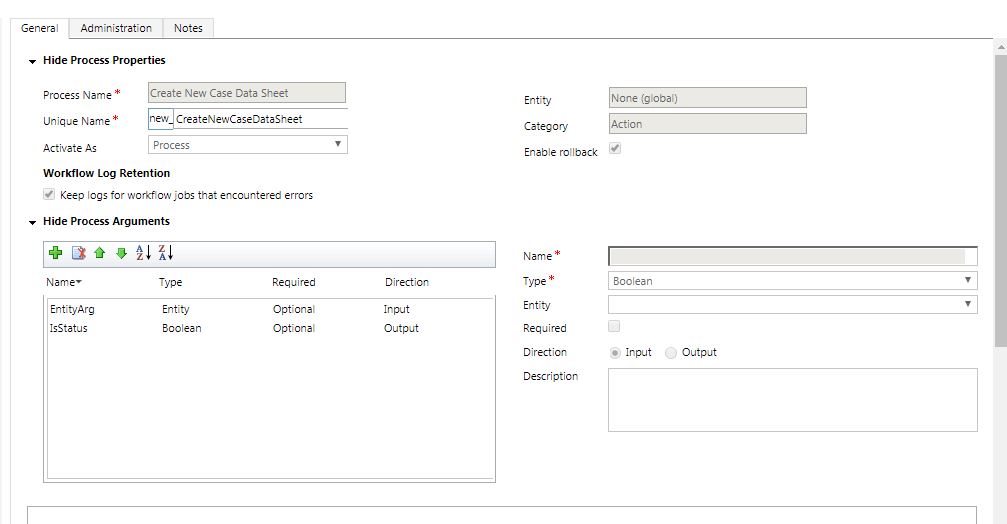
5483.actionProcess.JPG

javascript code - responseText is coming back with nothing

$.ajax({
     url: organizationUrl + "/api/data/v8.0/new_CreateNewCaseDataSheet",
     type: 'POST',
     contentType: "application/json; charset=utf-8",
     datatype: "json",
     data: data,
     success: function (responseText) {
         //var jsonData = JSON.stringify(responseText); 
         //var getStatus = JSON.parse(this.responseText);
         //isStatus = getStatus.isStatus;
         alert(" -- Action Called - 23");
         //    updateMap(myArr); 
         window.close();
         return false;
         
          },


Plugin Code

       // TODO: Implement your custom Plug-in business logic.
       IPluginExecutionContext context = localContext.PluginExecutionContext;
       IOrganizationService service = localContext.OrganizationService;

       if (context.InputParameters.Contains("EntityArg") && context.InputParameters["EntityArg"] is Entity)
       {
           context.OutputParameters["IsStatus"] = false;
           bool isStatus = true;
           context.OutputParameters["IsStatus"] = isStatus;
       }


*This post is locked for comments

I have the same question (0)
  • a33ik Profile Picture
    84,331 Most Valuable Professional on at

    Hello,

    Can you please show how you populate "data" variable in your JS and can you please provide screenshot that demonstrates plugin's step registration?

  • rthompson Profile Picture
    1,532 on at

    Here's the javascript

      function parseDataValue(datavalue) {
    
        //Pass to the action EntityArg
        var new_datatracking = {};
        new_datatracking.new_caseid = XrmP.Page.getAttribute("new_caseid").getValue()[0].id.replace(/{/g,'').replace(/}/g,'');
        new_datatracking.new_productstandardid = XrmP.Page.getAttribute("new_productstandardid").getValue()[0].id.replace(/{/g,'').replace(/}/g,'');
        new_datatracking.new_datasheettemplateid = XrmP.Page.getAttribute("new_selectortemplateid").getValue()[0].id.replace(/{/g, '').replace(/}/g, '');
        new_datatracking.new_samplegroupid = XrmP.Page.getAttribute("new_samplegroup").getValue()[0].id.replace(/{/g, '').replace(/}/g, '');
        new_datatracking.new_caseselectorid = XrmP.Page.data.entity.getId();
    
          button.onclick = function () {
            new_datatracking.new_clausenumberid = $("#clausenames option:selected").val();
            new_datatracking.new_isaddresult = $("#resultsflag option:selected").val();
    
            var data = { "EntityArg": new_datatracking };
            CallActionPlugin(data)
    
      }
    
      function CallActionPlugin(datatracking) {
    
          var isStatus;
          var organizationUrl = serverUrl;
    
          var query = "new_CreateNewCaseDataSheet"
    
          var data  = JSON.stringify(datatracking);
         $.ajax({
              url: organizationUrl + "/api/data/v8.0/new_CreateNewCaseDataSheet",
              type: 'POST',
              contentType: "application/json; charset=utf-8",
              datatype: "json",
              data: data,
              success: function (responseText) {
                  //var jsonData = JSON.stringify(responseText); 
                  //var getStatus = JSON.parse(this.responseText);
                  //isStatus = getStatus.isStatus;
    
                  alert(" -- Action Called - 23");
                  //    updateMap(myArr); 
                  window.close();
                  return false;
              },
              error: function (jqXHR, exception) {
                 var msg = '';
                 if (jqXHR.status === 0) {
                    msg = 'Not connect.\n Verify Network.';
                 } else if (jqXHR.status == 404) {
                    msg = 'Requested page not found. [404]';
                 } else if (jqXHR.status == 500) {
                    msg = 'Internal Server Error [500].';
                 } else if (exception === 'parsererror') {
                    msg = 'Requested JSON parse failed.';
                 } else if (exception === 'timeout') {
                    msg = 'Time out error.';
                 } else if (exception === 'abort') {
                    msg = 'Ajax request aborted.';
                 } else {
                    msg = 'Uncaught Error.\n' + jqXHR.responseText;
                 }
                 alert(msg);
              }
          });


  • rthompson Profile Picture
    1,532 on at

    Sorry forgot he screenshot

    5127.Register.JPG

  • a33ik Profile Picture
    84,331 Most Valuable Professional on at

    You code should not work at all because your code contains references to XrmP.

    new_datatracking.new_caseid = XrmP.Page.getAttribute("new_caseid").getValue()[0].id.replace(/{/g,'').replace(/}/g,'');

  • rthompson Profile Picture
    1,532 on at

    Hi Andrew,

    My input parameters are working in the plugin.  I am trying to send an output parameter stating that the process has completed.

  • a33ik Profile Picture
    84,331 Most Valuable Professional on at

    I mean your JS code is not valid. It will not work.

    Regarding fact that "your input parameters are working in the plugin" - why are you so sure?

  • rthompson Profile Picture
    1,532 on at

    Did not show all this code.

            var XrmP = window.top.opener.frames[0].Xrm;

  • rthompson Profile Picture
    1,532 on at

    Here's the input parameters from the plugin.

    Plugin

    InputParameter.JPG

    Debugging

    InputParameter.JPG

  • Suggested answer
    a33ik Profile Picture
    84,331 Most Valuable Professional on at

    Ok. That shows that your code works and reaches setting of value.

    Can you please provide code that you use to check output value?

    That piece of your code in initial post is commented out:

                 //var getStatus = JSON.parse(this.responseText);

                 //isStatus = getStatus.isStatus;

    Even if you will use it you should use IsStatus and not isStatus.

    Good luck.

  • rthompson Profile Picture
    1,532 on at

    Plugin that is setting the output Parameter to true.

    ResponseText.JPG

    The response is coming back with nothing.

    ResponseText.JPG

Under review

Thank you for your reply! To ensure a great experience for everyone, your content is awaiting approval by our Community Managers. Please check back later.

Helpful resources

Quick Links

Season of Sharing Community Challenge Winners!

Congratulations to our community stars!

Women in Power Builds Momentum

Expanding mentorship, skilling, and AI innovation

Congratulations to the July Top 10 Community Leaders

These are the community rock stars!

Leaderboard > 🔒一 Microsoft Dynamics CRM (Archived)

#1
RichardM Profile Picture

RichardM 1

Last 30 days Overall leaderboard

Featured topics

Product updates

Dynamics 365 release plans
