web
You’re offline. This is a read only version of the page.
close
Skip to main content

Notifications

Announcements

No record found.

Community site session details

Community site session details

Session Id :
Microsoft Dynamics CRM (Archived)

How to Create a CRM Business Process Flow that References a Different Entity of the Same Type

(1) ShareShare
ReportReport
Posted on by 500 Most Valuable Professional

I have a custom job entity in CRM 2016. It has a relationship to itself (Post-Completion Job). So basically if I know that a process will require 2 "jobs", I create the 2 jobs, and assign the Post Completion job to link the first job to the second.

I wanted to create a Business Process Flow that contained these two jobs. The use would schedule the first job, then go to the next stage which is the dependent job, and schedule that one (with JS/Business Rules to ensure that the second job is scheduled after the first one is completed)

I thought it would be as simple as creating two stages, and setting the second stage's relationship to use the Post Completion Job relationship, but when I attempt to do this, I'm unable to select any relationships:
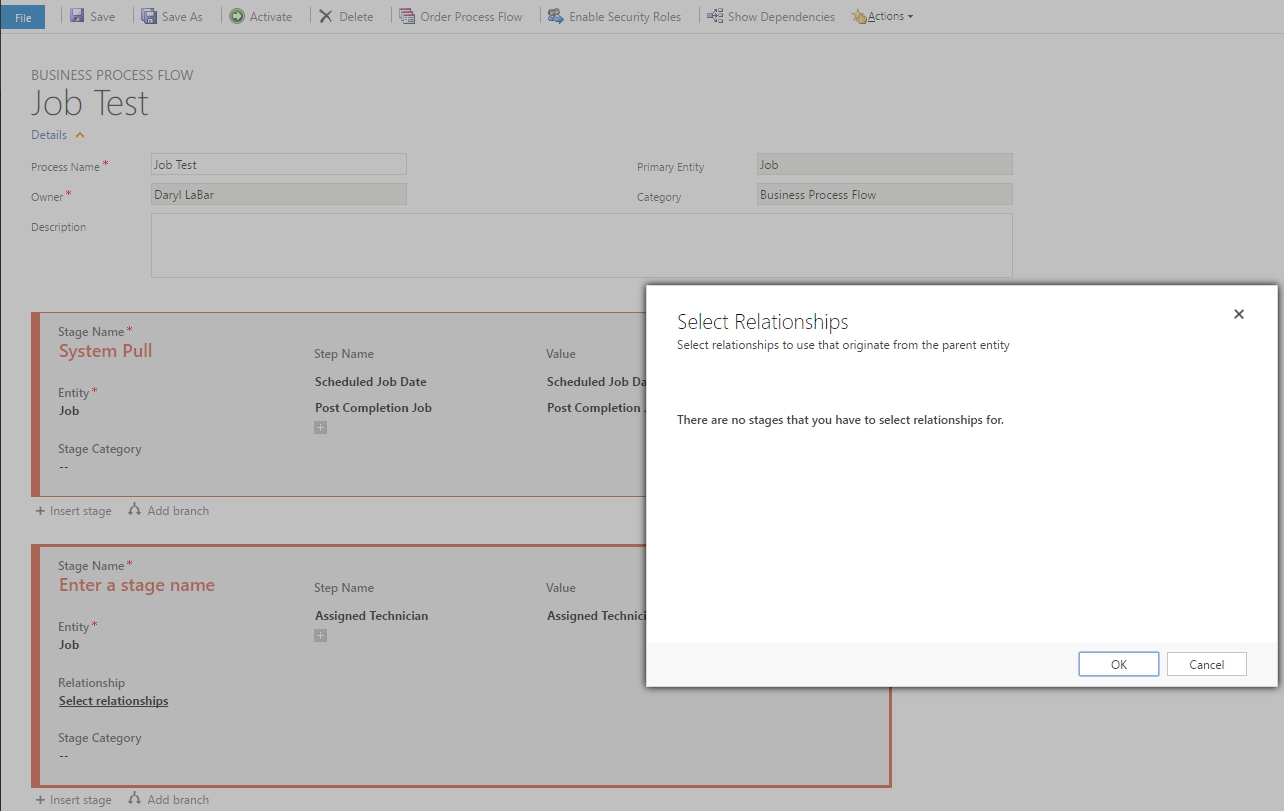
8358.screenshot.jpg

The Modal that pops up just says: "There are not Stages that you have to select relationships for."

Is what I'm attempting even possible? If so, what am I doing wrong?

*This post is locked for comments

I have the same question (0)
  • David Mochrie Profile Picture
    on at

    I raised this on MS Connect in 2014. It seems it hasn't been addressed yet.

  • Daryl LaBar Profile Picture
    500 Most Valuable Professional on at

    Can you link to the Issue so we can all upvote it?  :)

  • Suggested answer
    PS Profile Picture
    23,577 on at

    Unfortunately, its not possible.  Business Process Flow can show/create new records for cross-entity but not for same entity.

  • Verified answer
    Daryl LaBar Profile Picture
    500 Most Valuable Professional on at

    This is not possible, here is David Mochrie's suggestion on the CRMIdeas site if anyone finds this and wants to encourage MS to make this change in the future.

Under review

Thank you for your reply! To ensure a great experience for everyone, your content is awaiting approval by our Community Managers. Please check back later.

Helpful resources

Quick Links

Responsible AI policies

As AI tools become more common, we’re introducing a Responsible AI Use…

Neeraj Kumar – Community Spotlight

We are honored to recognize Neeraj Kumar as our Community Spotlight honoree for…

Leaderboard > 🔒一 Microsoft Dynamics CRM (Archived)

#1
SA-08121319-0 Profile Picture

SA-08121319-0 4

#1
Calum MacFarlane Profile Picture

Calum MacFarlane 4

#3
Alex Fun Wei Jie Profile Picture

Alex Fun Wei Jie 2

Last 30 days Overall leaderboard

Featured topics

Product updates

Dynamics 365 release plans



