web
You’re offline. This is a read only version of the page.
close
Skip to main content

Announcements

No record found.

News and Announcements icon
Community site session details

Community site session details

Session Id :
Finance | Project Operations, Human Resources, ...
Answered

Access a datasource from 2 forms away using Extension - X++

(0) ShareShare
ReportReport
Posted on by 65

Hi,

How can I access a datasource from the PurchReqTable in the third form(BudgetCreateTransfer) using Extension?

I want to access PurchReqTable.PurchReqId when I click Create Budget Request(Lower right of the picture).

[ExtensionOf(formControlStr(BudgetCreateTransfer, RequestBudgetButton))]
final class BudgetCreateTransfer_Extension
{

    public void clicked()
    {
        next clicked();
         //.... Access PurchReqTable.PurchReqId here ....////

    }

}

Left to Right
PurchReqTable

BudgetCheckResults

BudgetCreateTransfer
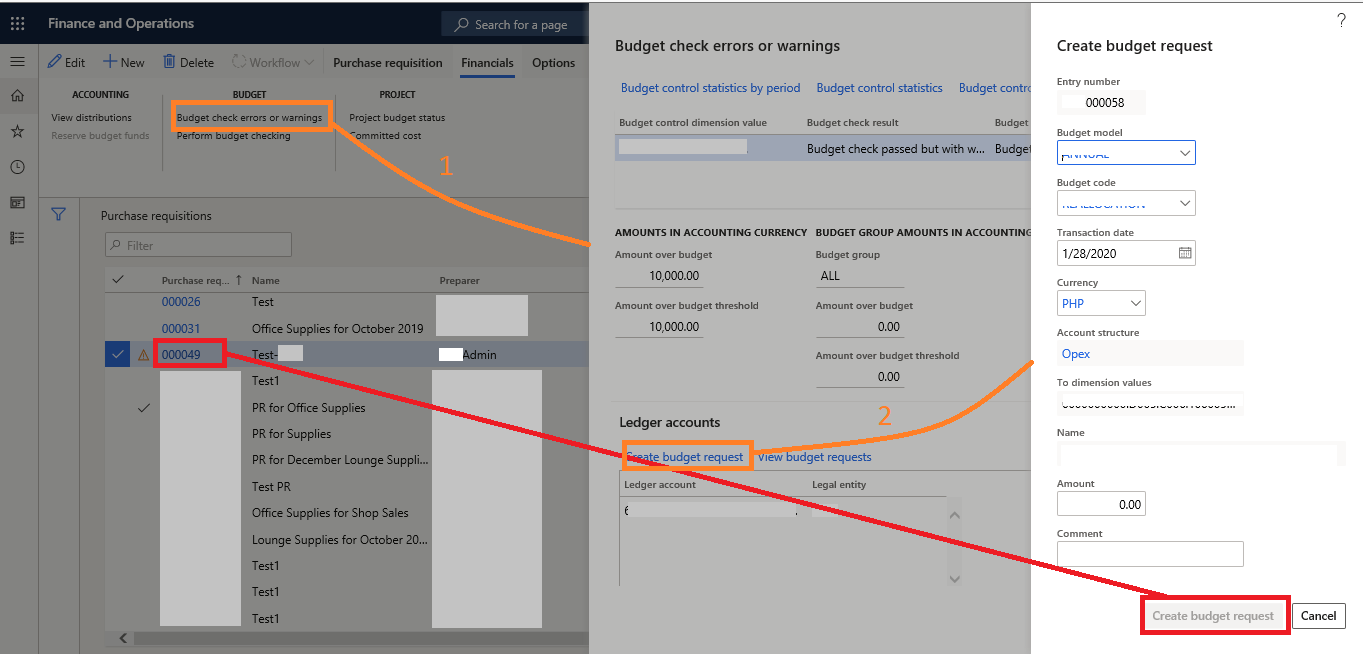

0876.png

Thanks in advance!

I have the same question (0)
  • Verified answer
    nmaenpaa Profile Picture
    101,166 Moderator on at

    You can access current FormRun via "element".

    You can access caller formRun via "element.args().caller()".

    And the caller of the caller via "element.args().caller().args().caller()". Depending on the case you might need to adjust a bit but that's the idea.

    So, on each form you can access the caller via the caller() merhod of the args.

  • Verified answer
    nmaenpaa Profile Picture
    101,166 Moderator on at

    And once you have the correct FormRun, you can access anything on that form. Data sources can be accessed via FormRun.DataSource() method.

  • Suggested answer
    jerrold-verzosa Profile Picture
    65 on at

    Hello, this is my approach and thanks for the help
    Found out that you can access the field through element.BudgetTransactionHeader.TransferSourceNumber

    [ExtensionOf(formControlStr(BudgetCreateTransfer, RequestBudgetButton))]
    final class BudgetCreateTransfer_Extension
    {
    
        public void clicked()
        {
            next clicked();
            ttsbegin;
            try
            {
                str purchReqId      = element.budgetTransactionHeader.TransferSourceNumber;
                //Insert other code here
                //
                //
            }
            catch { info("Caught an exception."); }
            ttscommit;
        }
    }

Under review

Thank you for your reply! To ensure a great experience for everyone, your content is awaiting approval by our Community Managers. Please check back later.

Helpful resources

Quick Links

Introducing the 2026 Season 1 community Super Users

Congratulations to our 2026 Super Stars!

Meet the Microsoft Dynamics 365 Contact Center Champions

We are thrilled to have these Champions in our Community!

Congratulations to the March Top 10 Community Leaders

These are the community rock stars!

Leaderboard > Finance | Project Operations, Human Resources, AX, GP, SL

#1
Giorgio Bonacorsi Profile Picture

Giorgio Bonacorsi 658

#2
André Arnaud de Calavon Profile Picture

André Arnaud de Cal... 468 Super User 2026 Season 1

#3
Syed Haris Shah Profile Picture

Syed Haris Shah 333 Super User 2026 Season 1

Last 30 days Overall leaderboard

Product updates

Dynamics 365 release plans
