web
You’re offline. This is a read only version of the page.
close
Skip to main content

Announcements

No record found.

News and Announcements icon
Community site session details

Community site session details

Session Id :
Microsoft Dynamics AX (Archived)

BILL of Material Report Dataset (Drill down to the lowest level)

(0) ShareShare
ReportReport
Posted on by 1,623

Hi,

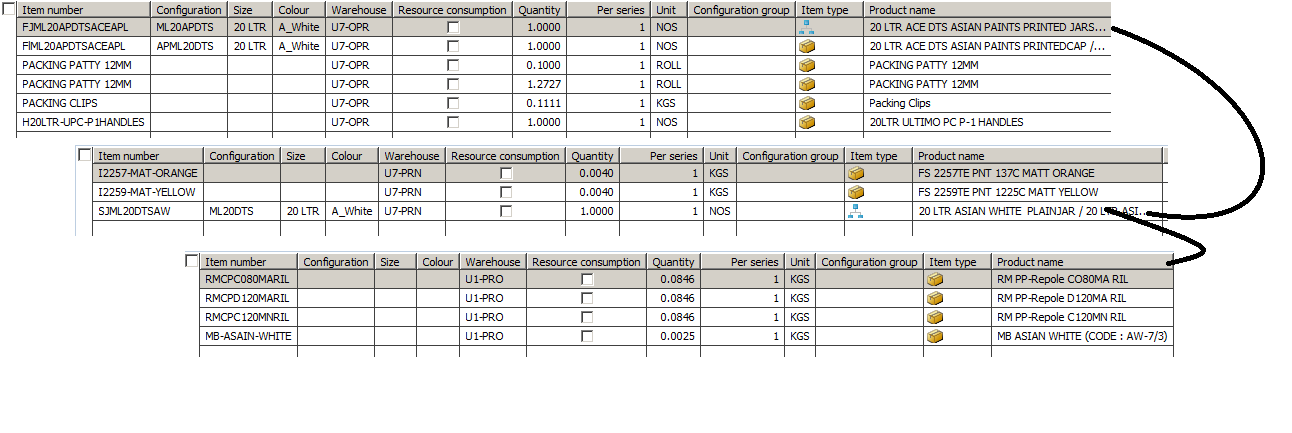
I have written following code for BOM report against sales order qty, and its showing only two levels of bom and not drilling to lowest level.

public Void bomMain()
{
    BOMVersion      bomVersion;
    BOM             bom;

    queryRun    =  new QueryRun(queryStr(SalesTableBOM));

    ttsbegin;
    while (queryRun.next())
    {
        salesTable = queryRun.get(tableNum(SalesTable));
        salesLine = queryRun.get(tableNum(SalesLine));

        inventTable = InventTable::find(salesLine.ItemId);

        select * from bomVersion
            where bomVersion.ItemId == salesLine.ItemId;
        {
            while select bom
                where bom.BOMId ==  bomVersion.BOMId
            {
                this.bomChild(bom.ItemId);
                this.insertTmp(bom, NoYes::No);
            }
        }
    }
    ttsCommit;
    info("Done");
}
------------------------------------------------------------------------------------------------------------BOM-Lines.png
public void bomChild(BOMId  _bom)
{
    BOMVersion      bomVersion;
    BOM             bom;

    void test()
    {
        select * from bomVersion
            where bomVersion.ItemId == _bom;
        {
            while select bom
                where bom.BOMId ==  bomVersion.BOMId
            {
                this.insertTmp(bom, NoYes::Yes);
            }

        }
    }
    select * from bomVersion
            where bomVersion.ItemId == _bom;
    {
        while select bom
            where bom.BOMId ==  bomVersion.BOMId
        
        {
                        test();
            this.insertTmp(bom, NoYes::Yes);
        }

    }
}

Thanks in Advance,

*This post is locked for comments

I have the same question (0)
  • Suggested answer
    Sohaib Cheema Profile Picture
    49,664 Super User 2026 Season 1 on at

    Your code is not correct to expand it to N levels. N represents any depth of BOM tree.

    so use code to find BOMlines as under

    BOMSearch::bomTreePackLevelConfig(callerSalesLine.ItemBOMId ? callerSalesLine.ItemBOMId : callerSalesLine.inventTable().bomId(callerSalesLine.deliveryDate(), callerSalesLine.QtyOrdered, callerSalesLine.inventDim()),
                                                       callerSalesLine.deliveryDate(),
                                                       callerSalesLine.ItemId,
                                                       callerSalesLine.inventDim().ConfigId,
                                                       true,
                                                       true);


      In addition kindly have a look at AOT>>Forms>>BOMExpandSales ; you will get idea how it goes.

  • manikumar Profile Picture
    1,623 on at

    Can you explain a bit more?

  • Verified answer
    Sohaib Cheema Profile Picture
    49,664 Super User 2026 Season 1 on at
    • there is a table named as BOM. It is regular table.
    • there is a form BOMExpandSales which is having BOM table as DataSource.
    • in init method BOM table is being set as temporary table
    public void init()
    {
        ;
    
        super();
    
        //BP Deviation documented
        bom.setTmp();
        bom.checkRecord(false);
    
    }

    • BOMSearch::bomTreePackLevelConfig is a standard method to fins related bom(S) for any salesLine Item.
    • after getting list of bom(S) using BOMSearch::bomTreePackLevelConfig system is steeing it into a container
    • The system is calculation length of container
    • looping over length of container and doing processing i.e. inserting data into BOM table which was set as temptable earlier
    numBOMLines = conlen(conBOM);
    
            for (i=1; i<=numBOMLines; i++)
            {
                tmpBOM.data(conpeek(conBOM,i));
                tmpBOM.doInsert();
            }

    so what you will do is that you will set data as tmpBOM.data(conpeek(conBOM,i)); and then you can use it anywhere as per your need

Under review

Thank you for your reply! To ensure a great experience for everyone, your content is awaiting approval by our Community Managers. Please check back later.

Helpful resources

Quick Links

Introducing the 2026 Season 1 community Super Users

Congratulations to our 2026 Super Stars!

Meet the Microsoft Dynamics 365 Contact Center Champions

We are thrilled to have these Champions in our Community!

Congratulations to the April Top 10 Community Leaders

These are the community rock stars!

Leaderboard > 🔒一 Microsoft Dynamics AX (Archived)

#1
CP04-islander Profile Picture

CP04-islander 24

#2
Michel ROY Profile Picture

Michel ROY 14

#3
Jagadabi Profile Picture

Jagadabi 6

Last 30 days Overall leaderboard

Featured topics

Product updates

Dynamics 365 release plans
