web
You’re offline. This is a read only version of the page.
close
Skip to main content

Notifications

Announcements

No record found.

Community site session details

Community site session details

Session Id :
Microsoft Dynamics 365 | Integration, Dataverse...
Answered

Filter customer lookup to show accounts only on Contact

(0) ShareShare
ReportReport
Posted on by

Hi, 

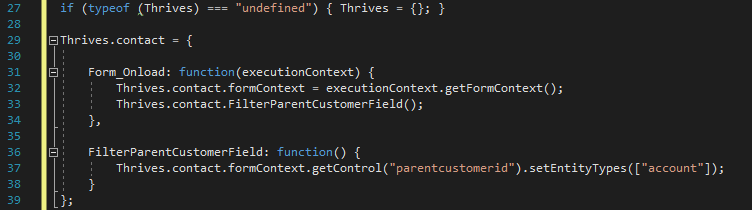
I have found this blog post on to hide the contact section in the customer lookup, to only show accounts using the JavaScript below. 
pastedimage1629097455090v1.png

However, I am a rookie dealing with JavaScript, so I am looking for some help to apply it. 

I have created a JS Web Resource with the above code and added the library to my contact form. However, I get an error after I have configured the OnLoad event. 

Can anyone help/show me how it should be configured on the form? 

BR,
Niels

I have the same question (0)
  • meelamri Profile Picture
    13,216 User Group Leader on at

    Hi,

    Can you please share the error message?

  • NielsSL Profile Picture
    on at

    Hi Mehdi, 

    I used the code from the website, where I replaced "Thrives" with "Hello". I typed the code, as it wasn't possible to copy it from the site - so I am hoping there are not typos.

    if (typeof (Hello) === "undefined") { Hello = {}; }
    
    Hello.contact = {
    	
    	Form_Onload: function(executionContext) {
    		Hello.contact.formContext = executionContext.getFormContext();
    		Hello.contact.FilterParentCustomerField();
    	},
    	
    	FilterParentCustomerField: function() {
    		Hello.contact.formContext.getControl("parentcustomerid").setEntityTypes(["account"]);
    	}
    };

    However, the error message I get depends on what I enter under Function - so that is probably where I need help. 

    I am not sure what the name of the function I am calling. I have tried Hello.contact, Hello.contact.FilterParentCustomerField, FilterParentCustomerField. 

    pastedimage1629100998919v1.png

    pastedimage1629101238238v2.png

  • Verified answer
    meelamri Profile Picture
    13,216 User Group Leader on at

    Hi, 

    You need to call Hello.contact.Form_Onload function. Please refer to the image below: 

    pastedimage1629102064236v1.png

  • NielsSL Profile Picture
    on at

    That did the job.

    Thanks for the swift help, Mehdi. It is very much appreciated!

Under review

Thank you for your reply! To ensure a great experience for everyone, your content is awaiting approval by our Community Managers. Please check back later.

Helpful resources

Quick Links

Responsible AI policies

As AI tools become more common, we’re introducing a Responsible AI Use…

Neeraj Kumar – Community Spotlight

We are honored to recognize Neeraj Kumar as our Community Spotlight honoree for…

Leaderboard > Microsoft Dynamics 365 | Integration, Dataverse, and general topics

#1
Siv Sagar Profile Picture

Siv Sagar 93 Super User 2025 Season 2

#2
#ManoVerse Profile Picture

#ManoVerse 74

#3
Martin Dráb Profile Picture

Martin Dráb 64 Most Valuable Professional

Last 30 days Overall leaderboard

Product updates

Dynamics 365 release plans
