web
You’re offline. This is a read only version of the page.
close
Skip to main content

Announcements

No record found.

News and Announcements icon
Community site session details

Community site session details

Session Id :
Microsoft Dynamics AX (Archived)

Return orders registration line per line.

(0) ShareShare
ReportReport
Posted on by

Hello Ax forum,

I have a question regarding Return orders in Ax 2012.

Our client is a wholesales company. They have return orders for orders with up to 100 lines that need to be posted in the system.

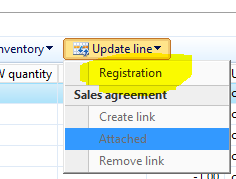
When i create a Return order from Sales and marketing -> Common -> Return orders-> All return orders selecting the customer and the sales order i want to be return i have to do the functionality line per line Update line -> Registration
pastedimage1568034405476v1.png

But doing this takes a lot of time, is there any other way we can register all the lines with the same? 

is there any other way we can do the registration for all the lines in one functionality? 

Also we are using the return order so the return order lot ID is marked with the lines of the first sales order.

Thanks,

Ermal 

*This post is locked for comments

I have the same question (0)
  • qianwang Profile Picture
    7,168 on at

    Hi Ermal,

    I haven’t found any other way that we can register all the lines with the same.

    But regarding the registration of return orders, I think you can also register items in the Arrival overview form.

    docs.microsoft.com/.../register-the-receipt-of-returned-items

    regards,

    QianQW

  • Suggested answer
    SouravDam Profile Picture
    11,730 on at

    Hi Ermal Curri,

    Can you check if you use Return order lines data entity and upload return order lines through it; is it helping you to set the status of all individual lines as 'Registered' in return order or not?

    Also, you will get staging tables like ReturnInventoryLotId and ReturnStatus in this data entity where you can set the lot IDs and status as 'Registered' and then upload the lines through data export import module.

    Below is the screen shot for your understanding (I don't have AX environment available).

    4744.JPG

    6102.JPG

    You need to download the Return order lines data entity template first; fill relevant details and then upload.

    Kindly check and update in this forum.

    Best regards,
    Sourav Dam

    Please take time to click 'Yes' against the answers that help you guide in right direction to help other community members.

  • Community Member Profile Picture
    on at

    Thanks a lot. I have already being doing the same thing you are suggesting but its not conventional for the client.

    I was wondering if there is a way where you can register all

  • Suggested answer
    SouravDam Profile Picture
    11,730 on at

    Hi Ermal Curri,

    Thanks for the update.

    I don't think any such option available in standard environment where all lines can be registered in one click in return order.

    However, would like to know if you are already using data management, then is there any challenge you are facing as you mentioned that this is not conventional for the client? Or may be they don't have the data management related roles assigned to use this feature?

    Have you tried with excel add-ins if this is working?

    Looking forward to hear from you.

    Best regards,
    Sourav Dam

  • Community Member Profile Picture
    on at

    We can not use the Arrival overview because we are using the Retail module in this client.

  • Community Member Profile Picture
    on at

    Hi Sourav Dam,

    Return orders should be perform by the end-users in retail channels and they do not have role assigned to use the Data import export framework, but only a few from the administrations can use this module.

    [quote user="Sourav Dam"]

    Hi Ermal Curri,

    Thanks for the update.

    I don't think any such option available in standard environment where all lines can be registered in one click.

    However, would like to know if you are already using data management, then is there any challenge you are facing as you mentioned that this is not conventional for the client? Or may be they don't have the data management related roles assigned to use this feature?

    Have you tried with excel add-ins if this is working?

    Looking forward to hear from you.

    Best regards,
    Sourav Dam

    [/quote]
  • Suggested answer
    SouravDam Profile Picture
    11,730 on at

    Hi Ermal Curri,

    Thanks for the feedback.

    What about excel add-ins? Have you tried this?

    Unfortunately as highlighted before; there is no standard option available in return order to update 'Register all' for all lines in a single click.

    Best regards,
    Sourav Dam

    Please take time to click 'Yes' against the answers that help you guide in right direction to help other community members.

  • Guy Terry Profile Picture
    28,970 Moderator on at

    Hi Ermal,

    The Arrival overview (and specifically the Item arrival journal part of that process) are designed for what you are asking.... almost. i.e. a quick way to register the return order lines and apply a disposition code.

    I have not heard that you cannot use Arrival overview if Retail functionality is being used. What problem does it cause?

Under review

Thank you for your reply! To ensure a great experience for everyone, your content is awaiting approval by our Community Managers. Please check back later.

Helpful resources

Quick Links

Introducing the 2026 Season 1 community Super Users

Congratulations to our 2026 Super Stars!

Meet the Microsoft Dynamics 365 Contact Center Champions

We are thrilled to have these Champions in our Community!

Congratulations to the March Top 10 Community Leaders

These are the community rock stars!

Leaderboard > 🔒一 Microsoft Dynamics AX (Archived)

#1
Joris dG Profile Picture

Joris dG 5

#2
Andrew Jones a1x Profile Picture

Andrew Jones a1x 2

#3
GL-01081504-0 Profile Picture

GL-01081504-0 1

Last 30 days Overall leaderboard

Featured topics

Product updates

Dynamics 365 release plans
